
Automatic Apply Rule for template not working
-
I am trying to make some SNMP templates for devices, but I am having trouble getting them to apply automatically.
For example, I want to log the POE power usage for switches.
I can apply them manually and they work, but if I leave it for NetXMS to apply them automatically, nothing happens.
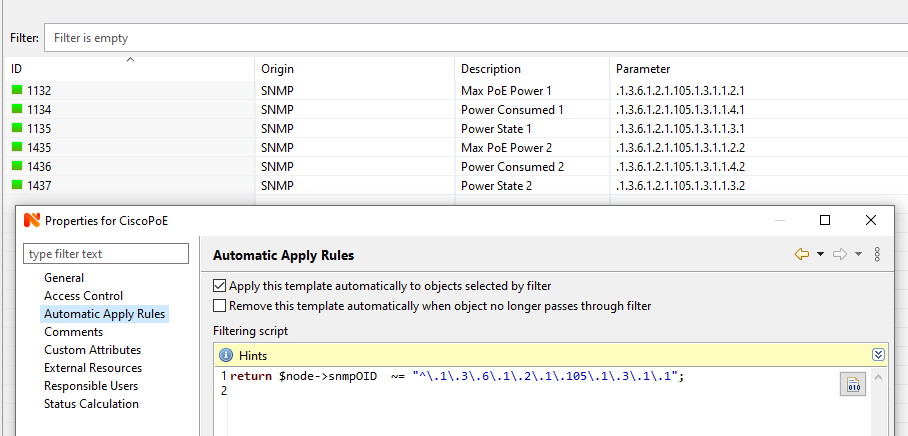
Please see the attached image.
For some switches, there is no 2nd PSU, could this be why it doesn't apply automatically?Secondly, for switches that don't have a second PSU, is there any way of making the 2nd set of DCIs (1435, 1436 and 1437) optional so it doesn't error?
I assume I should really be using a loop somehow to find anything under the root of the PSU OID, but I have no idea how to do that yet!
Thanks!
-
In context menu of that node you can select "Execute server script" and try your script there; The node that you right-clicked will be available as $node, so all the attributes will be there.
You can doprintln $node->snmpOID;to see what's actually in there.
Match operation ~= looks to be correct, but you could just use simple comparison with == , then you'd not need to escape with backslashes.
In out-of-the-box templates there's e.g. SNMP->UPS->APC that has automatic apply rule that is checking some SNMP data.The other debugging approach is to use
PollerTrace("your text");
or
trace(0, "your text");
First one will produce debug output in nxmc when you do Poll-> Configuration poll from node context menu.
Second will put debug to server log (at debug level 0 in this example) -
Hi,
\ is an escape character in NXSL string, so for actually passing \ to regex processor, you can escape it, like this: "^\\.1\\.3\\.6".
In simple cases you can use like instead of regexp matching. For example, to match all OIDs starting with .1.3.6.1.2.1 you can use condition
if (oid like ".1.3.6.1.2.1.*")
{
   /* match, dio something */
}
Best regards,
Victor -
Hello! It looks like you're interested in this conversation, but you don't have an account yet.
Getting fed up of having to scroll through the same posts each visit? When you register for an account, you'll always come back to exactly where you were before, and choose to be notified of new replies (either via email, or push notification). You'll also be able to save bookmarks and upvote posts to show your appreciation to other community members.
With your input, this post could be even better 💗
Register Login