
Silent Windows agent install 3.9.235
-
Hi
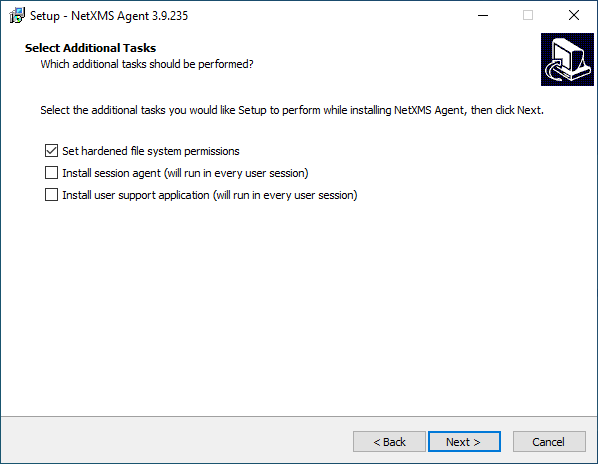
I am adding this in the hopes that it would save someone time. Another older post from Alex put me on the right track.We are installing the windows agent with opsi a software deployment package, so a silent unattended install. The following two options are available in the manual install and not selected by default. We wanted them on and could not see a way to select it with the silent options.
[ ]Install session agent (will run in every user session)
To see who is logged in and take a screen shot.[ ]Install user support application (will run in every user session)
To send a application support message.Part of our silent string:
files1\nxagent-3.9.235-x64.exe" /sp- /silent /norestart /nocancel /SUPPRESSMSGBOXES /LOG "$LogDir$\$ProductId$.install_log.txt" /SERVER=netxms.xxx.com.na /TUNNEL /LOGFILE=C:\NetXMS\log\nxagentd.log /SUBAGENT=FILEMGRThe following black registry were needed especially the second dword one if that is not in no sending messages.
[HKEY_LOCAL_MACHINE\SOFTWARE\Microsoft\Windows\CurrentVersion\Run]
NetXMSSessionAgent REG_SZ C:\NetXMS\bin\nxsagent.exe -c C:\NetXMS\etc\nxagentd.conf -H
NetXMSUserAgent REG_SZ C:\NetXMS\\bin\\nxuseragent.exeThis part was setup by the silent install.
[HKEY_LOCAL_MACHINE\SOFTWARE\NetXMS\Agent]
InstallPath REG_SZ C:\\NetXMS
ConfigFile REG_SZ C:\NetXMS\etc\nxagentd.conf
ConfigIncludeDir REG_SZ C:\NetXMS\etc\nxagentd.conf.d
ReloadFlag REG_DWORD 0x00000001(1)
WithUserAgent REG_DWORD 0x00000001 (1)Regards Dawid
-
Hi,
few notes here. First, you don't need both session agent and user agent - use agent has all the functionality of session agent.
And you can select "Install user support application" in unattended installer by adding to installer command line option/MERGETASKS="useragent"
Best regards,
Victor -
Thank you Victor!
So I will be removing all the mess I made :-[
Then do it with the /MERGETASKS I misses while skimming thru while being in a rush..Act in haste repent at leisure..
Thanks Again!
Dawid
P.S. The /MERGETASKS="useragent" Worked like a charm. Thank you!
Hello! It looks like you're interested in this conversation, but you don't have an account yet.
Getting fed up of having to scroll through the same posts each visit? When you register for an account, you'll always come back to exactly where you were before, and choose to be notified of new replies (either via email, or push notification). You'll also be able to save bookmarks and upvote posts to show your appreciation to other community members.
With your input, this post could be even better 💗
Register Login