Skip to content
  • Categories
  • Recent
  • Tags
  • Popular
  • Users
  • Groups
Skins
  • Light
  • Brite
  • Cerulean
  • Cosmo
  • Flatly
  • Journal
  • Litera
  • Lumen
  • Lux
  • Materia
  • Minty
  • Morph
  • Pulse
  • Sandstone
  • Simplex
  • Sketchy
  • Spacelab
  • United
  • Yeti
  • Zephyr
  • Dark
  • Cyborg
  • Darkly
  • Quartz
  • Slate
  • Solar
  • Superhero
  • Vapor

  • Default (Flatly)
  • No Skin
Collapse
Brand Logo

NetXMS Forum

  1. Home
  2. Support
  3. Notification Channel driver "Shell"

Notification Channel driver "Shell"

Scheduled Pinned Locked Moved Support
6 Posts 3 Posters 23.5k Views
  • Oldest to Newest
  • Newest to Oldest
  • Most Votes
Reply
  • Reply as topic
Log in to reply
This topic has been deleted. Only users with topic management privileges can see it.
  • S
    S
    sq
    wrote on last edited by
    #1

    Hi, could you please provide some documentation for the "Shell" "Notification Channel" driver?

    I was looking for some documentation in the source code:

    Link Preview Image
    netxms/src/ncdrivers/shell/shell.cpp at 3f1e052583ade764a1512e30c16ca6809ec8e982 路 netxms/netxms

    NetXMS - Open Source network and infrastructure monitoring and management - netxms/src/ncdrivers/shell/shell.cpp at 3f1e052583ade764a1512e30c16ca6809ec8e982 路 netxms/netxms

    favicon

    GitHub (github.com)

    but for example

    Command=/usr/bin/test.py --message=${text}

    ${text} ends up empty.

    and I'm not sure how to enable a higher debug level (6) for this shell driver, the debug of the dummy driver worked pretty much as expected, for the shell driver I've tried to enable the debug output with the following command:

    nxadm -c "debug ncd.shell 6"
    
    
    1 Reply Last reply
    0
    • F
      F
      Filipp Sudanov
      wrote on last edited by
      #2

      Your debug approach looks to be correct. There also could be also some information under "nc" tag.
      Is the actual .py script executed?

      I've tried like this, it's working:
      Command=/bin/bash -c "/bin/echo ${recipient} ${text} >> /tmp/sss.txt"

      What exact version of netxms are you using?

      1 Reply Last reply
      0
      • S
        S
        sq
        wrote on last edited by
        #3
        NetXMS Server Version 3.9.298 Build 3.9-298-g2adbdd51e5 (UNICODE)
        NXCP: 5.53.1.31 (AES-256, Blowfish-256, 3DES, AES-128, Blowfish-128)
        Built with: g++ (Ubuntu 9.3.0-17ubuntu1~20.04) 9.3.0
        

        for test purposes I've copied your command, /tmp/sss.txt is created, but empty.

        1 Reply Last reply
        0
        • S
          S
          sq
          wrote on last edited by
          #4

          I'm now on

          NetXMS Server Version 3.9.334 Build 3.9-334-g799c5eb953 (UNICODE)
          NXCP: 5.53.1.31 (AES-256, Blowfish-256, 3DES, AES-128, Blowfish-128)
          Built with: g++ (Ubuntu 9.3.0-17ubuntu1~20.04) 9.3.0
          

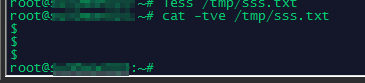
          same behavior, but I've figured out the file /tmp/sss.txt聽 isn't "empty" a blank line is added for every test notification.

          nc_shell-2.png

          1 Reply Last reply
          0
          • F
            F
            Filipp Sudanov
            wrote on last edited by
            #5

            Replicated this on Ubuntu 18 so looks to be a bug. Created an issue, you can monitor resolution there: https://track.radensolutions.com/issue/NX-2170

            1 Reply Last reply
            0
            • V
              V
              Victor Kirhenshtein
              wrote on last edited by
              #6

              Fixed in 3.9.361.

              Best regards,
              Victor

              1 Reply Last reply
              0

              Hello! It looks like you're interested in this conversation, but you don't have an account yet.

              Getting fed up of having to scroll through the same posts each visit? When you register for an account, you'll always come back to exactly where you were before, and choose to be notified of new replies (either via email, or push notification). You'll also be able to save bookmarks and upvote posts to show your appreciation to other community members.

              With your input, this post could be even better 馃挆

              Register Login
              Reply
              • Reply as topic
              Log in to reply
              • Oldest to Newest
              • Newest to Oldest
              • Most Votes


              • Login

              • Don't have an account? Register

              • Login or register to search.
              Powered by NodeBB Contributors
              • First post
                Last post
              0
              • Categories
              • Recent
              • Tags
              • Popular
              • Users
              • Groups