
Database schema upgrade, sqlite
-
Dear support team,
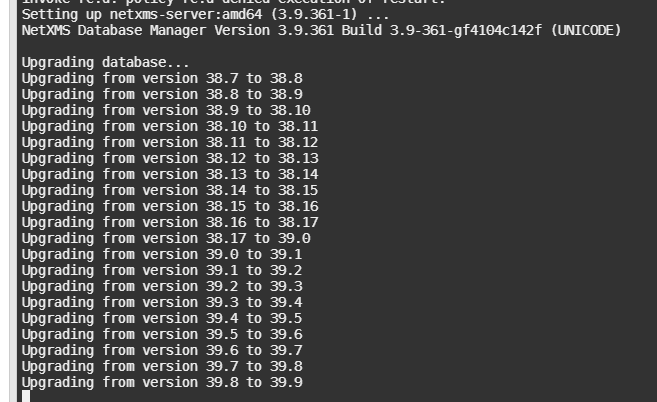
i have problem with my sqlite database which im using in docker image on debian 10 base, im unable to upgrade database schema from version 39.8 to 39.9before i write this forum topic i check consistency of migrated db, and all checks are ok.
Upgrade db schema ends in step 39.8 to 39.9 and not continue further, any idea what to check ?
Docker image is avalible here > https://hub.docker.com/repository/docker/madmucho/netxms/general
i stopped all services in docker using supervisorctl stop all
update distro packages and during package update process upgrade schema hangs.In attachment is screen of update proces on which step upgrade stops and not continue further.
-
Try to run upgrade with option -t - it will trace SQL queries so we will see what query cause this.
Best regards,
Victor -
Dear Victor,
thank you for reply.nxdbmgr -t updateOutput is attached in screen and last query in text.
CREATE TABLE new_network_map_links (   map_id integer not null,   link_id integer not null,   element1 integer not null,   element2 integer not nul
l,   link_type integer not null,   link_name varchar(255) null,   connector_name1 varchar(255) null,   connector_name2 varchar(255) null,   element_dat
a varchar null,   flags integer not null,   color_source integer not null,   color integer not null,   color_provider varchar(255) null,   PRIMARY KEY(
map_id,link_id))

-
Next it tries to open second connection to database, which I suppose is not working for SQLite. Do you have any network maps configured?
If you DO NOT have any network maps, you can do this step manually by executing the following queries (it will delete any configured links on network maps):
DROP TABLE network_map_links;
CREATE TABLE network_map_links
(
  map_id integer not null,
  link_id integer not null,
  element1 integer not null,
  element2 integer not null,
  link_type integer not null,
  link_name varchar(255) null,
  connector_name1 varchar(255) null,
  connector_name2 varchar(255) null,
  element_data varchar null,
  flags integer not null,
  color_source integer not null,
  color integer not null,
  color_provider varchar(255) null,
  PRIMARY KEY(map_id,link_id)
);
CREATE INDEX idx_network_map_links_map_id ON network_map_links(map_id);
UPDATE metadata SET var_value='9' WHERE var_name='SchemaVersionMinor';
And then run nxdbmgr upgrade again - it should continue from next step.
Best regards,
Victor -
Thank You Victor,
after sqlite db modification update procedure continues and done successfully.Ok then i will create new base image and put it on dockerhub for other to use version with this manual fix.
But upgrade from old image will still be not possible because after docker start i begin upgrading db schema, and if user have old sqlite db it will not upgrade correctly, nxdbmgr hangs and because it is in entry point of docker image, docker image will not start up netxms service and agent.Please it is possible make fix it into nxdbmgr, to do same manual fix? If it will be in new version i will release docker image with this fix, upgrade procedure will be automatic.
@victor said in Database schema upgrade, sqlite:
Next it tries to open second connection to database, which I suppose is not working for SQLite. Do you have any network maps configured?
If you DO NOT have any network maps, you can do this step manually by executing the following queries (it will delete any configured links on network maps):
DROP TABLE network_map_links;
CREATE TABLE network_map_links
(
  map_id integer not null,
  link_id integer not null,
  element1 integer not null,
  element2 integer not null,
  link_type integer not null,
  link_name varchar(255) null,
  connector_name1 varchar(255) null,
  connector_name2 varchar(255) null,
  element_data varchar null,
  flags integer not null,
  color_source integer not null,
  color integer not null,
  color_provider varchar(255) null,
  PRIMARY KEY(map_id,link_id)
);
CREATE INDEX idx_network_map_links_map_id ON network_map_links(map_id);
UPDATE metadata SET var_value='9' WHERE var_name='SchemaVersionMinor';
And then run nxdbmgr upgrade again - it should continue from next step.
Best regards,
Victor
Hello! It looks like you're interested in this conversation, but you don't have an account yet.
Getting fed up of having to scroll through the same posts each visit? When you register for an account, you'll always come back to exactly where you were before, and choose to be notified of new replies (either via email, or push notification). You'll also be able to save bookmarks and upvote posts to show your appreciation to other community members.
With your input, this post could be even better 💗
Register Login