Skip to content
  • Categories
  • Recent
  • Tags
  • Popular
  • Users
  • Groups
Skins
  • Light
  • Brite
  • Cerulean
  • Cosmo
  • Flatly
  • Journal
  • Litera
  • Lumen
  • Lux
  • Materia
  • Minty
  • Morph
  • Pulse
  • Sandstone
  • Simplex
  • Sketchy
  • Spacelab
  • United
  • Yeti
  • Zephyr
  • Dark
  • Cyborg
  • Darkly
  • Quartz
  • Slate
  • Solar
  • Superhero
  • Vapor

  • Default (Flatly)
  • No Skin
Collapse
Brand Logo

NetXMS Forum

  1. Home
  2. Support
  3. TOTP based two-factor authentication

TOTP based two-factor authentication

Scheduled Pinned Locked Moved Support
5 Posts 3 Posters 40.6k Views
  • Oldest to Newest
  • Newest to Oldest
  • Most Votes
Reply
  • Reply as topic
Log in to reply
This topic has been deleted. Only users with topic management privileges can see it.
  • E
    E
    Egert143
    wrote on last edited by
    #1

    Hello

    Where can i find some instructions or samples how to configure TOTP based two-factor authentication ?

    Egert

    1 Reply Last reply
    0
    • F
      F
      Filipp Sudanov
      wrote on last edited by
      #2

      It was finally documented

      Link Preview Image
      User management — NetXMS Administrator Guide (7.0.0)

      favicon

      (www.netxms.org)

      1 Reply Last reply
      0
      • D
        D
        Dawid Kellerman
        wrote on last edited by
        #3

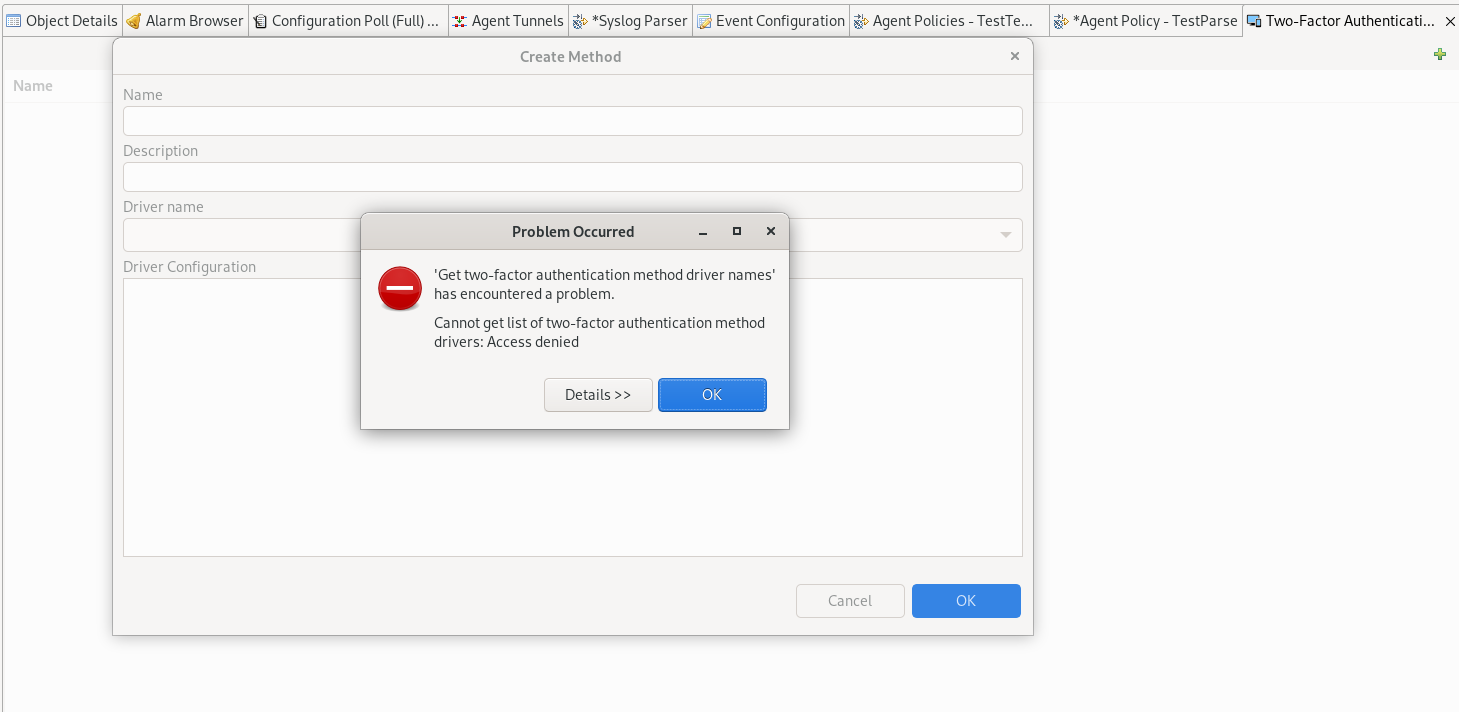
        Hi when I try to follow the instructions..

        Cannot get list of two-factor authentication method drivers: Access denied

        I am the only admin user Version 4.0.2227 on debian

        Screenshot from 2022-04-07 22-44-55.png

        1 Reply Last reply
        0
        • F
          F
          Filipp Sudanov
          wrote on last edited by
          #4

          There was a bug that access rights for editing two-factor auth methods were not automatically added to admin users when this feature was introduced. Check access right for Admins groups in user manager.

          1 Reply Last reply
          0
          • D
            D
            Dawid Kellerman
            wrote on last edited by
            #5

            Thank You Philipp !
            Answer in pictures  ;D
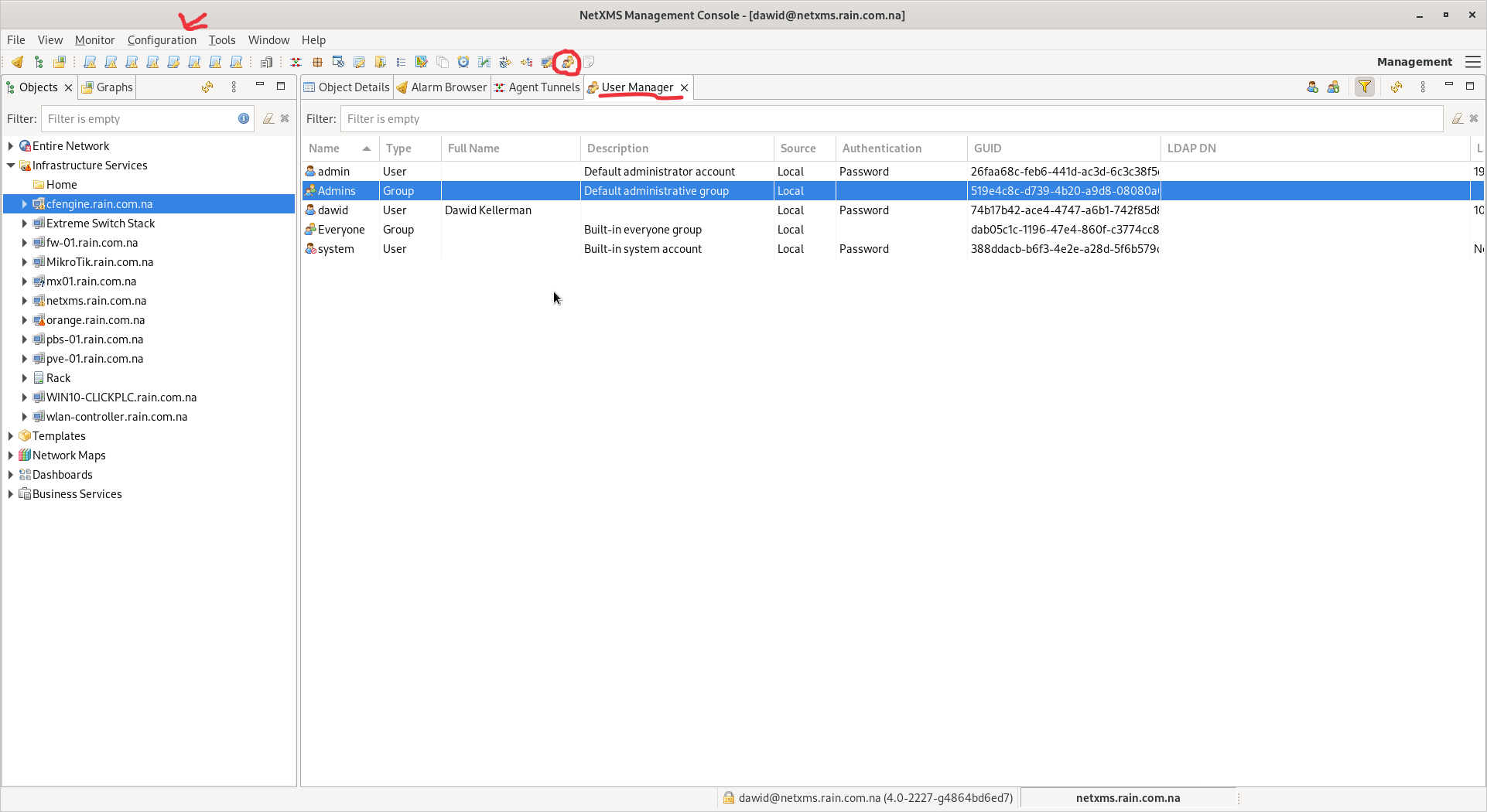
            Click the usermanager icon in the circle or find the entry in the configuration drop down.
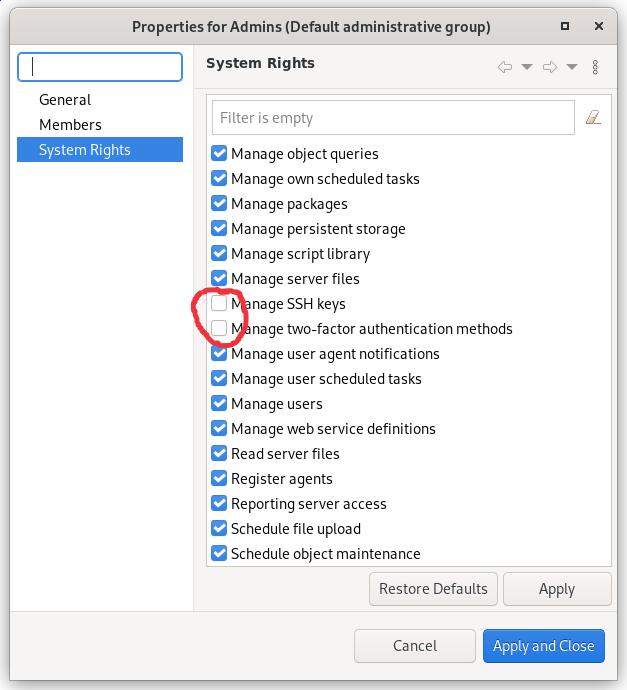
            Find the Admin Group and right click that will bring the next window and you will need do select Rights then scroll down and find the un ticked rights
            Tick  Apply and Close

            Screenshot from 2022-04-10 10-05-27.png

            Screenshot from 2022-04-10 10-06-15.png

            1 Reply Last reply
            0

            Hello! It looks like you're interested in this conversation, but you don't have an account yet.

            Getting fed up of having to scroll through the same posts each visit? When you register for an account, you'll always come back to exactly where you were before, and choose to be notified of new replies (either via email, or push notification). You'll also be able to save bookmarks and upvote posts to show your appreciation to other community members.

            With your input, this post could be even better 💗

            Register Login
            Reply
            • Reply as topic
            Log in to reply
            • Oldest to Newest
            • Newest to Oldest
            • Most Votes


            • Login

            • Don't have an account? Register

            • Login or register to search.
            Powered by NodeBB Contributors
            • First post
              Last post
            0
            • Categories
            • Recent
            • Tags
            • Popular
            • Users
            • Groups