
Tip: Proxmox backup server backup status monitor (External Table)
-
This one is not finished but this is a first draft

In agent configuration on the node add this:
[ExternalTable/PBSBackup]
Command = proxmox-backup-manager task list --all --output-format json-pretty | jq -r '(map(keys) | add | unique) as $cols | map(. as $row | $cols | map($row[.])) as $rows | $cols, $rows[] | @tsv'
Separator = \t
InstanceColumns = Index
Description = Proxmox backup server status
PollingInterval = 320
Do a restart agent and then a config poll.
After that you should be able to go to Data Collection Configuration on that node and add a new Table.
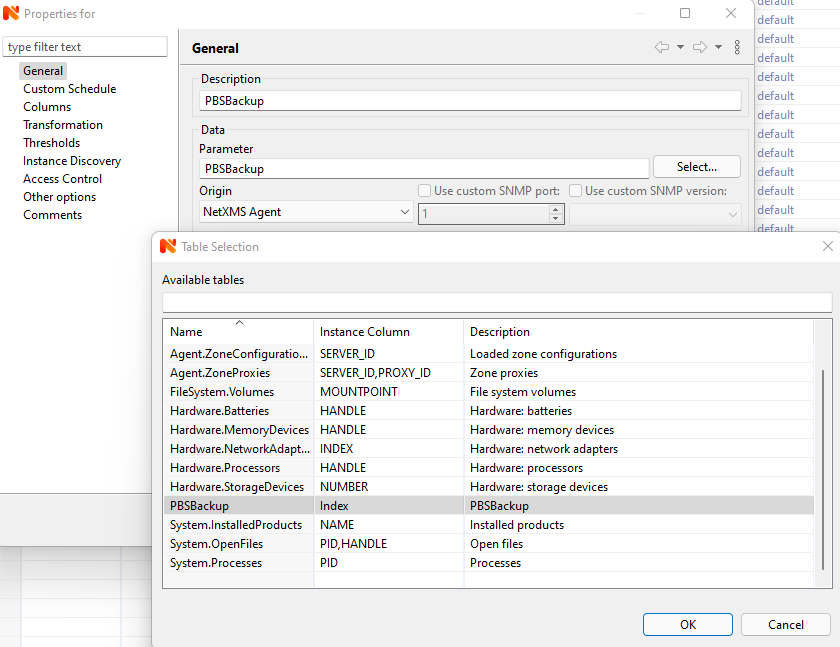

-
Thank you for the Draft !
If this is your first timeYou will need to install on your Proxmox Backup Server
apt install jq
ELSE you will get this in the Last Value on PBSBackup
thread 'main' panicked at 'failed printing to stdout: Broken pipe (os error 32)', library/std/src/io/stdio.rs:1187:9
note: run with `RUST_BACKTRACE=1` environment variable to display a backtraceIf you try the command on the command line
PVE-PBS-Server# proxmox-backup-manager task list --all --output-format json-pretty | jq -r '(map(keys) | add | unique) as $cols | map(. as $row | $cols | map($row[.])) as $rows | $cols, $rows[] | @tsv'-bash: jq: command not found
thread 'main' panicked at 'failed printing to stdout: Broken pipe (os error 32)', library/std/src/io/stdio.rs:1187:9
note: run with `RUST_BACKTRACE=1` environment variable to display a backtraceRegards Dawid
-
Hello! It looks like you're interested in this conversation, but you don't have an account yet.
Getting fed up of having to scroll through the same posts each visit? When you register for an account, you'll always come back to exactly where you were before, and choose to be notified of new replies (either via email, or push notification). You'll also be able to save bookmarks and upvote posts to show your appreciation to other community members.
With your input, this post could be even better 💗
Register Login