
watch service and start automatically
-
Hello,
i want to watch a service called FileWaveWinClient.
The Alarm works fine, but the Server action does not work.In agent´s config file I added this line:
ActionShellExec = StartFileWaveService:"C:\Windows\system32\net.exe" start FileWaveWinClientI tried also:
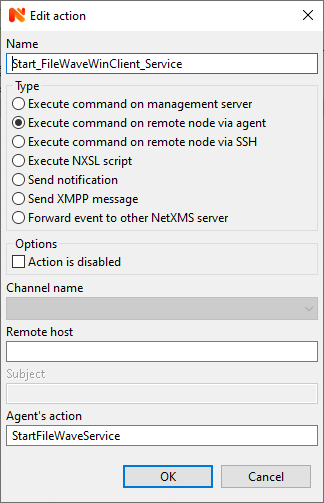
ActionShellExec = StartFileWaveService:net start FileWaveWinClientIn Actions Configuration I added
Name: Start_FileWaveWinClient_Service
Type: Execute command on remote node via agent
Remote host <empty>
Agents´s action: StartFileWaveService
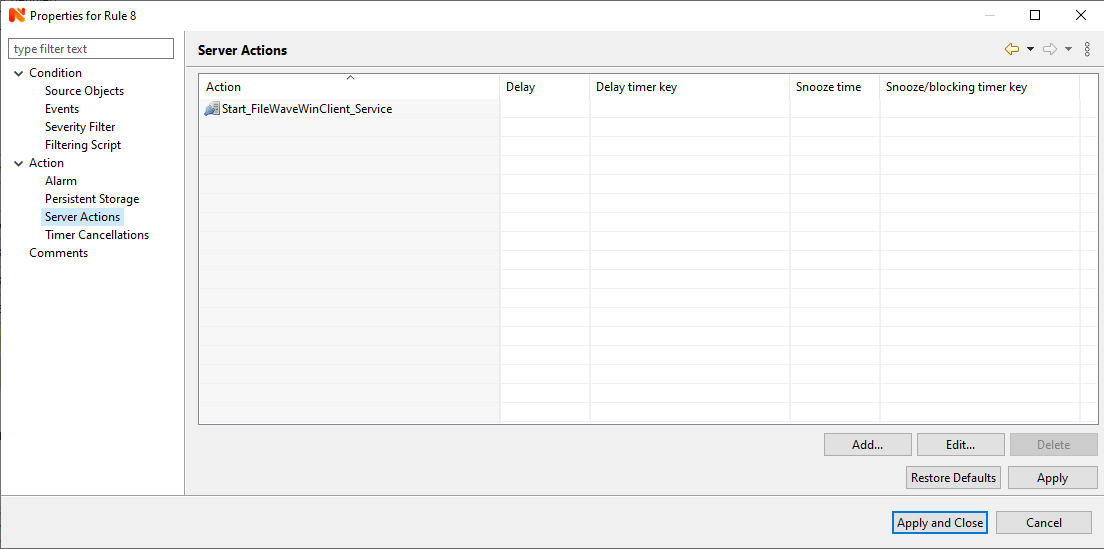
(See attachment "Action Configuration.png")I create a Event Processing Policy
Events: ... Process not running
Alarm - this configuration works fine. The Alarm is working
Server Actions: Start_FileWaveWinClient_Service - does not work
(See attachment "Event Processing Policy.png")The Alarm works fine, but the Server action does not work.
Thank you
Rainer
-
In action properties you need to specify hostname/ip address of the machine where your netxms agent is running. This is made so for greater flexibility, as event may be coming from one node, but you might need to execute the action on another system, for example.
You can use %a macro in "Remote host" field - in this case IP address of node where the event is coming from will be used.
-
Thank you very much


No it works fineI have the problem to add this line to agent config file
ActionShellExec = StartFileWaveService:"C:\Windows\system32\net.exe" start FileWaveWinClient
To all of my clients.
Only to add, not to send each client the same config filePlease help and thank you so much
Rainer -
Have a look at "Agent policies" in templates. One of the option is "Agent configuration" policy, where you can specify agent config lines. When template is added to a node, these config lines will be sent to agent and will start working after agent restart.
-
I have made a Template with automatic bind to all clients with running service I need (FileWaveWinClient)
In this Template I choose Agent Policies and created a new "Agent Configuration" policy called StartFileWaveClientService
I only inserted this (1) line:
ActionShellExec = StartFileWaveService:"C:\Windows\system32\net.exe" start FileWaveWinClient
(see AgentPolicy.png)
For test I removed 2 clients and poll "Automatic bind"
The 2 (test) clients added automatically to this TemplateUntil now every thing works perfect - thank you
But the agent config file at the new clients is not modified and the line I need is not in agent´s config file
I waited a long timeThank you
Rainer

-
Yes, I did not mention this - config policies are not actually modifying the main agent config file. Each policy confiig is kept in a separate file in config_ap under agent's DataDirectory (by default C:\Windows\System32\ config\systemprofile\ AppData\Local\nxagentd on windows). When agent starts it reads these files. In recent agent versions it dumps actual configuration into it's log file, so your line should be visible there.
-
I was looking for a bug that isn't a bug at all. The system is already working fine. I just thought that this line is added after agent restart. You can check the success quite simply by reading out the "Supported actions" on the client, and the desired one is there
Many many Thanks for this perfect support
Rainer
Hello! It looks like you're interested in this conversation, but you don't have an account yet.
Getting fed up of having to scroll through the same posts each visit? When you register for an account, you'll always come back to exactly where you were before, and choose to be notified of new replies (either via email, or push notification). You'll also be able to save bookmarks and upvote posts to show your appreciation to other community members.
With your input, this post could be even better 💗
Register Login