
Notification Channel - Portech Driver Error
-
Hi,
I've asked this question before, but I have to again, about the Notification Channel.
When adding a new Channel, do I select Portech and in the field for Driver Conf enter:
host=ip address
login=name
pass=pass
mode=TEXTI manually send an SMS message and once it works, but the second time it reports an error, Driver error.
I have to set the configuration again and it works once again...I set in the Server console:
debug nc.* 6
debug ncd.* 6
but there are no messages...Helpp!!
Thanks, best regards.
-
Hi.
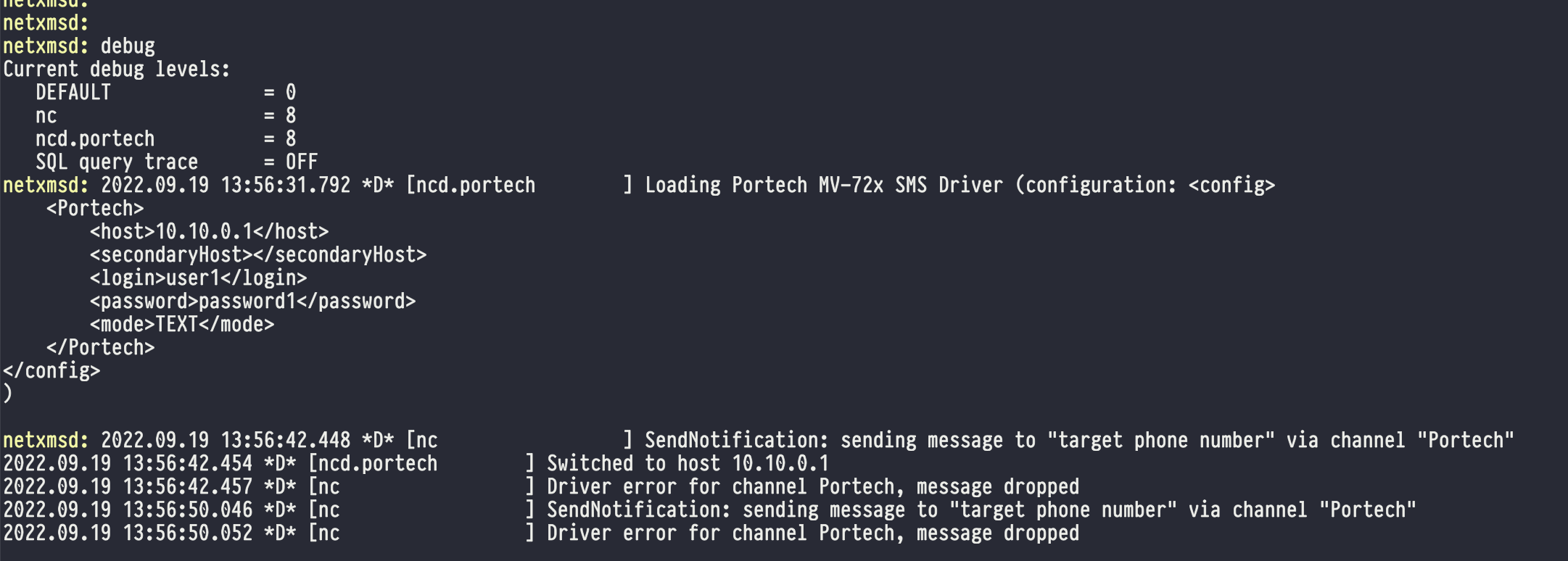
"pass" should be "password" in your config. Also debug tag "nc.*" should be "nc".
Correct confiration:
host=10.0.0.1
secondaryHost=10.0.0.2
login=user1
password=password1
mode=TEXT
mode can be either "TEXT" or "PDU". Secondary host is optional.
Sample session attached (added new notification channel and tried to send message to non-existing device):
-
Hi sir,
I tryed, but I can't do this at all: debug tag "nc.*" should be "nc".
And I have another problem, I installed NetXMS 4.1.420 on Linux Ubuntu 18.04 LTS.
Should the server address remain 127.0.0.1 or should it be changed to the server's own address (192.168.x.x), everything is local. Why am I asking you this, because when I create a node (Cisco Catalyst) and start with the Poll - Configuration option, I get the message:
Checking NetXMS agent...
Cannot connect to NetXMS agent (Connect failed) (Is this ok? Because the old version of NetXMS did not have this message...) Or I missed something...
Checking SNMP...
SNMP agent is active
...
etc
Hello! It looks like you're interested in this conversation, but you don't have an account yet.
Getting fed up of having to scroll through the same posts each visit? When you register for an account, you'll always come back to exactly where you were before, and choose to be notified of new replies (either via email, or push notification). You'll also be able to save bookmarks and upvote posts to show your appreciation to other community members.
With your input, this post could be even better 💗
Register Login