Skip to content
  • Categories
  • Recent
  • Tags
  • Popular
  • Users
  • Groups
Skins
  • Light
  • Brite
  • Cerulean
  • Cosmo
  • Flatly
  • Journal
  • Litera
  • Lumen
  • Lux
  • Materia
  • Minty
  • Morph
  • Pulse
  • Sandstone
  • Simplex
  • Sketchy
  • Spacelab
  • United
  • Yeti
  • Zephyr
  • Dark
  • Cyborg
  • Darkly
  • Quartz
  • Slate
  • Solar
  • Superhero
  • Vapor

  • Default (Flatly)
  • No Skin
Collapse
Brand Logo

NetXMS Forum

  1. Home
  2. Support
  3. Netowrk map related questions

Netowrk map related questions

Scheduled Pinned Locked Moved Support
6 Posts 2 Posters 33.1k Views
  • Oldest to Newest
  • Newest to Oldest
  • Most Votes
Reply
  • Reply as topic
Log in to reply
This topic has been deleted. Only users with topic management privileges can see it.
  • J
    J
    justrest
    wrote on last edited by
    #1

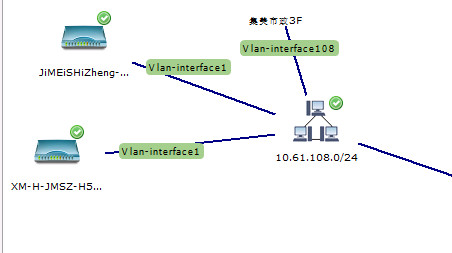
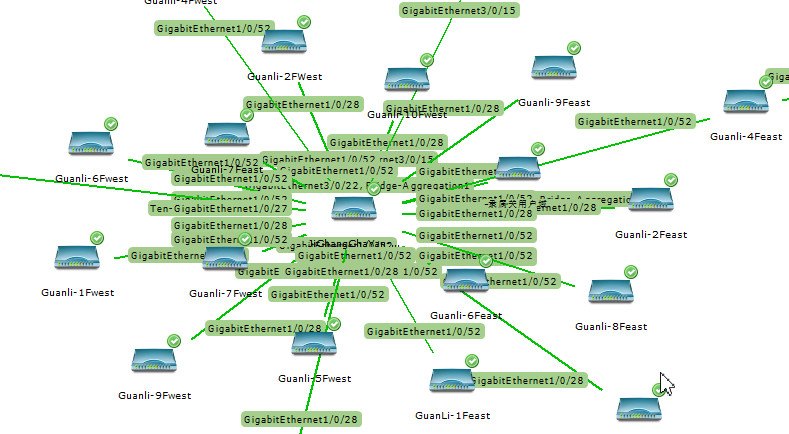
    A few questions about network map:
    1、How to hide the link label in the network map by default, or the default abbreviation, such as gigabitethernetg1/0/1 can be shown as g1/0/1?
    2、The default network topology will show subnets, can be canceled?
    3、If I want to show only the devices directly connected to the root node in the network topology, how to filter it?
    I look forward to your guidance, thank you very much!

    01.jpg

    02.jpg

    1 Reply Last reply
    0
    • F
      F
      Filipp Sudanov
      wrote on last edited by
      #2
      1. There is filter script in map properties. It works in a way that this script is executed for each node that is about to be put on the map. If script returns true, node will be added to the map, if false, will not be added. Here's an example script:
      rootNode = FindNodeObject($node, "your_root_node_name");
      if (!rootNode) return false;
      
      for (i : $node->children) {
        if (classof(i) == "Interface") {
          p = i->peerNode;
          if (p and p->id == rootNode->id) return true;
        }
      }
      
      return false;
      

      This script finds your root node by name. Then for each node it's getting all interfaces, and check peer nodes for them. If your root node is peer node for one of the interfaces, script will return true.

      1. and 2. seem to be not customizable, but I will check.
      1 Reply Last reply
      0
      • J
        J
        justrest
        wrote on last edited by
        #3

        Okay,thank you very much!!

        1 Reply Last reply
        0
        • J
          J
          justrest
          wrote on last edited by
          #4

          I found that only the physical interface can get the peernode, but seems the value fetched by the vlan interface or bridge-aggregation interface is null, how can I get all the directly connected devices?

          1 Reply Last reply
          0
          • F
            F
            Filipp Sudanov
            wrote on last edited by
            #5
            1. It's taking interface names from node object when map is generated. You can have a script that is executed in Hook::CreateInterface (for newly created interfaces) or in Hook::ConfigurationPoll and rename interfaces there.

            2. Subnets are always displayed.

            3. Actually, instead of script it's possible to set discovery radius to 1.

            vlans kinda go beyond the scope of L2 map - devices only report physical connections on it's ports. For bridged ports it depends - some equipment reports bridged ports, some do not.

            1 Reply Last reply
            0
            • J
              J
              justrest
              wrote on last edited by
              #6

              Thank you very much for your advice! This is really the most powerful network manager I have ever tried!

              1 Reply Last reply
              0

              Hello! It looks like you're interested in this conversation, but you don't have an account yet.

              Getting fed up of having to scroll through the same posts each visit? When you register for an account, you'll always come back to exactly where you were before, and choose to be notified of new replies (either via email, or push notification). You'll also be able to save bookmarks and upvote posts to show your appreciation to other community members.

              With your input, this post could be even better 💗

              Register Login
              Reply
              • Reply as topic
              Log in to reply
              • Oldest to Newest
              • Newest to Oldest
              • Most Votes


              • Login

              • Don't have an account? Register

              • Login or register to search.
              Powered by NodeBB Contributors
              • First post
                Last post
              0
              • Categories
              • Recent
              • Tags
              • Popular
              • Users
              • Groups