
Object query dashboard component
-
Dear community
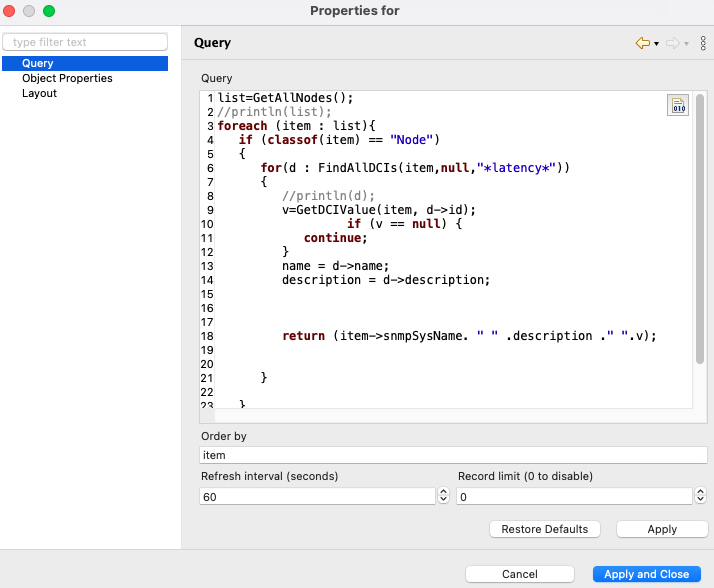
I'm trying to create a dashboard with a list of DCIs that have a specific description. I'm tracking service latency and a node can have multiple DCIs with latency description. If I create the object query as dashboard element I get the following error 'Cannot execute object query: Request timed out' I'm probably doing something wrong with the script. Does someone has an example on how to use dashboards object queries?
list=GetAllNodes();
foreach (item : list){
if (classof(item) == "Node")
{
for(d : FindAllDCIs(item,null,"*latency*"))
{v=GetDCIValue(item, d->id);
if (v == null) {
continue;
}
name = d->name;
description = d->description;
return (item->snmpSysName. " " .description ." ".v);
}
}}
-
Hi,
object queries are for a bit different purpose. They are for selecting objects. Script in query is executed for each node and should return true or false. You can include additional fields into resulting table, but number of columns will be static.
One possible solution for your task is to create script table DCI on one of the nodes (could be NetXMS server itself) that will collect data from other nodes and populate the table. Then you can put content of that table on dashboard. You can choose "do not store" option for that table DCI to avoid keeping unnecessary information in database. Script for such DCI could be following:
result = new Table();
result->addColumn("sysName", DCI::STRING, "System Name", true);
result->addColumn("description", DCI::STRING, "Description", true);
result->addColumn("value", DCI::FLOAT, "Value");

for (node : GetAllNodes())
{
   for(dci : FindAllDCIs(node, null, "*latency*"))
   {
      value = GetDCIValue(node, dci->id);
      if (value != null)
      {
         row = result->addRow();
         result->set(row, 0, node->snmpSysName);
         result->set(row, 1, dci->description);
         result->set(row, 2, value);
      }
   }
}

return result;
Best regards,
Victor -
-
Good morning guys!
How do you exactly display that table on a dashboard?
I wrote a similar script, tested it, and it's working fine. It returns the table, as the above example.
I created a new DCI on the NetXMS server, with its origin being this script. When I go to the Last Values tab, the value of this DCI is show, e.g. Table@00000142F14623E0.On the script, I can use println associated with table->rows, row->values etc. to print the table,
but how do I display this table on the dashboard? I tried the Table Value element, but i didin't work.Thank you in advance.
-
On a node you need to create "New table", not "New parameter". In properties of that table DCI name of the script from script library is specified. Then you should be able to open "Table last value" - the whole table should be visible there.
Then in Dashboard it's Tables->Table value
Hello! It looks like you're interested in this conversation, but you don't have an account yet.
Getting fed up of having to scroll through the same posts each visit? When you register for an account, you'll always come back to exactly where you were before, and choose to be notified of new replies (either via email, or push notification). You'll also be able to save bookmarks and upvote posts to show your appreciation to other community members.
With your input, this post could be even better 💗
Register Login