Skip to content
  • Categories
  • Recent
  • Tags
  • Popular
  • Users
  • Groups
Skins
  • Light
  • Brite
  • Cerulean
  • Cosmo
  • Flatly
  • Journal
  • Litera
  • Lumen
  • Lux
  • Materia
  • Minty
  • Morph
  • Pulse
  • Sandstone
  • Simplex
  • Sketchy
  • Spacelab
  • United
  • Yeti
  • Zephyr
  • Dark
  • Cyborg
  • Darkly
  • Quartz
  • Slate
  • Solar
  • Superhero
  • Vapor

  • Default (Flatly)
  • No Skin
Collapse
Brand Logo

NetXMS Forum

  1. Home
  2. Support
  3. How to mass update "interface expected state" in 4.4?

How to mass update "interface expected state" in 4.4?

Scheduled Pinned Locked Moved Support
7 Posts 4 Posters 47.7k Views
  • Oldest to Newest
  • Newest to Oldest
  • Most Votes
Reply
  • Reply as topic
Log in to reply
This topic has been deleted. Only users with topic management privileges can see it.
  • T
    T
    troffasky
    wrote on last edited by
    #1

    Since updating to 4.4, I no longer see the "Change interface expected state" option. This now has to be done at Properties > Polling, which is only one interface at a time.
    Can I expect the old behaviour to come back at some point?

    1 Reply Last reply
    0
    • F
      F
      Filipp Sudanov
      wrote on last edited by
      #2

      No sure what was the approach that you are mentioning.

      There is a way to change global defaults for newly created interfaces - it's in Configuration -> Server configuration, parameter Objects.Interfaces.DefaultExpectedState

      The other approach is to use scripting - either in configuration poll hook script (that script would go through interfaces of one node and change expected state) or a script that is meant to be executed only once and will go through all nodes and all interfaces of these. I can provide an example

      1 Reply Last reply
      0
      • T
        T
        troffasky
        wrote on last edited by
        #3

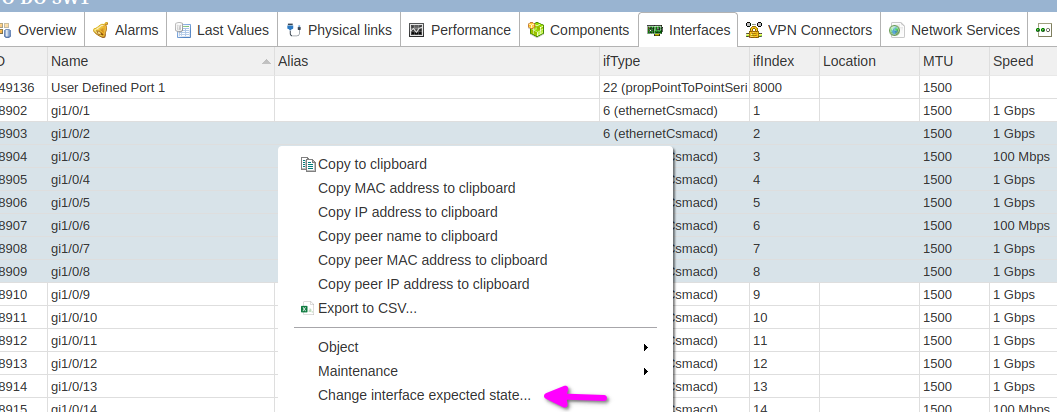
        4.1: Node > Interfaces, select 1 or more, right click, Change interface expected state...

        ksnip_20230815-105856.png
        In 4.4, this option is not present.


        ksnip_20230815-105856.png

        1 Reply Last reply
        0
        • N
          N
          normalcy
          wrote on last edited by
          #4

          Hi Troffasky, are you using the legacy desktop client or the new desktop client?

          I've noticed in the legacy client that in some screens right click doesn't seem to work unless you hold down the ctrl key as well.  Specifically I had that with the interfaces tab of a node, shift+select a range and hold down ctrl+right-click to get the popup.

          Doesn't happen in the new client.

          1 Reply Last reply
          0
          • T
            T
            troffasky
            wrote on last edited by
            #5

            I am only using the web client. 
            The screenshot showing it working is from the Legacy web client on 4.1.
            I wasn't able to get the legacy web client 4.4 working. Perhaps this is a difference between legacy and new.

            1 Reply Last reply
            0
            • V
              V
              Victor Kirhenshtein
              wrote on last edited by
              #6

              It is fixed in current development branch (change expected state added to new UI). We will do patch release 4.4.2 soon, fix will be part of it.

              Best regards,
              Victor

              1 Reply Last reply
              0
              • T
                T
                troffasky
                wrote on last edited by
                #7

                Thanks as always, Victor!

                1 Reply Last reply
                0

                Hello! It looks like you're interested in this conversation, but you don't have an account yet.

                Getting fed up of having to scroll through the same posts each visit? When you register for an account, you'll always come back to exactly where you were before, and choose to be notified of new replies (either via email, or push notification). You'll also be able to save bookmarks and upvote posts to show your appreciation to other community members.

                With your input, this post could be even better 💗

                Register Login
                Reply
                • Reply as topic
                Log in to reply
                • Oldest to Newest
                • Newest to Oldest
                • Most Votes


                • Login

                • Don't have an account? Register

                • Login or register to search.
                Powered by NodeBB Contributors
                • First post
                  Last post
                0
                • Categories
                • Recent
                • Tags
                • Popular
                • Users
                • Groups