Skip to content
  • Categories
  • Recent
  • Tags
  • Popular
  • Users
  • Groups
Skins
  • Light
  • Brite
  • Cerulean
  • Cosmo
  • Flatly
  • Journal
  • Litera
  • Lumen
  • Lux
  • Materia
  • Minty
  • Morph
  • Pulse
  • Sandstone
  • Simplex
  • Sketchy
  • Spacelab
  • United
  • Yeti
  • Zephyr
  • Dark
  • Cyborg
  • Darkly
  • Quartz
  • Slate
  • Solar
  • Superhero
  • Vapor

  • Default (Flatly)
  • No Skin
Collapse
Brand Logo

NetXMS Forum

  1. Home
  2. Support
  3. Gauge – Dial type setup

Gauge – Dial type setup

Scheduled Pinned Locked Moved Support
6 Posts 4 Posters 19.2k Views
  • Oldest to Newest
  • Newest to Oldest
  • Most Votes
Reply
  • Reply as topic
Log in to reply
This topic has been deleted. Only users with topic management privileges can see it.
  • N
    N
    Nagav
    wrote on last edited by
    #1

    Hi

    In Gauge – Dial type, I have following setting
    Min value as 0.0
    Max value as 250.0
    Left red zero end as 0.0
    Left yellow zero end as 0.0
    Right yellow zone start as 150.0
    Right red zone start as 200.0
    With above setting I got dial as
    0 to 150 – with green color
    150 to 200 – with yellow color
    200 to 250 – with red color
    But I have requirement where I need to get
    0 to 150 – with red color
    150 to 200 – with yellow color
    200 to 250 – with green color
    What value I need to change to get dial with above my requirement? Is it possible? In our case as the value decrease it is more risk and its color should be red.

    1 Reply Last reply
    0
    • V
      V
      Victor Kirhenshtein
      wrote on last edited by
      #2

      Hi,

      you should set:

      left red end at 150;
      left yellow end at 200;
      right yellow start at 250;
      right red start at 250;

      Best regards,
      Victor

      1 Reply Last reply
      0
      • N
        N
        Nagav
        wrote on last edited by
        #3

        Hi Victor

        Thanks, it works

        Regards
        Naga

        1 Reply Last reply
        0
        • E
          E
          eugene1
          wrote on last edited by
          #4

          Possibly an error?
          I need to do color management like this:
          0 - red
          1 - red
          2 - yellow
          3 - green
          The variable takes one of the fixed values - 0,1,2,3
          If you do it as in the example above, it doesn’t work. at value 3 the indicator is red, not green
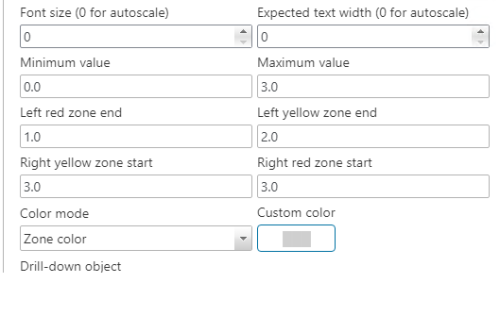
          Current settings are below, not working as expected. My wish - is to make the names of the fields more precise in future releases. Now their purpose and behavior of the system is not clear.
          1 Reply Last reply
          0
          • F
            F
            Filipp Sudanov
            wrote on last edited by
            #5

            It's kinda a rare case to use color zones with values exactly on the edge of zones. The logic seems to be, with your settings, that:
            left red is from 0.0 till 1.0 (including it)
            left yellow is from 1.0 (excluding) till 2.0 (including)
            but on the right it's opposite and red stars from 3.0 (including) and till the end of the dial, which is again 3.0

            Just use 3.01 for right yellow and red zones

            1 Reply Last reply
            0
            • E
              E
              eugene1
              wrote on last edited by
              #6

              I still don't understand the meaning of these text labels - but thanks, with the value set to 3.1 everything worked.

              1 Reply Last reply
              0

              Hello! It looks like you're interested in this conversation, but you don't have an account yet.

              Getting fed up of having to scroll through the same posts each visit? When you register for an account, you'll always come back to exactly where you were before, and choose to be notified of new replies (either via email, or push notification). You'll also be able to save bookmarks and upvote posts to show your appreciation to other community members.

              With your input, this post could be even better 💗

              Register Login
              Reply
              • Reply as topic
              Log in to reply
              • Oldest to Newest
              • Newest to Oldest
              • Most Votes


              • Login

              • Don't have an account? Register

              • Login or register to search.
              Powered by NodeBB Contributors
              • First post
                Last post
              0
              • Categories
              • Recent
              • Tags
              • Popular
              • Users
              • Groups