Skip to content
  • Categories
  • Recent
  • Tags
  • Popular
  • Users
  • Groups
Skins
  • Light
  • Brite
  • Cerulean
  • Cosmo
  • Flatly
  • Journal
  • Litera
  • Lumen
  • Lux
  • Materia
  • Minty
  • Morph
  • Pulse
  • Sandstone
  • Simplex
  • Sketchy
  • Spacelab
  • United
  • Yeti
  • Zephyr
  • Dark
  • Cyborg
  • Darkly
  • Quartz
  • Slate
  • Solar
  • Superhero
  • Vapor

  • Default (Flatly)
  • No Skin
Collapse
Brand Logo

NetXMS Forum

  1. Home
  2. Support
  3. Web Service Monitoring

Web Service Monitoring

Scheduled Pinned Locked Moved Support
4 Posts 3 Posters 28.0k Views
  • Oldest to Newest
  • Newest to Oldest
  • Most Votes
Reply
  • Reply as topic
Log in to reply
This topic has been deleted. Only users with topic management privileges can see it.
  • T
    T
    twparker
    wrote on last edited by
    #1

    Hello all,

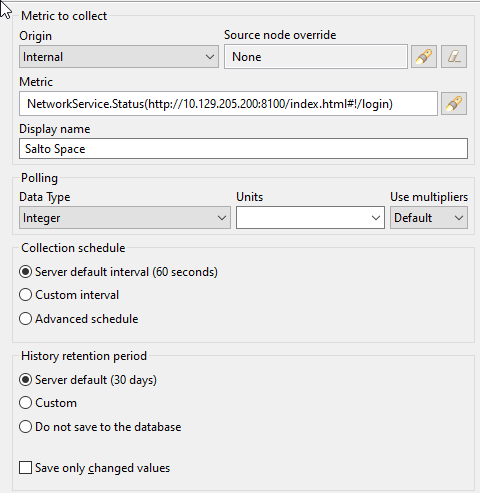
    I am trying to monitor the status of a door access controller by using a DCI that monitors the status of its web UI as ICMP is blocked. I used the NetworkService.Status and relevant URL, but my DCI goes inactive and does not pull a status code. I have verified that the web page loads on the NetXMS server itself.

    Any suggestions?

    2024-07-01 14_04_51-Properties for NetworkService.Status(tcp___10.129.205.200_8100_index.html#!_logi.png

    1 Reply Last reply
    0
    • F
      F
      Filipp Sudanov
      wrote on last edited by
      #2

      Looks like documentation is not clear on this - this metric is collected from NetXMS agent. 

      Origin should be set to "NetXMS Agent". 
      This DCI should either be on the node where an agent is running, or node with agent should be specified in "Source node override" field. 
      Agent that is used should have netsvc subagent enabled.

      1 Reply Last reply
      0
      • T
        T
        twparker
        wrote on last edited by
        #3

        I installed the agent on the server and enabled netsvc subagent. I then specified the server itself as "Source node Override" but it still appears to not be pulling any status codes.

        1 Reply Last reply
        0
        • Z
          Z
          Tatjana Dubrovica
          wrote on last edited by
          #4

          You can set debug level to 6 on agent, where requests should go through and check agent log. There should be messages like: 
          2024.07.22 16:44:06.575 *D* [comm.cs.1250      ] Requesting metric "NetworkService.Status(https://netxms.org)"
          2024.07.22 16:44:06.995 *D* [netsvc            ] NetworkServiceStatus_HTTP(https://netxms.org😞 got reply (807 bytes, response code 302)

          1 Reply Last reply
          0

          Hello! It looks like you're interested in this conversation, but you don't have an account yet.

          Getting fed up of having to scroll through the same posts each visit? When you register for an account, you'll always come back to exactly where you were before, and choose to be notified of new replies (either via email, or push notification). You'll also be able to save bookmarks and upvote posts to show your appreciation to other community members.

          With your input, this post could be even better 💗

          Register Login
          Reply
          • Reply as topic
          Log in to reply
          • Oldest to Newest
          • Newest to Oldest
          • Most Votes


          • Login

          • Don't have an account? Register

          • Login or register to search.
          Powered by NodeBB Contributors
          • First post
            Last post
          0
          • Categories
          • Recent
          • Tags
          • Popular
          • Users
          • Groups