Skip to content
  • Categories
  • Recent
  • Tags
  • Popular
  • Users
  • Groups
Skins
  • Light
  • Brite
  • Cerulean
  • Cosmo
  • Flatly
  • Journal
  • Litera
  • Lumen
  • Lux
  • Materia
  • Minty
  • Morph
  • Pulse
  • Sandstone
  • Simplex
  • Sketchy
  • Spacelab
  • United
  • Yeti
  • Zephyr
  • Dark
  • Cyborg
  • Darkly
  • Quartz
  • Slate
  • Solar
  • Superhero
  • Vapor

  • Default (Flatly)
  • No Skin
Collapse
Brand Logo

NetXMS Forum

  1. Home
  2. Support
  3. LDAP SearchFilter syntax

LDAP SearchFilter syntax

Scheduled Pinned Locked Moved Support
7 Posts 2 Posters 109.3k Views
  • Oldest to Newest
  • Newest to Oldest
  • Most Votes
Reply
  • Reply as topic
Log in to reply
This topic has been deleted. Only users with topic management privileges can see it.
  • Y
    Y
    yordi
    wrote on last edited by
    #1

    Hello fellow IT admins,

    I have LDAP conneciton with the default LDAP.SearchFilter --> (objectClass=*) .
    this has more then 1000 users importing NetXMS.
    I already narrow down the LDAP.SearchBase.

    I want to change the LDAP.SearchFilter to only include users from the "Department ICT"
    I have tried different LDAP.Searchfilter strings, all resulting in 0 users getting pulled..

    (&(objectCategory=person)(objectClass=user)(department=<Departement ICT>))
    (&(objectCategory=person)(objectClass=*)(department=<Departement ICT>))
    (department=<Departement ICT>)

    There is little to non documentation/examples ho to implement this.
    I have found those strings syntax online.

    Ho has a working example ?
    using latest version NetXMS Server Version 5.1.3
    Thank!

    1 Reply Last reply
    0
    • A
      A
      Alex Kirhenshtein
      wrote on last edited by
      #2

      I usually filter by the base group, but you need to use ActiveDirectory(?) extensions to do it recursively, something like this:

      (&(|(objectClass=user)(objectClass=group))(memberOf:1.2.840.113556.1.4.1941:=CN=…))
      
      1 Reply Last reply
      0
      • Y
        Y
        yordi
        wrote on last edited by
        #3

        @alk said in LDAP SearchFilter syntax:

        I usually filter by the base group, but you need to use ActiveDirectory(?) extensions to do it recursively, something like this:

        (&(|(objectClass=user)(objectClass=group))(memberOf:1.2.840.113556.1.4.1941:=CN=…))
        

        Hi Thanks,

        As a workaround i created a dedicated group in AD and use Your solution ;-).
        Is there no documentation with the use of "Department" attribute in AD ?

        1 Reply Last reply
        0
        • A
          A
          Alex Kirhenshtein
          wrote on last edited by
          #4
          (&(|(objectClass=user)(objectClass=group))(department=Department1))
          

          you can even use wildcards there:

          (&(|(objectClass=user)(objectClass=group))(department=Department*))
          
          1 Reply Last reply
          0
          • Y
            Y
            yordi
            wrote on last edited by
            #5

            @alk said in LDAP SearchFilter syntax:

            (&(|(objectClass=user)(objectClass=group))(department=Department1))
            

            you can even use wildcards there:

            (&(|(objectClass=user)(objectClass=group))(department=Department*))
            

            I have try it but i get not any users, do you have a example with a space in the string ?
            my 2 treys are:

            (&(|(objectClass=user)(objectClass=group))(department="Department ICT"))
            (&(|(objectClass=user)(objectClass=group))(department=Department ICT))

            I have no control over the naming of the department attribute

            1 Reply Last reply
            0
            • A
              A
              Alex Kirhenshtein
              wrote on last edited by
              #6

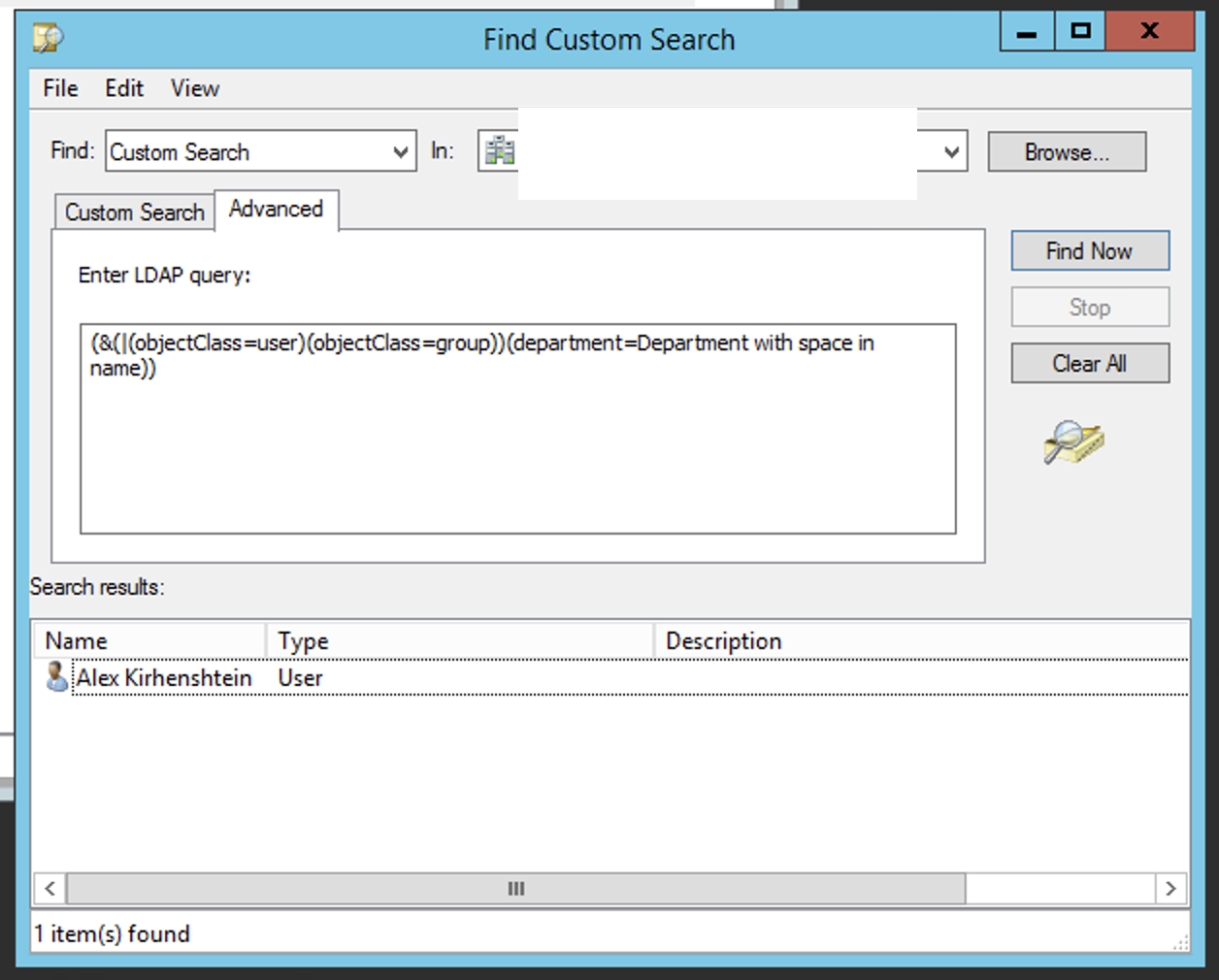
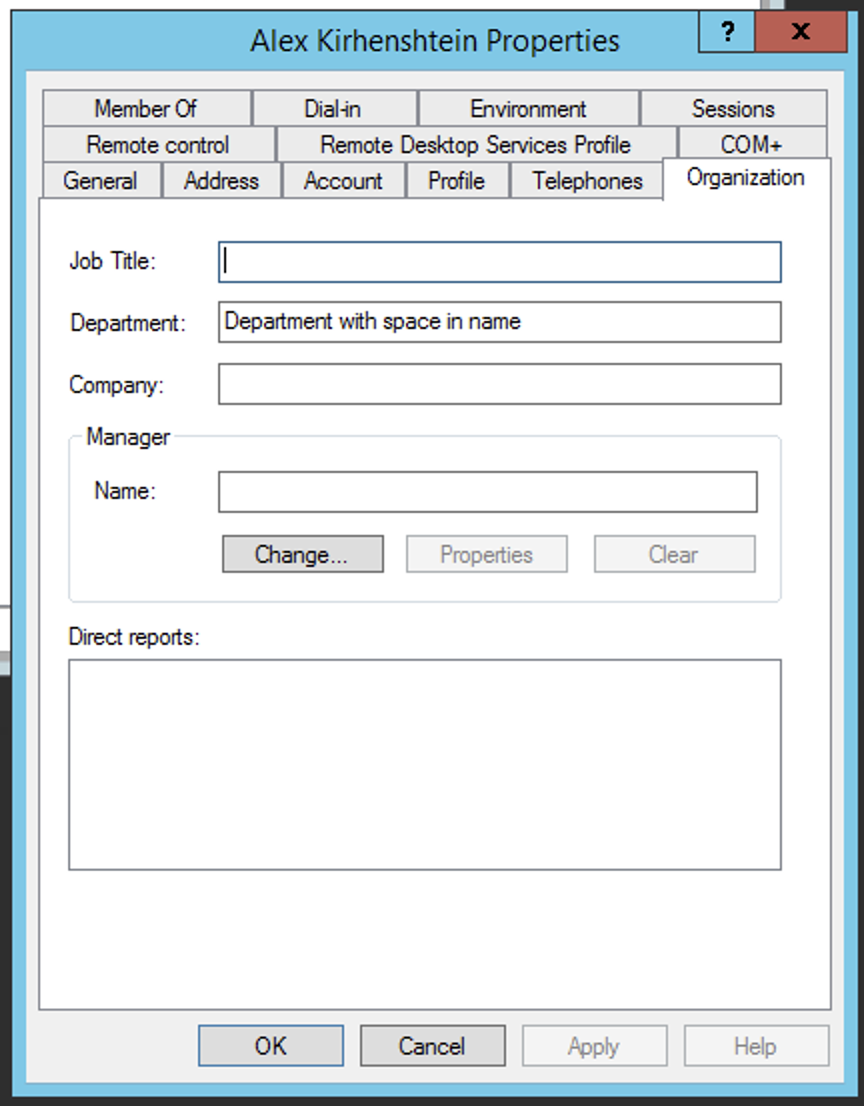
              Second one is correct. See screenshot.

              I'd check that search base is wide enough.

              Screenshot 2025-01-21 at 15.32.20.png

              Screenshot 2025-01-21 at 15.29.42.png

              1 Reply Last reply
              0
              • Y
                Y
                yordi
                wrote on last edited by
                #7

                Supper fixed !

                Using the AD "custom Search" to evaluate.
                Learned something new today !

                supper Thanks!

                1 Reply Last reply
                0

                Hello! It looks like you're interested in this conversation, but you don't have an account yet.

                Getting fed up of having to scroll through the same posts each visit? When you register for an account, you'll always come back to exactly where you were before, and choose to be notified of new replies (either via email, or push notification). You'll also be able to save bookmarks and upvote posts to show your appreciation to other community members.

                With your input, this post could be even better 💗

                Register Login
                Reply
                • Reply as topic
                Log in to reply
                • Oldest to Newest
                • Newest to Oldest
                • Most Votes


                • Login

                • Don't have an account? Register

                • Login or register to search.
                Powered by NodeBB Contributors
                • First post
                  Last post
                0
                • Categories
                • Recent
                • Tags
                • Popular
                • Users
                • Groups