
Public Access for a map
-
Good day!
I have newest netxms server running on an Ubuntu server, and using postgre background DB.
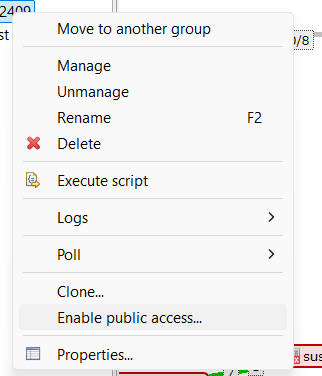
I just find the interesting feature in the netxms management client, I can enable the public access to others, I have interesting use it.
I have few questions,
what else software packages do I need to install? Except netxms-server, I did not try/install others before.
Could these software be installed on other server, not the same netxms one?Thanks for help!
Br,
Mika Chu
-
Hi!
You need web UI for this feature, pls see installation manual here: https://www.netxms.org/documentation/adminguide/installation.html#web-management-client
-
-
I mentioned installation docs in relation to how install the web UI. And, by the way, public maps are also possible with desktop UI, as it's possible to start it from command line, specifying authentication token and map id, but it's probably quite rare use case.
Now more details on the configuration:
Performing "Enable public access..." on a map actually does two things:
- issues/gets authentication token for user "anonymous"
- adds read access right for "anonymous" user to given map
This, however, does not give access to objects present on map to user "anonymous" - the map will be displayed, but objects will have no names and will have question mark instead of object icons.
So we need to fix that and there's access right created specially for that - Delegated read. It allows access to a limited subset of object properties (basically name and status) and only if that object is referenced in a map to which "anonymous" has read access. So you can just give Delegated read to "anonymous" for Infrastructure services (and may be also to Entire Network, if your map displays subnets).This should be it for configuration, pls give an update if this works for you. We plan to update documentation with this info.
-
Hi Filipp,
We had difficult let the WebUI work during last few day, we did not use tomcat before.
Anyway, from your words, I understand why the map could not share to other user in desktop app - did not grant read permission to the object.
Appreciate your kindly explaination!Br,
Mika
Hello! It looks like you're interested in this conversation, but you don't have an account yet.
Getting fed up of having to scroll through the same posts each visit? When you register for an account, you'll always come back to exactly where you were before, and choose to be notified of new replies (either via email, or push notification). You'll also be able to save bookmarks and upvote posts to show your appreciation to other community members.
With your input, this post could be even better 💗
Register Login