
Update DCI from syslog message
-
Hello fellow admin,
I want to monitor very simple wifi enabled battery powered clocks.
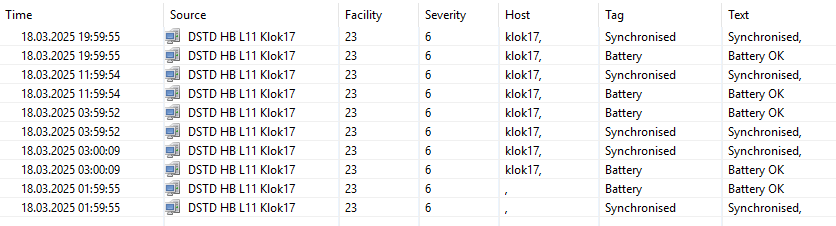
those clock only send syslog message when executing NTP sync. (see image)
and only connect to wifi when syncing to save battery power. (5 times a day)Ho to monitor up status ? like if there is more then 8:30hours past no syslog message received mark as offline status
Second create a DCI for the Synchronised and Battery TAG in syslog.
So i can create action rules if the Battery TAG of a clock is not "Battery OK" or the Synchronised TAG is not "Synchronised".
Try to create a syslog parser could not get it to work.
At the moment the node only has the default DCI, i know how to create DCI templates but not ho to us a syslog status to update de DCI of a host.
Thanks.
-
In syslog parser we can configure event generation. You can create some event template for this and uncheck "write to log" as we use that event just to pass information.
Next step is to have EPP rule. In this rule we can specify container with the clocks, so that rule reacts only to messages from them. Here we need some scripting, e.g.:
$node.setCustomAttribute("lastSyslogMessageTimestamp", GetCurrentTime());
return true; // To process actions in the rule if we need them
This will store timestamp into custom attribute on the node. We can access parameters of the event, e.g. $event.getParameter("message") will be the message, so you can filter by that in the script if needed.
Now on the node we can create a script DCI or Internal DCI with Dummy metric and to things in it's transformation script:
return GetCurrentTime() - $node.setCustomAttribute("lastSyslogMessageTimestamp");So our DCI keeps number of seconds since last syslog message. You can set units to Uptime to display the value in human-readable form. Threshold would compare with the number of seconds that you need.
P.S. We also can push value to a push DCI from EPP rule's script:
dciId = FindDCIByName($node, "lastMessageTimestamp");
if (dciId != null) {
  PushDCIData($node, dciId, GetCurrentTime());
}
but the problem is that threshold on a DCI is processed only when new value is coming, so for that we need some DCI that is regularly collected.
-
-
Simple syslog parser rule with Matching regular expression .* and specifying the event will work. They you can add Facility and Severity filters if needed.
Hello! It looks like you're interested in this conversation, but you don't have an account yet.
Getting fed up of having to scroll through the same posts each visit? When you register for an account, you'll always come back to exactly where you were before, and choose to be notified of new replies (either via email, or push notification). You'll also be able to save bookmarks and upvote posts to show your appreciation to other community members.
With your input, this post could be even better 💗
Register Login