
How to use "External Resources" or "Custom Attributes"
-
Hi,
what is the "External resources" or "Custom Attributes", in the Node properties meant for?
My idea was that I e.g. enter the managament URL from our Azure VMs there and then have a way to
open that URL by adding it to the Tools menu to open that URL. Is that possible?It should open a webbrowser pointing to the URL configured in eather "External Resources" or "Custom Attributs". Whatever is easier.
Best regards
Stefan
-
Hi,
External resources are meant to store URLs. They are visible in the Overview tab of a node.
Custom attributes are for storing any custom information you need. They have inheritance, so you can specify a custom attribute on container and it will be on node under that container. A few use cases:
- If you have a template that needs to be applied only to specific nodes - it's autobind script can check for a custom attribute.
- Check File system: free space on {instance} DCI from Operating Systems->Windows template. Note how threshold value is configured.
- You can add text from custom attributes to your event messages or notification text by using %{custom_attribute_name} macro.
You can have object tool that uses URL from a custom attribute, just use %{custom_attribute_name} in that tool.
-
-
I think I must doing something wrong using the custom attributes for tools.
What I did:-
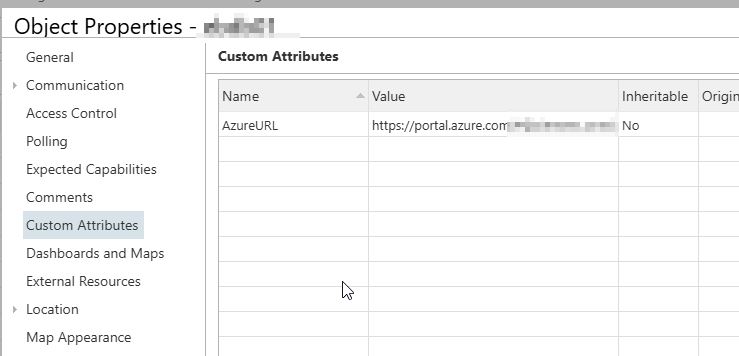
Create a custom attribute
Name: AzureVM
Value: https://portal.azure.com/#home -
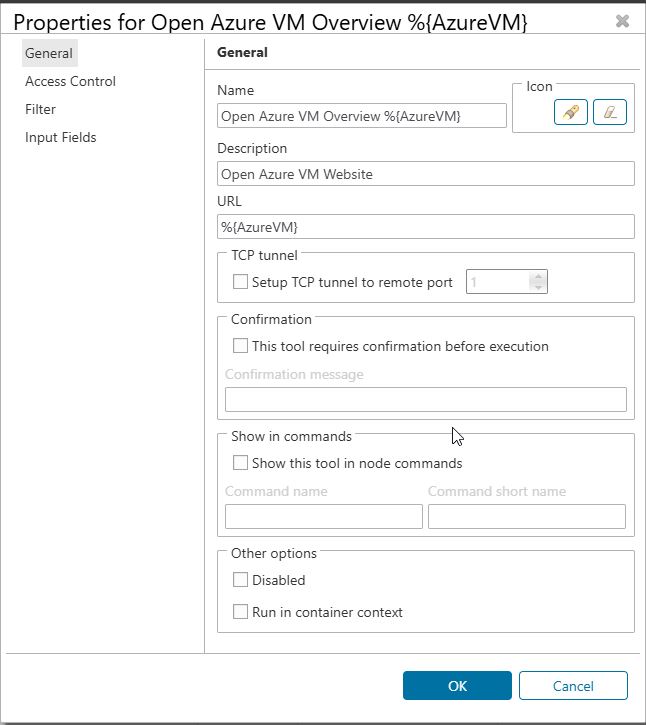
Create a new menu entry in Object Tools
Type: URL
Name: Open Azure
URL: %{AzureVM}
Selecting this in the tools menu on the node I set the custom attribute results in opening File Explorer.
Any thoughts?
Best regards
Stefan
-
-
Are you using desktop client? Legacy or new one? What exactly version of the client? What is the OS?
-
-
Make sure that you start your url with http:// or https://
Windows is analyzing the URL and decides somehow which app should be used for opening. URL like file:///C:/ does indeed open in File Explorer -
Hello! It looks like you're interested in this conversation, but you don't have an account yet.
Getting fed up of having to scroll through the same posts each visit? When you register for an account, you'll always come back to exactly where you were before, and choose to be notified of new replies (either via email, or push notification). You'll also be able to save bookmarks and upvote posts to show your appreciation to other community members.
With your input, this post could be even better 💗
Register Login