Skip to content
  • Categories
  • Recent
  • Tags
  • Popular
  • Users
  • Groups
Skins
  • Light
  • Brite
  • Cerulean
  • Cosmo
  • Flatly
  • Journal
  • Litera
  • Lumen
  • Lux
  • Materia
  • Minty
  • Morph
  • Pulse
  • Sandstone
  • Simplex
  • Sketchy
  • Spacelab
  • United
  • Yeti
  • Zephyr
  • Dark
  • Cyborg
  • Darkly
  • Quartz
  • Slate
  • Solar
  • Superhero
  • Vapor

  • Default (Flatly)
  • No Skin
Collapse
Brand Logo

NetXMS Forum

  1. Home
  2. Support
  3. Inconsistent data/details between NetXMS Clients

Inconsistent data/details between NetXMS Clients

Scheduled Pinned Locked Moved Support
4 Posts 2 Posters 63.9k Views
  • Oldest to Newest
  • Newest to Oldest
  • Most Votes
Reply
  • Reply as topic
Log in to reply
This topic has been deleted. Only users with topic management privileges can see it.
  • C
    C
    cbwecomm
    wrote on last edited by
    #1

    I'm logged into a client remotely (via remote session to another computer), and I have a client running on my local machine.  I'm logged in as the same user account.  

    The DCI's are different between the two.  I have tried closing and restarting... I created a test, which appeared in both.  And I can delete the test item from the other machine (the one other than where I created it) and it disappears on both.    I'm not even sure how this could happen.  

    1 Reply Last reply
    0
    • C
      C
      cbwecomm
      wrote on last edited by
      #2

      Actually, now my Test DCI has disappeared from the same client as well (but still shows on the other remote client). 

      Both of the missing DCIs are broken/not working (expected), and it throws an alarm saying they are unsupported (which, I know and would expect, no issue here).   

      But is there something that removes an unsupported DCI from any client which did not create it?   Why would it be accessible on the original client, briefly appear on other clients, and then disappear when it switches to unsupported?

      1 Reply Last reply
      0
      • N
        N
        normalcy
        wrote on last edited by
        #3

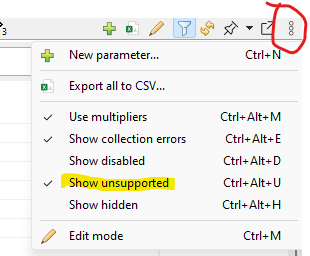
        Up at the top right of the DCI tab, can you see the little three dots menu there?  Do you have 'show unsupported' or 'show hidden' un-ticked?  It could be that the local/remote management console has slightly different combo of preferences ticked.


        Screenshot 2025-08-20 091455.png

        1 Reply Last reply
        0
        • C
          C
          cbwecomm
          wrote on last edited by
          #4

          :-[ :-[ :-[ 

          hahaha.. wow.... I have never see those options before, but yes, that was the problem.  That's so dumb on my part!  Thank you for pointing this out!

          1 Reply Last reply
          0

          Hello! It looks like you're interested in this conversation, but you don't have an account yet.

          Getting fed up of having to scroll through the same posts each visit? When you register for an account, you'll always come back to exactly where you were before, and choose to be notified of new replies (either via email, or push notification). You'll also be able to save bookmarks and upvote posts to show your appreciation to other community members.

          With your input, this post could be even better 💗

          Register Login
          Reply
          • Reply as topic
          Log in to reply
          • Oldest to Newest
          • Newest to Oldest
          • Most Votes


          • Login

          • Don't have an account? Register

          • Login or register to search.
          Powered by NodeBB Contributors
          • First post
            Last post
          0
          • Categories
          • Recent
          • Tags
          • Popular
          • Users
          • Groups