
Agent configuration policy not being applied to node
-
Helo everybody.
We are having rpoblems with agent config policies. We have created new template and configured policy, and appled it to node. When doing Poll>Status it's visible in the log that the policy has been applied but no changes were made.
conf file on the server itself remains unchanged, no logs are visible in nxagentd.conf.d folder.[pre] [pre][color=#000000][2025-08-22 12:33:56] Checking agent policy deployment [2025-08-22 12:33:56] Deploying policy Policy1 from template Template1[/color].
.
.[/pre]
[2025-08-22 12:33:57] Node configuration was not changed after pollIs there anything we are missing?
[/pre]
-
Agent configuration from policy does not change main agent configuration file - one of the reasons is that it could be write-protected.
So instead policy files are stored in what's called data directory - this is set by DataDirectory parameter in main agent config, by default it's /var/lib/netxms on Linux and C:\Windows\System32\ config\systemprofile\AppData\Local\nxagentd on Windows. Specifically agent configuration policies are under config_ap folder there. -
Hi,
When going right click in NetXMS UI, edit agent config, it works.
So, it is not write protected and it knows the path of it.
But when using policy, it does not work.So, you say, I should not modify the main config file, instead add additional files and keep them in sync with agent policies?
Can I somehow enable debug option to show more details why it is not updated? -
After policies are deployed agent should be restarted, as it reads configuration on it's startup.
Agent logs it's configuration to it's log when it starts - you can check the log. Or you can get agent's list "Agent.RunningConfig" - it will contain current configuration.
If things feel wrong - you can put
DebugLevel = 6
to agent's config - it will collect detailed log, during configuration poll this log should contain info on what's happening with the policies.Also pls inform what are server and agent versions.
-
Thank you,
Windows Service for NetXMS Agent is manually restarted, but still no new config there...
Latest stable Windows Agent x64
server is latest stable netxms
Again,
if I edit agent config on a note, it is saved to file instantly on save button press, but never when using agent config policies. -
Do you see file(s) with configuration from your policin in this folder?:
C:\Windows\System32\ config\systemprofile\AppData\Local\nxagentd\config_ap(files have .xml extension, but inside there should be plain-text agent configuration).
-
Yes we can see the policy with xml extension in aforementioned folder. So does this mean the policy is applied?
-
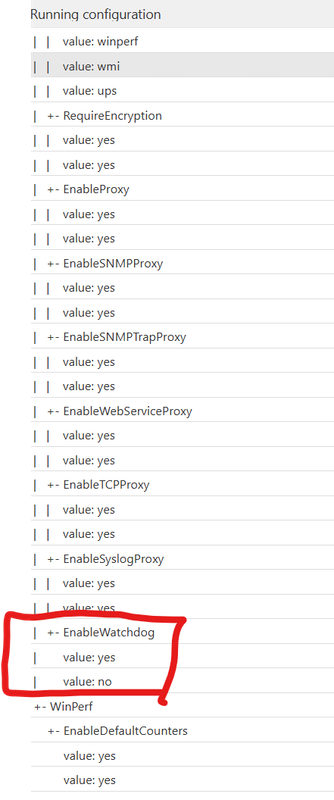
Also running config shows double settings , Default is Yes and in template we changed EnableWatchDog to No
-
Consulted with developers, when configuration is parsed the parser does not know, if a parameter is single-value one (like EnableWatchdog) or multiple-value one (like MasterServers). So parser stacks all the values it finds together, that's why it's seen this way in the running configuration.
When agent needs the value of specific parameter, it will take the last value if it's single-value parameter. So in your case it will take EnableWatchdog = no, as it's last in the list.
You can check this, if you enable DebugLevel = 6, then in agent log you'll see
2025.09.11 15:58:09.499 *I* [watchdog ] Watchdog process startedif watchdog is enabled.
-
Yeah the problem was that NetXMS shows both local config seting and config policy applied via template, after editing local config and restarting agent everything is ok. Thx for the effort anyway.
Hello! It looks like you're interested in this conversation, but you don't have an account yet.
Getting fed up of having to scroll through the same posts each visit? When you register for an account, you'll always come back to exactly where you were before, and choose to be notified of new replies (either via email, or push notification). You'll also be able to save bookmarks and upvote posts to show your appreciation to other community members.
With your input, this post could be even better 💗
Register Login