
v7.01 client issue
-
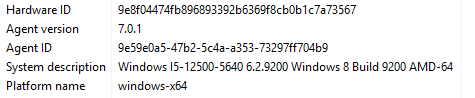
Using the v7.01 agent, all Windows 10/11 nodes have a "System description=Windows 6.2.9200 Windows 8 Build 9200 AMD-64"
Not sure where the "Windows 8" in the description comes from.
Using the agent metrics on any Windows 10/11 node, build is always 9200, product name is Windows 10 Pro, and version is 6.2.9200.
Agent v6.26 and earlier show to correct info:
System description=Windows 10.0.26200 Windows 11 Build 26200 AMD-64
Build 26200, product name Windows 11 Pro, version 10.0.26200
Attached are screenshots from 2 identical PCs, one with the 7.01 agent and one with 6.26



-
Hi,
This is a bug in the 7.0.1 Windows agent build, fixed in 7.0.2, which was released today. Upgrading the agent brings back the correct version, build and product name.
Here's what's actually happening: Windows reports itself as Windows 8 (6.2.9200) to any program that doesn't declare support for newer Windows versions in its application manifest. The 7.0 Windows build moved to a new toolchain, and the 7.0.1 agent shipped without that manifest. It's back in 7.0.2.
Note: on 7.0.1 the agent also skipped Windows Store apps in software inventory, because it thought it was running on Windows 8. If you have inventory enabled, the first configuration poll after the upgrade will show those packages as newly installed. That's expected, nothing was actually installed.
Hello! It looks like you're interested in this conversation, but you don't have an account yet.
Getting fed up of having to scroll through the same posts each visit? When you register for an account, you'll always come back to exactly where you were before, and choose to be notified of new replies (either via email, or push notification). You'll also be able to save bookmarks and upvote posts to show your appreciation to other community members.
With your input, this post could be even better 💗
Register Login