Skip to content
  • Categories
  • Recent
  • Tags
  • Popular
  • Users
  • Groups
Skins
  • Light
  • Brite
  • Cerulean
  • Cosmo
  • Flatly
  • Journal
  • Litera
  • Lumen
  • Lux
  • Materia
  • Minty
  • Morph
  • Pulse
  • Sandstone
  • Simplex
  • Sketchy
  • Spacelab
  • United
  • Yeti
  • Zephyr
  • Dark
  • Cyborg
  • Darkly
  • Quartz
  • Slate
  • Solar
  • Superhero
  • Vapor

  • Default (Flatly)
  • No Skin
Collapse
Brand Logo

NetXMS Forum

  1. Home
  2. Support
  3. Specified action not running for an event

Specified action not running for an event

Scheduled Pinned Locked Moved Support
5 Posts 2 Posters 28.1k Views
  • Oldest to Newest
  • Newest to Oldest
  • Most Votes
Reply
  • Reply as topic
Log in to reply
This topic has been deleted. Only users with topic management privileges can see it.
  • A
    A
    anandprabhusk
    wrote on last edited by
    #1

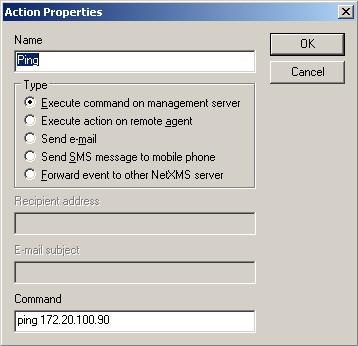
    I am new to this NetXMS and I have set an action as shown in ACTION IMG attached.

    Action is to "Execute command on management server" and command is "ping 172.20.100.1". The reason for pinging is, if this ping works then I would call a sql query to execute (query to connect to a different database and insert data).

    I specified this Action in Event column, but it is not executed even when the event becomes TRUE!

    Action.jpg

    Event.jpg

    1 Reply Last reply
    0
    • V
      V
      Victor Kirhenshtein
      wrote on last edited by
      #2

      Hi!

      How did you check the results of the ping? As it configured now, server will just execute ping command - you only will be able to notice thos pings by capturing packets or looking at server's debug output.

      Best regards,
      Victor

      1 Reply Last reply
      0
      • A
        A
        anandprabhusk
        wrote on last edited by
        #3

        @victor said in Specified action not running for an event:

        Hi!

        How did you check the results of the ping? As it configured now, server will just execute ping command - you only will be able to notice thos pings by capturing packets or looking at server's debug output.

        Best regards,
        Victor

        Thanks for your reply.  🙂
        I modified the action like 'del c:\ok\ok.txt', just to ensure that the action is running. But even when the event is triggered, this specific action is not running. Can't we not run commands like these?

        1 Reply Last reply
        0
        • V
          V
          Victor Kirhenshtein
          wrote on last edited by
          #4

          Hi!

          In case of del c:\ok\ok.txt, the problem is that \ is an escape character (it is escape character in all event-related text strings: event message, alarm key, etc.). So you have to specify it as del c:\\ok\\ok.txt.

          Best regards,
          Victor

          1 Reply Last reply
          0
          • A
            A
            anandprabhusk
            wrote on last edited by
            #5

            Man, great thanks to you. It works well.
            Now I would write a sql script to connect to my another database and insert required data.

            Thanks to You!

            1 Reply Last reply
            0

            Hello! It looks like you're interested in this conversation, but you don't have an account yet.

            Getting fed up of having to scroll through the same posts each visit? When you register for an account, you'll always come back to exactly where you were before, and choose to be notified of new replies (either via email, or push notification). You'll also be able to save bookmarks and upvote posts to show your appreciation to other community members.

            With your input, this post could be even better 💗

            Register Login
            Reply
            • Reply as topic
            Log in to reply
            • Oldest to Newest
            • Newest to Oldest
            • Most Votes


            • Login

            • Don't have an account? Register

            • Login or register to search.
            Powered by NodeBB Contributors
            • First post
              Last post
            0
            • Categories
            • Recent
            • Tags
            • Popular
            • Users
            • Groups
