Skip to content
  • Categories
  • Recent
  • Tags
  • Popular
  • Users
  • Groups
Skins
  • Light
  • Brite
  • Cerulean
  • Cosmo
  • Flatly
  • Journal
  • Litera
  • Lumen
  • Lux
  • Materia
  • Minty
  • Morph
  • Pulse
  • Sandstone
  • Simplex
  • Sketchy
  • Spacelab
  • United
  • Yeti
  • Zephyr
  • Dark
  • Cyborg
  • Darkly
  • Quartz
  • Slate
  • Solar
  • Superhero
  • Vapor

  • Default (Flatly)
  • No Skin
Collapse
Brand Logo

NetXMS Forum

  1. Home
  2. Support
  3. Unable to connect to Database - Windows MSSQL

Unable to connect to Database - Windows MSSQL

Scheduled Pinned Locked Moved Support
10 Posts 2 Posters 103.9k Views
  • Oldest to Newest
  • Newest to Oldest
  • Most Votes
Reply
  • Reply as topic
Log in to reply
This topic has been deleted. Only users with topic management privileges can see it.
  • K
    K
    krknopp
    wrote on last edited by
    #1

    I'm trying to install a new NetXMS server.  I've installed MSSQL Express Edition on localhost and verified Windows Authentication works via the management console.  When i run the NetXMS installation it can't connect to the database.  I've entered * for the user, no password and entered the administrator account for the service to run as.  I even tried creating a database and telling the install file to use an existing database, but I get the same results.

    I'm running Windows Server 2003 Standard Edition, SP2 and Microsoft SQL Server 2005 Express Edition SP2.

    Thanks for the help.

    Kerry

    1 Reply Last reply
    0
    • V
      V
      Victor Kirhenshtein
      wrote on last edited by
      #2

      Hello!

      Do you have TCP/IP enabled on SQL server? NetXMS can use only TCP/IP connection.

      Best regards,
      Victor

      1 Reply Last reply
      0
      • K
        K
        krknopp
        wrote on last edited by
        #3

        the SQL server is on the local box so there's no changes there is no TCP connection.  I did enable all remote connections to see if it made a difference, but it didn't.  Still cannot connect to it.

        1 Reply Last reply
        0
        • V
          V
          Victor Kirhenshtein
          wrote on last edited by
          #4

          I'll try to setup Microsoft SQL Server 2005 Express Edition to chek it myself. Please wait till Monday's evening.

          Best regards,
          Victor

          1 Reply Last reply
          0
          • K
            K
            krknopp
            wrote on last edited by
            #5

            any luck on this?

            1 Reply Last reply
            0
            • K
              K
              krknopp
              wrote on last edited by
              #6

              I would really like to try this software out.  I'd rather run it on Windows, but I guess I'll try Linux and see what happens.  Please test it when you get time and let me know your findings.

              1 Reply Last reply
              0
              • V
                V
                Victor Kirhenshtein
                wrote on last edited by
                #7

                Hello!

                Sorry for delay with reply, was really busy last weeks... Just download SQL 2005 Express, will check it this weekend.

                Best regards,
                Victor

                1 Reply Last reply
                0
                • V
                  V
                  Victor Kirhenshtein
                  wrote on last edited by
                  #8

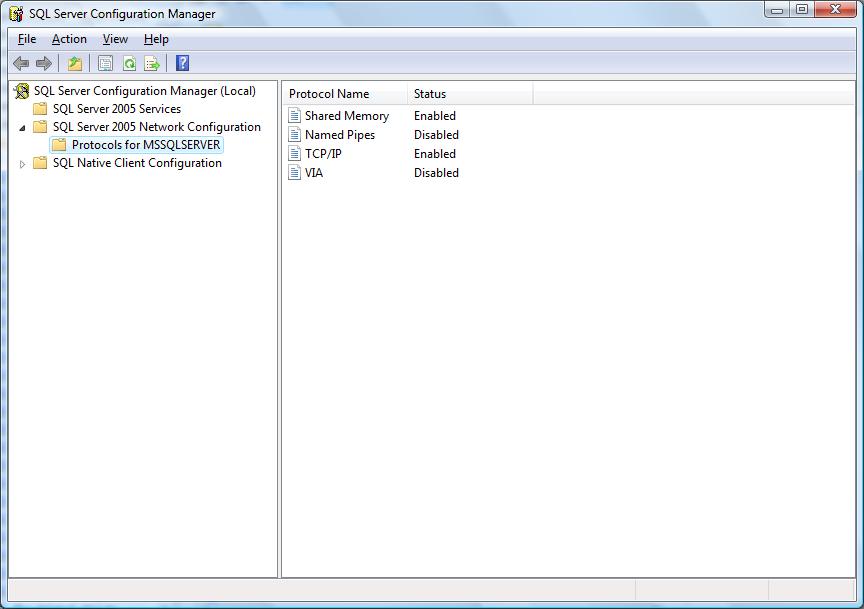
                  Just check it on my laptop (the only difference is that it's Windows Vista not Windows Server 2003). It's not working out of the box, but start to work when I enable TCP/IP in SQL Server Configuration Manager (see attached screenshot). Do you have the same settings? Also, when installing, did you select "Microsoft SQL DB-library" component?

                  Best regards,
                  Victor

                  netcfg.jpg

                  1 Reply Last reply
                  0
                  • V
                    V
                    Victor Kirhenshtein
                    wrote on last edited by
                    #9

                    P.S. You can also try to setup ODBC and use odbc.ddr instead of mssql.ddr.

                    Best regards,
                    Victor

                    1 Reply Last reply
                    0
                    • K
                      K
                      krknopp
                      wrote on last edited by
                      #10

                      thanks for the help.  I actually need to change the default database name from localhost to .\sqlexpress and it connected right up.

                      Kerry

                      1 Reply Last reply
                      0

                      Hello! It looks like you're interested in this conversation, but you don't have an account yet.

                      Getting fed up of having to scroll through the same posts each visit? When you register for an account, you'll always come back to exactly where you were before, and choose to be notified of new replies (either via email, or push notification). You'll also be able to save bookmarks and upvote posts to show your appreciation to other community members.

                      With your input, this post could be even better 💗

                      Register Login
                      Reply
                      • Reply as topic
                      Log in to reply
                      • Oldest to Newest
                      • Newest to Oldest
                      • Most Votes


                      • Login

                      • Don't have an account? Register

                      • Login or register to search.
                      Powered by NodeBB Contributors
                      • First post
                        Last post
                      0
                      • Categories
                      • Recent
                      • Tags
                      • Popular
                      • Users
                      • Groups