Skip to content
  • Categories
  • Recent
  • Tags
  • Popular
  • Users
  • Groups
Skins
  • Light
  • Brite
  • Cerulean
  • Cosmo
  • Flatly
  • Journal
  • Litera
  • Lumen
  • Lux
  • Materia
  • Minty
  • Morph
  • Pulse
  • Sandstone
  • Simplex
  • Sketchy
  • Spacelab
  • United
  • Yeti
  • Zephyr
  • Dark
  • Cyborg
  • Darkly
  • Quartz
  • Slate
  • Solar
  • Superhero
  • Vapor

  • Default (Flatly)
  • No Skin
Collapse
Brand Logo

NetXMS Forum

  1. Home
  2. Support
  3. Services: Request and Return codes.

Services: Request and Return codes.

Scheduled Pinned Locked Moved Support
5 Posts 4 Posters 40.7k Views
  • Oldest to Newest
  • Newest to Oldest
  • Most Votes
Reply
  • Reply as topic
Log in to reply
This topic has been deleted. Only users with topic management privileges can see it.
  • P
    P
    prutser
    wrote on last edited by
    #1

    Hello there,

    Thank you in advance for such a nice piece of software! However I have a question about some service checking functionality. Ill try to keep it as general as possible, so that everyone can use the post.

    If you create a service for a managed node to check, how do you create the service? Below is a table, and I only know the request and return codes for http. I'm very interested in FTP and user-defined.

    Service:        Request code:                Return Code:

    http:            server:/page.html            ^HTTP/1\.[01] 200.*
    ftp:               ??                                ??
    pop3:            ??                                ??
    snmp:            ??                                ??
    ssh:              ??                                ??
    user-defined:  ??                                ??

    Thank you for your help,
    Best regards,
    Peter.
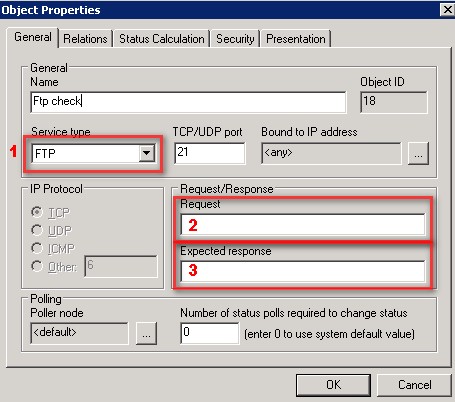

    FtpService.jpg

    1 Reply Last reply
    0
    • W
      W
      weec
      wrote on last edited by
      #2

      SMTP:
      request = e-mail address, response is not used

      SSH:
      all tabs is ignored

      POP3:
      request = user:password, response is not used

      FTP - don`t realised

      1 Reply Last reply
      0
      • P
        P
        prutser
        wrote on last edited by
        #3

        Thank you very much.
        What do you mean by "Don't realised"? Do you mean that the functionality is not implemented yet?
        And what about the "User-defined" functionality?

        Thank you very much...

        1 Reply Last reply
        0
        • V
          V
          Victor Kirhenshtein
          wrote on last edited by
          #4

          Yes, it was meant "not implemented". User-defined actually is connect-only check - request and response not used, service considered to be ok if TCP connection was established successfully.

          1 Reply Last reply
          0
          • ?
            ?
            possamai
            wrote on last edited by
            #5

            Remember not to check your smtp service too often...
            It sends an email to the address you enter 🙂 So if you check it every 5 minutes, your mailbox might overload..

            1 Reply Last reply
            0

            Hello! It looks like you're interested in this conversation, but you don't have an account yet.

            Getting fed up of having to scroll through the same posts each visit? When you register for an account, you'll always come back to exactly where you were before, and choose to be notified of new replies (either via email, or push notification). You'll also be able to save bookmarks and upvote posts to show your appreciation to other community members.

            With your input, this post could be even better 💗

            Register Login
            Reply
            • Reply as topic
            Log in to reply
            • Oldest to Newest
            • Newest to Oldest
            • Most Votes


            • Login

            • Don't have an account? Register

            • Login or register to search.
            Powered by NodeBB Contributors
            • First post
              Last post
            0
            • Categories
            • Recent
            • Tags
            • Popular
            • Users
            • Groups