
Custom Attributes
-
Is there a way to create custom attribute fields for a node when it is discovered and potentially populate them based on some rules? I tried adding a couple of custom attributes fields to some of my templates hoping it would apply them to all of the objects that this applied to, but that did not happen. The scripting language seems to have a function to get a custom attribute, but I did not find one to create or set them.
Thanks!
-
Hi!
There are previously undocumented function SetCustomAttribute. I have added appropriate wiki page: http://wiki.netxms.org/wiki/NXSL:SetCustomAttribute. To set custom attributes for new nodes, you can handle SYS_NODE_ADDED event in event processing policy and start a NXSL script which will populate custom attributes.
Best regards,
Victor -
-
This works great for all new nodes being added and they are being setup as needed. I am looking for a way now to add these few attributes to the few hundred nodes that were previously discovered and have been setup. Cannot find an easy way to apply that script against existing nodes. Tried using Object Tools, but do not believe it will run a script. Cannot figure out any way to write a script either that loops through all of the nodes. Any ideas?
-
It will be easy since version 1.2.2
 I have added new function GetObjectChildren, which can be used for node enumeration. See also example: http://wiki.netxms.org/wiki/Script_Example:_Enumerate_All_Nodes.
For 1.2.1, one possible way could be to add handler for SYS_NODE_UNMANAGED event, and unmanage all (or required) nodes, then manage them again.
Best regards,
Victor -
-
I set this up however, it seems to be causing problems. I have the following in the event log:
[09-Jul-2012 10:22:53] *actions* Executing NXSL script "Event::xlSetCustomAttributes"
[09-Jul-2012 10:22:53] ExecuteActionScript(): Cannot find script Event::xlSetCustomAttributesThe odd thing, this is the EXACT same script / action we use for SYS_NODE_ADDED events and that is able to run it / find it just fine. Is it possible that once an event is unmanaged it cannot have scripts run against it?
-
It should not be related to event. Could it be a typo somewhere? Can you send me a configuration screenshots?
Best regards,
Victor -
The problem with the typo theory, which I thought as well is that when you are selecting the action you pick it from a list and do not type anything in. In fact I even tried renaming things but the same issue persisted. Both events are using the same action, picked from the list. SYS_NODE_ADDED works, SYS_NODE_UNMANAGED does not. Screens are attached.
Now however, after taking the screen grabs I thought that I should crank up debugging to 9 and see if that gives any more information. So I did that, restarted the server and ran it again. My new problems is that it now worked:
[10-Jul-2012 06:49:45] Event 24997 match EPP rule 24
[10-Jul-2012 06:49:45] Event::expandText(event=0x7f40ac007c50 sourceObject=3184 template='%m' alarmMsg='(null)')
[10-Jul-2012 06:49:45] Event::expandText(event=0x7f40ac007c50 sourceObject=3184 template='' alarmMsg='Node status changed to UNMANAGED')
[10-Jul-2012 06:49:45] Event::expandText(event=0x7f40ac007c50 sourceObject=3184 template='Event::xlSetCustomAttributes' alarmMsg='Node status changed to UNMANAGED')
[10-Jul-2012 06:49:45] *actions* Executing NXSL script "Event::xlSetCustomAttributes"
[10-Jul-2012 06:49:45] [CLSN-0] Sending message CMD_OBJECT_UPDATE
[10-Jul-2012 06:49:45] [CLSN-0] Sending message CMD_OBJECT_UPDATE
[10-Jul-2012 06:49:45] [CLSN-0] Sending message CMD_OBJECT_UPDATE
[10-Jul-2012 06:49:45] [CLSN-0] Sending message CMD_OBJECT_UPDATE
[10-Jul-2012 06:49:45] ExecuteActionScript: script Event::xlSetCustomAttributes successfully executed
[10-Jul-2012 06:49:45] Event 24997 with code 12 passed event processing policyI am assuming the 4 CMD_OBJECT_UPDATE messages are related to the 4 custom attributes I setup.
At any rate it is working now, just a bit confused what the cause was with both events using the same action.

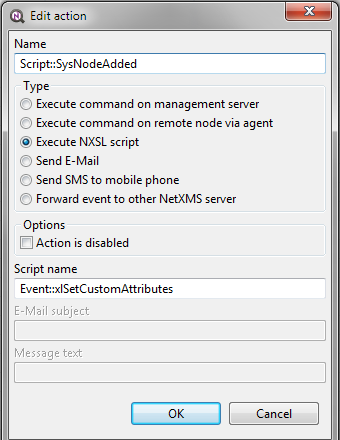
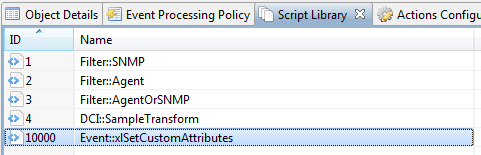
-
Ok, back to the typo issue. What I have found is if the script contains a typo when you save it, no errors are generated - BUT the compiler must be rejecting it (as it should). This then in turn causes the cannot find script errors.
Is there some way in the console when you save a script if it cannot be compiled you pop up errors / warnings with line numbers so we can properly correct them. Also, if a compiled version of the script exists I would suggest not removing it until after a successful compilation of a modified script. Maybe include line numbering in the left "grey" section (where you might set breakpoints in other IDE's so you can hunt down messages more easily.
Thanks
-
Currently server generates SYS_SCRIPT_ERROR events for script compilation and execution errors. You can handle this event and generate alarms or send notifications. But I agree that script editor should do at least syntax checking before saving the script on server. Added this as to-do.
Best regards,
Victor -

Hello! It looks like you're interested in this conversation, but you don't have an account yet.
Getting fed up of having to scroll through the same posts each visit? When you register for an account, you'll always come back to exactly where you were before, and choose to be notified of new replies (either via email, or push notification). You'll also be able to save bookmarks and upvote posts to show your appreciation to other community members.
With your input, this post could be even better 💗
Register Login