
SNMP Proxy Lockup via Remote Agents server.1.2.0
-
-
That's bad, because I found memory leak in SNMP code (fixed in 1.2.1) and was thinking that it was the cause for your problem too. I'll do more tests next week.
Best regards,
Victor -
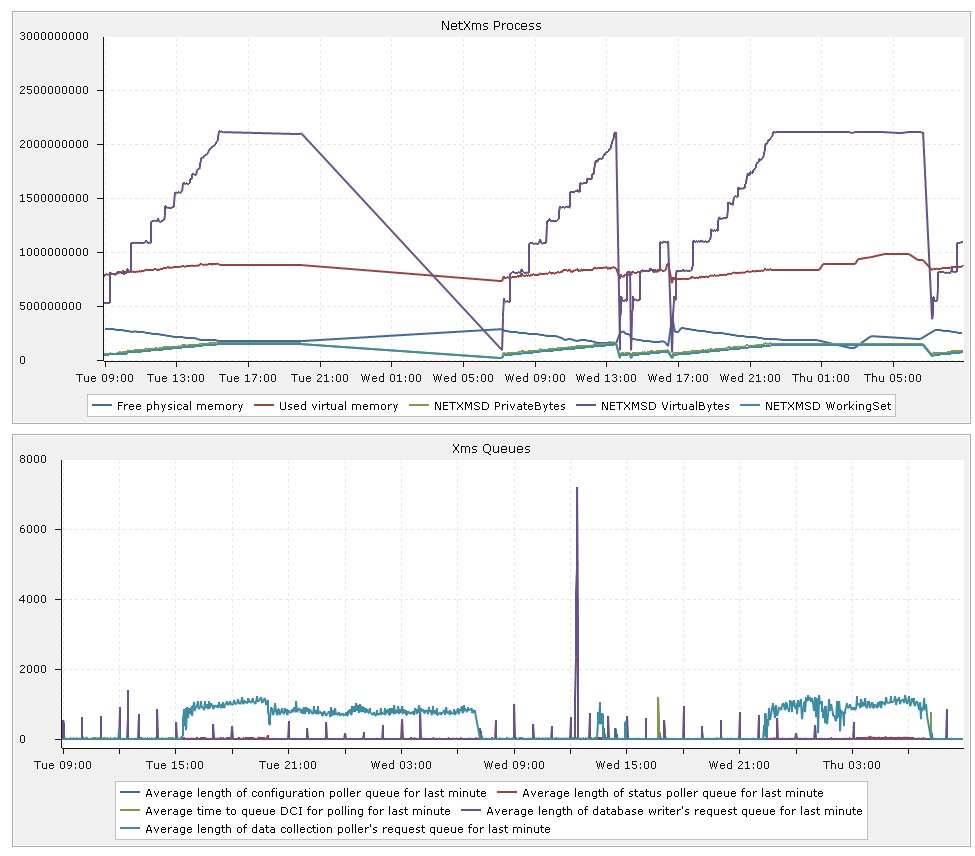
I have changed some of the settings and had a look at the logs to try and see if I can provide any constructive information. Firstly I changed the house keeping and configuration poll timers from 1 hours to 2 hours. This had no affect on the general time before it had an operational affect. The logs unfortunately did not find anything particularly insightful but when the system goes into its degraded state it reports socket_error =8 which i believe is the Out Of Memory message.
If there is anything particularly constructive I can do please let me know.
Regards
Aron
-
Hi!
Is it possible to unmanage all nodes for some time and see if memory consumption is growing? If it stops growing, then set managed state for nodes one by one or in groups of similar nodes, and see after what node/group memory consumption starts growing again?
Best regards,
Victor -
Hello
Unfortunately I will be going on holiday for a week (this being the last day) so I will not be a position to do this constructively in the short term.
I have been trying to push this forward in my own time to see if I can assist. I have been trying to add tools build / find the memleaks, predominantly to get a working build environment and gain greater familiarity with the code base and how it works. The memleak tool looks ideal with no modification to the codebase required to run the memleak tests. http://valgrind.org/
We have been pushing the forward with the deployment regardless which does provide additional useful information. The average time between degraded performance has been generally around 7 hours. I would say that we have at least doubled the amount of DCI's (combination of NXAgent/SNMP) being collected but this appears to have had no affect on the up time. I assume the fact the issue is being quite elusive and seems to predominantly affect our deployment it may be something specific to our or the way we have it deployed.
Total objects: 6608, Monitored Nodes: 356, Number DCis 3119
I would have said that most of our equipment being probed would be run of the mil, but we probably steer away from the norm with our L3 cisco switch deployments. We have 60 Cisco Switches (2950-3750 24 or 48 port POE), NetXms is seeing all of these units for (isBridge,isCdp,isRouter,isSnmp,isSTP). 20 of these are acting as L3 vlan routers (generally at different locations) with generally around 60-200 vlans each, not every vlan will have an IP address however each deployment would have similar IP deployment structure (some would be configured but disabled). Depending on how the IP addresses are used by netxms it may get confused of duplicate IP addresses, IE LocationA.Vlan5 ip = 192.168.5.1/255.255.255.0 and LocationB.Vlan5 = 192.168.5.1/255.255.255.0 , for each of the 20 locations.
As our experience with NetXMS is growing we are also noticing other features that may be the result of the above deployment style or of the issue that is causing the memleak.
- When selecting a Cisco Switch > Show L2 Topology in some instances show a correct network maps, in other instances they will show a connection between 2 physically separated units which share no physical connection. What is slightly stranger is that it is inconsistent. IE L2 Topology on LocationB.Switch2 shows a connection to LocationA.Switch1, however if you do the same topology map is done on LocationA.Switch1 it shows no connection back to LocationB.Switch2.
- IP Neighbours does get very confused but I would expect this due to the IP deployment structure so I consider this a NonFault but mention just in case.
I have been trying to see if this should be setup using the VPN connector however the currently GUI does not seem to allow the creation of the connector. Documentation on the Forum/Manual seems a little with regards the use of the VPN connector.
Sorry I have provided lots of information that may provide little constructive insight. As soon as I get back I will setup a test rig to do the requested tests.
Regards
Aron
-
Hello
A quick update on this is that investigation is continuing to go slowly. Upgrade to 1.2.2 has had no affect on the issue. Investigation with valgrind has reported allot of issues which I will look into to confirm that they are actually the cause of the leaks.
Recent incidents on out internal system where we were unable to contact a heavily used Remote NX agent on Unbuntu (currently v1.2.2) resulted in the system running for longer before it run out of memory. The agent is predominantly doing ICMP and SNMP proxy requests.
Regards
Aron
-
Hello
Tracing information shows the bulk of the missing memory from the following area;
==26275== 129 bytes in 3 blocks are definitely lost in loss record 711 of 813
==26275== at 0x4C2B6CD: malloc (in /usr/lib/valgrind/vgpreload_memcheck-amd64-linux.so)
==26275== by 0x5077C61: SNMP_ProxyTransport::readMessage(SNMP_PDU**, unsigned int, sockaddr*, unsigned int*, SNMP_SecurityContext* (*)(sockaddr*, unsigned int)) (snmpproxy.cpp:101)
==26275== by 0x68A3FA2: SNMP_Transport::doRequest(SNMP_PDU*, SNMP_PDU**, unsigned int, int) (transport.cpp:127)
==26275== by 0x50771BB: SnmpGet(unsigned int, SNMP_Transport*, char const*, unsigned int const*, unsigned int, void*, unsigned int, unsigned int) (snmp.cpp:79)
==26275== by 0x535C9F1: SnmpGetInterfaceStatus(unsigned int, SNMP_Transport*, unsigned int, int*, int*) (snmp.cpp:108)
==26275== by 0x531A4EB: Node::getInterfaceStatusFromSNMP(SNMP_Transport*, unsigned int, int*, int*) (node.cpp:3058)
==26275== by 0x52FA00D: Interface::StatusPoll(ClientSession*, unsigned int, Queue*, int, SNMP_Transport*) (interface.cpp:373)
==26275== by 0x5313A80: Node::statusPoll(ClientSession*, unsigned int, int) (node.cpp:1201)
==26275== by 0x533124B: StatusPoller(void*) (poll.cpp:273)
==26275== by 0x55B5E99: start_thread (pthread_create.c:308)
==26275== by 0x58BD4BC: clone (clone.S:112)Reading the code I have a made a guess that pBuffer is not free'ed in SNMP_ProxyTransport::readMessage. Adding this to the function has stopped the report of this leak. Unfortunately I am not able to build a windows version to confirm in the live environment.
Regards
Aron
-
Hi!
It should be the problem. Attached is recompiled libnxsrv.dll for 32 bit Windows.
Best regards,
Victor
-
-
Hello! It looks like you're interested in this conversation, but you don't have an account yet.
Getting fed up of having to scroll through the same posts each visit? When you register for an account, you'll always come back to exactly where you were before, and choose to be notified of new replies (either via email, or push notification). You'll also be able to save bookmarks and upvote posts to show your appreciation to other community members.
With your input, this post could be even better 💗
Register Login