Skip to content
  • Categories
  • Recent
  • Tags
  • Popular
  • Users
  • Groups
Skins
  • Light
  • Brite
  • Cerulean
  • Cosmo
  • Flatly
  • Journal
  • Litera
  • Lumen
  • Lux
  • Materia
  • Minty
  • Morph
  • Pulse
  • Sandstone
  • Simplex
  • Sketchy
  • Spacelab
  • United
  • Yeti
  • Zephyr
  • Dark
  • Cyborg
  • Darkly
  • Quartz
  • Slate
  • Solar
  • Superhero
  • Vapor

  • Default (Flatly)
  • No Skin
Collapse
Brand Logo

NetXMS Forum

  1. Home
  2. Support
  3. Status NORMAL on closed port

Status NORMAL on closed port

Scheduled Pinned Locked Moved Support
8 Posts 4 Posters 65.1k Views
  • Oldest to Newest
  • Newest to Oldest
  • Most Votes
Reply
  • Reply as topic
Log in to reply
This topic has been deleted. Only users with topic management privileges can see it.
  • J
    J
    jmgm
    wrote on last edited by
    #1

    Hi,

    I need to fire a CRITICAL error if a port is OPEN (instead of closed) and I cannot find a way to do this.

    Thanks in advance

    Juan

    1 Reply Last reply
    0
    • S
      S
      SKYnv
      wrote on last edited by
      #2

      @jmgm said in Status NORMAL on closed port:

      Hi,

      I need to fire a CRITICAL error if a port is OPEN (instead of closed) and I cannot find a way to do this.

      Thanks in advance

      Juan

      change interface expected state, "up" by default

      1 Reply Last reply
      0
      • J
        J
        jmgm
        wrote on last edited by
        #3

        Hi Viktor,

        Thanks for your fast response.

        When I click on the node, and the in the "interfaces" tab, the services I' added aren't listed (i.e. ftp, ssh, etc) . Just the interfaces (i.e. eth0, etc)

        So I don't know how to access the "polling" options for these ones.

        Thanks

        Juan

        1 Reply Last reply
        0
        • J
          J
          jmgm
          wrote on last edited by
          #4

          I've also tried a simple "transformation" to change values in the data collection, without success

          1 Reply Last reply
          0
          • V
            V
            Victor Kirhenshtein
            wrote on last edited by
            #5

            Hi!

            You have to manually add network services you want to monitor. Right-click on node object, and select "create network service".

            What kind of problem you have with transformation script?

            Best regards,
            Victor

            1 Reply Last reply
            0
            • J
              J
              jmgm
              wrote on last edited by
              #6

              Victor,

              I've already added several network services, and most of them are being monitored correctly.

              However, the issue I have is that in the "Interfaces" tab of the Object Details Section of the node, I only have the INTERFACES listed (not the NETWORK SERVICES I've manually added). In the Object Details of each Network Service I do not have any way to set expected state either.

              The transformation script seems to be ignored.

              Can you give me a quick example to return Normal on Critical state?

              Thanks, and many thanks for your time

              Juan

              PS: I've attached an screenshot to be more clear.

              As you can see on the left, I've created _SSH and __Apache. However, in the "Interfaces" list, they aren't listed.
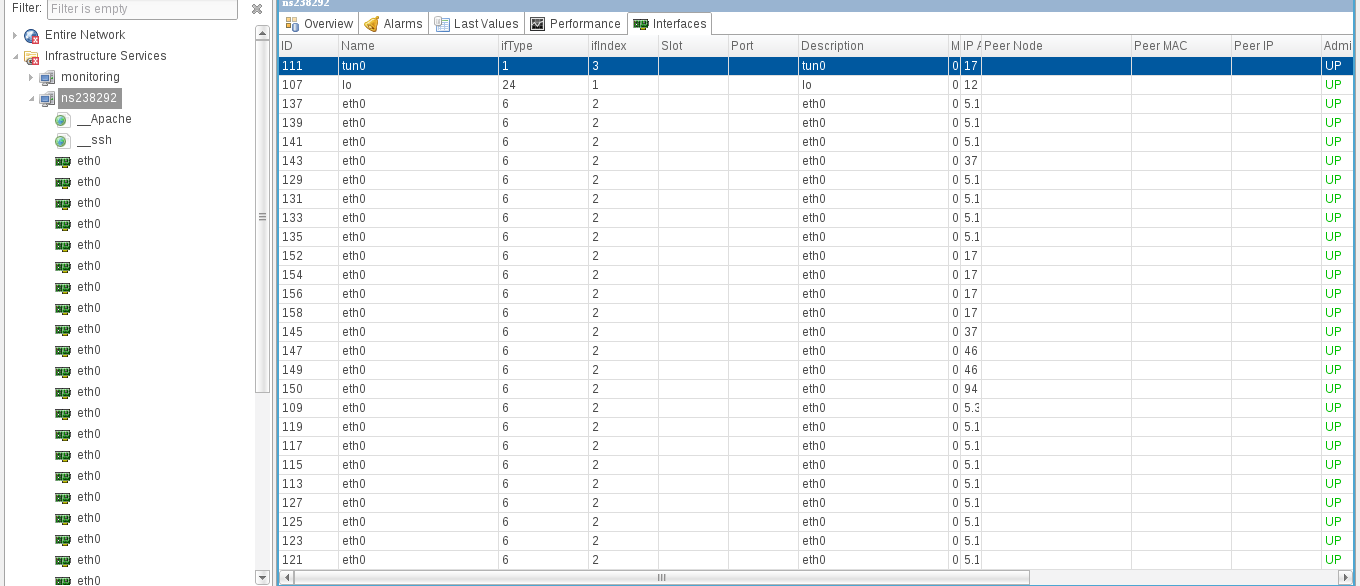

              netxms2.png

              1 Reply Last reply
              0
              • J
                J
                jmgm
                wrote on last edited by
                #7

                Also, In the right click menu of an INTERFACE I have the expected state option, while in the right click menu of a network service, I don't  😞

                1 Reply Last reply
                0
                • A
                  A
                  Alex Kirhenshtein
                  wrote on last edited by
                  #8

                  Right now it's not possible. Services do not have "expected state", as interfaces do. Right now they are expected to be up, so if normal state for network service is "down", you'll always get critical status.
                  As a workaround, you can handle SYS_SERVICE_UP / SYS_SERVICE_DOWN (there is default rule for that in Event Processin Policy, so add your rule before that and select "stop processing" checkbox) to create alarm / send notification.
                  To prevent "critical" status on the node itself as well as whole tree, you can status propagation for service to fixed -> Normal. This way service itself will be shown with red dot, but whole tree will be left intact.
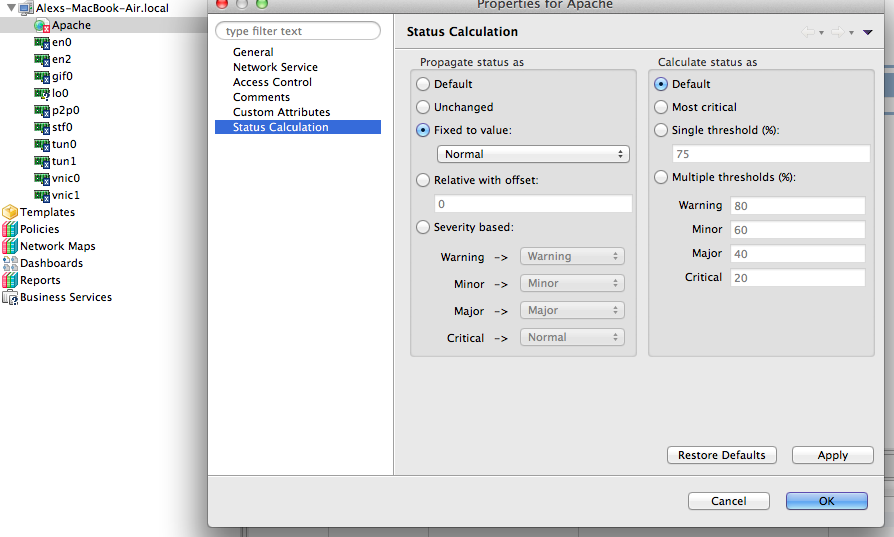

                  Screen Shot 2013-01-18 at 12.56.00 PM.png

                  1 Reply Last reply
                  0

                  Hello! It looks like you're interested in this conversation, but you don't have an account yet.

                  Getting fed up of having to scroll through the same posts each visit? When you register for an account, you'll always come back to exactly where you were before, and choose to be notified of new replies (either via email, or push notification). You'll also be able to save bookmarks and upvote posts to show your appreciation to other community members.

                  With your input, this post could be even better 💗

                  Register Login
                  Reply
                  • Reply as topic
                  Log in to reply
                  • Oldest to Newest
                  • Newest to Oldest
                  • Most Votes


                  • Login

                  • Don't have an account? Register

                  • Login or register to search.
                  Powered by NodeBB Contributors
                  • First post
                    Last post
                  0
                  • Categories
                  • Recent
                  • Tags
                  • Popular
                  • Users
                  • Groups