
Usage of nxpush to load values in a new DCI over a node
-
Hi
We installed NetXMS 1.2.4 few days ago. Very good tool thanks!
We create a node called Switch_1 and add a new push DCI called Time (Push Integer).
We are loading values into Time using command
nxpush -u admin -P ******** localhost Switch_1:Time="c:\netXMS\bin\nxget localhost Icmp.Ping(10.194.133.1)"
When we check Last Values in node, the DCI took the string c:\netXMS\bin\nxget localhost Icmp.Ping(10.194.133.1) not the value itself. We replace " by ', remove c:\netXMS/bin and do many possible variations but nothing happen.
Thanks for your support
-
Hi!
It's not so simple to use command's output in Windows as in UNIX shell. You can achieve this using FOR command:
for /F %x in ('nxget localhost Icmp.Ping(10.194.133.1)') do @nxpush -u admin -P ******** localhost Switch_1:Time=%xHowever, there are easier way to achieve what you want using proxy DCI: create DCI on node Switch_1, set origin to "NetXMS Agent", enter Icmp.Ping(10.194.133.1) as name, and set proxy node to your NetXMS server node. This way system will show collected data for node Switch_1, but real data collection will occur from NetXMS server node. You will also need to add Switch_1 to list of trusted nodes in NetXMS server node's properties, or set server configuration variable "CheckTrustedNodes" to 0.
Best regards,
Victor -
Hi
Thanks to clarify my mistake using UNIX instructions in Windows
We use your solution but still it does not work; Last value is <<ERROR>>. This is what we did
-
We modify server parameter CheckTrustedNodes to 0 and restart server.
-
We check that nxagentd.conf in server have line SubAgent = ping.nsm and define timeout, packetrate and target values
-
We finally create new DCI as NetXMS Agent in swtich_1 and in server node
- Description Icmp.Ping(10.194.133.1) as description (There is no name field, right?)
- No parameters
- Proxy for Switch_1 SERVER; No Proxy for SERVER NODE
Thanks for your help
-
-
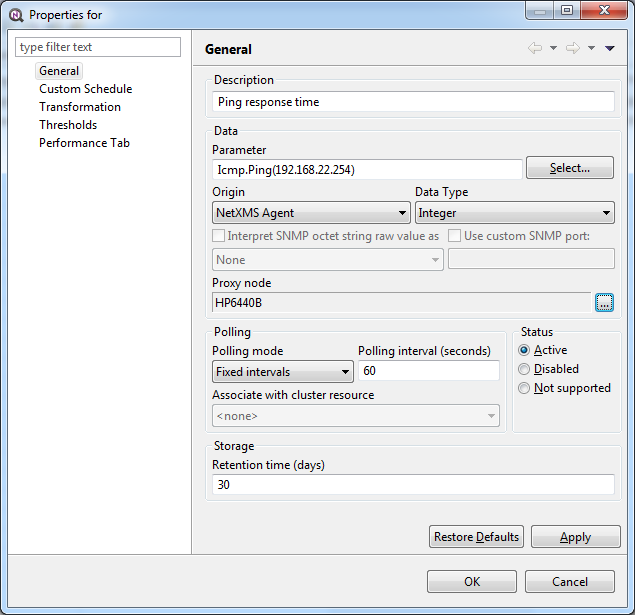
Sorry, my mistake - I mean "Parameter" field. "Name" was an old name for it. See attached screenshot for example. Description is a human-readable text to be displayed in UI, and "parameter" is an actual parameter name to be collected (it will be SNMP OID for SNMP parameters).
Best regards,
Victor
-
-
Did you restart agent after adding ping subagent? Also, can you check that you can get required value via nxget?
And maybe post here screenshot of your DCI config, this can help identifying the problem.Best regards,
Victor -
Yes I restart both server and agent. And I obtain a positive answer using nxget
This is the agent text
MasterServers = netxms.demo
SubAgent = ping.nsm
*PING
Timeout = 1000
PacketRate = 12
Target = 10.194.133.1This is the answer from nxget
C:\Users\marlon.hurtado>nxget localhost icmp.ping(10.194.133.1)
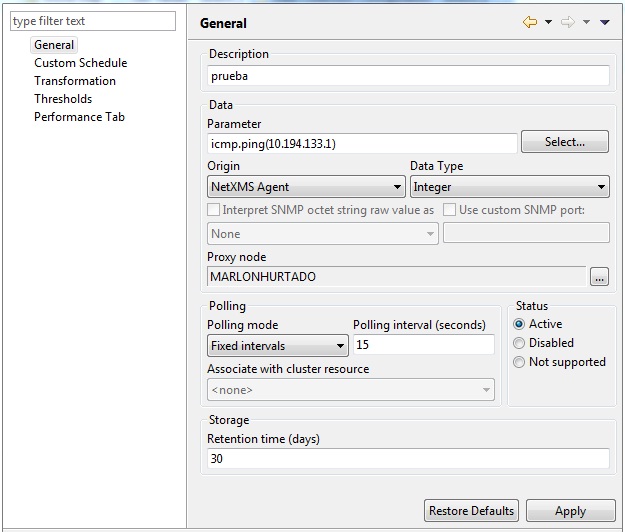
50DCI config is in attachment
-
- Check that "primary IP" on overview tab for node "MARLONHURTADO" is listed in MasterServers
- Check again with nxget, but use external IP instead of loopback.
Hello! It looks like you're interested in this conversation, but you don't have an account yet.
Getting fed up of having to scroll through the same posts each visit? When you register for an account, you'll always come back to exactly where you were before, and choose to be notified of new replies (either via email, or push notification). You'll also be able to save bookmarks and upvote posts to show your appreciation to other community members.
With your input, this post could be even better 💗
Register Login