Skip to content
  • Categories
  • Recent
  • Tags
  • Popular
  • Users
  • Groups
Skins
  • Light
  • Brite
  • Cerulean
  • Cosmo
  • Flatly
  • Journal
  • Litera
  • Lumen
  • Lux
  • Materia
  • Minty
  • Morph
  • Pulse
  • Sandstone
  • Simplex
  • Sketchy
  • Spacelab
  • United
  • Yeti
  • Zephyr
  • Dark
  • Cyborg
  • Darkly
  • Quartz
  • Slate
  • Solar
  • Superhero
  • Vapor

  • Default (Flatly)
  • No Skin
Collapse
Brand Logo

NetXMS Forum

  1. Home
  2. Support
  3. SNMP Traps handling

SNMP Traps handling

Scheduled Pinned Locked Moved Support
22 Posts 3 Posters 50.9k Views
  • Oldest to Newest
  • Newest to Oldest
  • Most Votes
Reply
  • Reply as topic
Log in to reply
This topic has been deleted. Only users with topic management privileges can see it.
  • C
    C
    calin.sarac
    wrote on last edited by
    #5

    Hi Victor,
    I added in Event Processing Policy Editor in script field both
    return $3(because this is the parameter used in sys log praser to send the text contained in the SNMP trap) like "ALARMA"
    and
    return $3 match "ALARMA"
    but it doesn't works. Is it something that maybe I missed? For example you put some strange characters in syntax form 1 before and after string ALARMA and the same characters plus point sign in syntax form 2. Are  these necessary?
    Thank you,
    Best regards,
    Calin

    1 Reply Last reply
    0
    • C
      C
      calin.sarac
      wrote on last edited by
      #6

      Hi Victor,
      I think that the strange character is the asterisk character that means everything, but I still don't understand the point sign before and after asterisk in syntax form 2.I tried also the sintax 
      return $3 like "*ALARMA*"
      But still doesn't work.
      Thanks,
      Looking forward for your help

      1 Reply Last reply
      0
      • V
        V
        Victor Kirhenshtein
        wrote on last edited by
        #7

        Hi!

        Yes, * character means "everything" - you need this if your message contains string ALARMA and not equals to it. About syntax - did you enter script exactly as I write it, with semicolon at the end? Otherwise it will fail with syntax error.

        Best regards,
        Victor

        1 Reply Last reply
        0
        • C
          C
          calin.sarac
          wrote on last edited by
          #8

          First time I missed semicolon but I had no error. I tried also with semicolon, had no error but is not filtering.
          I also tried someting like:
          sub main()
          {
          if ( $3 match "ALARMA")
          return true
          else
          return false
          }
          but still no result.
          It is correct the place where I put the script?(Event processing policy editor - Script)
          I don't have any idea now. What else can I try?
          Thanks,
          Calin

          1 Reply Last reply
          0
          • V
            V
            Victor Kirhenshtein
            wrote on last edited by
            #9

            Could you please send me screenshots of your trap configuration, event configuration, rule in event processing policy, and record in SNMP trap log?

            Best regards,
            Victor

            1 Reply Last reply
            0
            • C
              C
              calin.sarac
              wrote on last edited by
              #10

              Victor,
              attached you can find the screen shots that you asked.
              One question please, as long as  I was not able to execute comands or scripts from Actions section in your program could be there any connection with the present situation ?  I tried a simple command like "cmd.exe /C "mplay32"" and even it seems that is fine is not working.I tried to put the same command in a bat file and add that bat file in actions and still not working even if everything is fine (I read all your post on the forum regarding this subject and follow the recomandations). Anyway doesn't matter, I was just asking if can be any connection between the present situation and that situation as long as your program should execute/interpret some syntax/command.
              Thanks,
              Best regards,
              Calin


              event_config.rar

              1 Reply Last reply
              0
              • C
                C
                calin.sarac
                wrote on last edited by
                #11

                trap config, event policy processor config and syslog parser config


                trap_parser_policy_config.rar

                1 Reply Last reply
                0
                • C
                  C
                  calin.sarac
                  wrote on last edited by
                  #12

                  SNMP trap log


                  SNMP_trap_log_1.rar

                  1 Reply Last reply
                  0
                  • C
                    C
                    calin.sarac
                    wrote on last edited by
                    #13

                    SNMP trap log 2


                    SNMP_trap_log_2.rar

                    1 Reply Last reply
                    0
                    • V
                      V
                      Victor Kirhenshtein
                      wrote on last edited by
                      #14

                      Hi!

                      As I can see from your config, you extract only one varbind from SNMP trap - with OID .1.3.6.1.4.1.2509.8.21.2.2.1.7. Value of this varbind will become event's parameter number 2, as you can see from column "No." in trap configuration's "Parameter buindings" list. But, in your event configuration and event processing policy you refer to parameter number 3 (by using macro %3 and variable $3 in script), which will always be empty string, because you don't extract anything else from trap. If you change $3 in your script to $2, it should start working.

                      Also, why you are using syslog parser? Do you receive anything via syslog as well?

                      Best regards,
                      Victor

                      1 Reply Last reply
                      0
                      • V
                        V
                        Victor Kirhenshtein
                        wrote on last edited by
                        #15

                        @calin.sarac said in SNMP Traps handling:

                        One question please, as long as  I was not able to execute comands or scripts from Actions section in your program could be there any connection with the present situation ?  I tried a simple command like "cmd.exe /C "mplay32"" and even it seems that is fine is not working.I tried to put the same command in a bat file and add that bat file in actions and still not working even if everything is fine (I read all your post on the forum regarding this subject and follow the recomandations).

                        If you are running NetXMS server as a Windows service, you will not see any GUI for the programs started by the server. If you really wish to see GUI program started by the server, you should turn on "Allow service to interact with desktop" in NetXMS Core service properties. For simple tests, I recommend you to start simple program or bat file which writes something to some file, and check content of that file.

                        Best regards,
                        Victor

                        1 Reply Last reply
                        0
                        • C
                          C
                          calin.sarac
                          wrote on last edited by
                          #16

                          Hi!

                          As I can see from your config, you extract only one varbind from SNMP trap - with OID .1.3.6.1.4.1.2509.8.21.2.2.1.7. Value of this varbind will become event's parameter number 2, as you can see from column "No." in trap configuration's "Parameter buindings" list. But, in your event configuration and event processing policy you refer to parameter number 3 (by using macro %3 and variable $3 in script), which will always be empty string, because you don't extract anything else from trap. If you change $3 in your script to $2, it should start working.

                          Also, why you are using syslog parser? Do you receive anything via syslog as well?

                          Best regards,
                          Victor

                          First of all I changed $3 with $2 and it seems that it works.
                          Now regarding the syslog parser, the situation is like this. In one moment in the past I was not able to get alarm message in Alarm Browser. So as long as I didn't find in the documentation which files ar processed by syslog parser
                          I suposed that the  syslog parser process the default logs (like SNMP Trap log) and there for I tried to extract from SNMP Trap Log the message that contains string "201" and all that next (this because I observed that all messages contains the yaear 2010 or 2011), and for some reasons I belived that it really works. It is obviously that I was wrong. So now, what files are processed by syslog parser or which is the syntax that indicates the the file processed.
                          Anyway, problem solved,
                          Thanks a lot,
                          Calin

                          1 Reply Last reply
                          0
                          • C
                            C
                            calin.sarac
                            wrote on last edited by
                            #17

                            @victor said in SNMP Traps handling:

                            @calin.sarac said in SNMP Traps handling:

                            One question please, as long as  I was not able to execute comands or scripts from Actions section in your program could be there any connection with the present situation ?  I tried a simple command like "cmd.exe /C "mplay32"" and even it seems that is fine is not working.I tried to put the same command in a bat file and add that bat file in actions and still not working even if everything is fine (I read all your post on the forum regarding this subject and follow the recomandations).

                            If you are running NetXMS server as a Windows service, you will not see any GUI for the programs started by the server. If you really wish to see GUI program started by the server, you should turn on "Allow service to interact with desktop" in NetXMS Core service properties. For simple tests, I recommend you to start simple program or bat file which writes something to some file, and check content of that file.

                            Best regards,
                            Victor

                            I turned on "Allow service to interact with desktop" but still no result. I'm missing something but not sure what.
                            Thanks a lot
                            Calin

                            1 Reply Last reply
                            0
                            • V
                              V
                              Victor Kirhenshtein
                              wrote on last edited by
                              #18

                              Did you try console programs as well (something very simple like cmd /c echo test > c:\test.txt)?

                              1 Reply Last reply
                              0
                              • C
                                C
                                calin.sarac
                                wrote on last edited by
                                #19

                                Yes I tried, but nothing. Please take a look at attachements if you have time and tell me where I'm wrong.
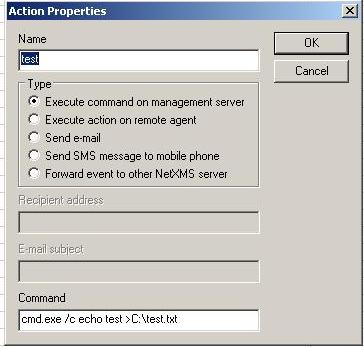
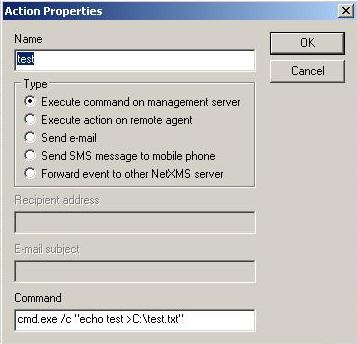
                                var1.JPG

                                var2.JPG

                                1 Reply Last reply
                                0
                                • K
                                  K
                                  kurt
                                  wrote on last edited by
                                  #20

                                  i have the same issue.
                                  I can see the processen in taskmanager but not in the desktop.
                                  Interact with Desktop was actief, Tried even with my User account.
                                  Running in windows 2003 Server

                                  anyone any clue

                                  thanks
                                  Kurt

                                  1 Reply Last reply
                                  0
                                  • V
                                    V
                                    Victor Kirhenshtein
                                    wrote on last edited by
                                    #21

                                    @calin.sarac said in SNMP Traps handling:

                                    Yes I tried, but nothing. Please take a look at attachements if you have time and tell me where I'm wrong.

                                    In action configuration, backslash character (\) is an escape character, so if you need it in resulting string, you should use two backslash characters. So, in your case you must write

                                    cmd /c "echo test > c:\\test.txt"
                                    

                                    Best regards,
                                    Victor

                                    1 Reply Last reply
                                    0
                                    • K
                                      K
                                      kurt
                                      wrote on last edited by
                                      #22

                                      Thanks, was one of the issues. 🙂

                                      1 Reply Last reply
                                      0

                                      Hello! It looks like you're interested in this conversation, but you don't have an account yet.

                                      Getting fed up of having to scroll through the same posts each visit? When you register for an account, you'll always come back to exactly where you were before, and choose to be notified of new replies (either via email, or push notification). You'll also be able to save bookmarks and upvote posts to show your appreciation to other community members.

                                      With your input, this post could be even better 💗

                                      Register Login
                                      Reply
                                      • Reply as topic
                                      Log in to reply
                                      • Oldest to Newest
                                      • Newest to Oldest
                                      • Most Votes


                                      • Login

                                      • Don't have an account? Register

                                      • Login or register to search.
                                      Powered by NodeBB Contributors
                                      • First post
                                        Last post
                                      0
                                      • Categories
                                      • Recent
                                      • Tags
                                      • Popular
                                      • Users
                                      • Groups