
NetXMS for Dummies
-
Victor,
I am working a million projects simultaneously and I need to get this up and running quickly. I've added one computer for testing email notifications. I would like to get an email when the machine goes down. And my mind is really fried about now to decipher.
Thanks,
Watson -
-
Control Panel -> Server Configuraration:
set "SMTPServer" to yout SMTP server IP -
Control Panel -> Actions:
Right click -> New.
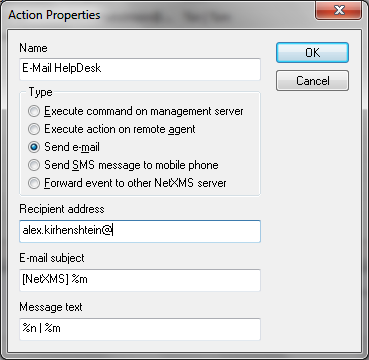
Set options as shown on attached image (email_action.png) -
Control Panel -> Event Processing Policy:
Find rule for SYS_NODE_DOWN event, right click on "Action" field and add action you've created in previous step.
EPP should be like shown on attached image (epp.png)
-
-
-

Hello! It looks like you're interested in this conversation, but you don't have an account yet.
Getting fed up of having to scroll through the same posts each visit? When you register for an account, you'll always come back to exactly where you were before, and choose to be notified of new replies (either via email, or push notification). You'll also be able to save bookmarks and upvote posts to show your appreciation to other community members.
With your input, this post could be even better 💗
Register Login