
server memory consumption
-
hi,
i have a weired situation.
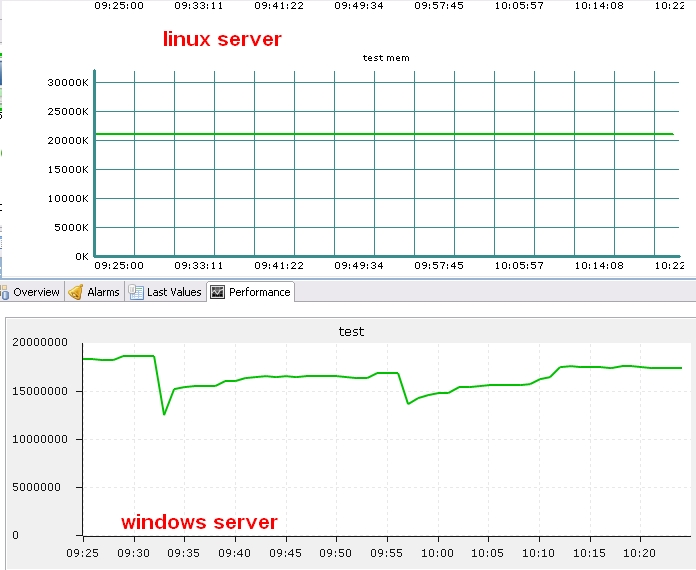
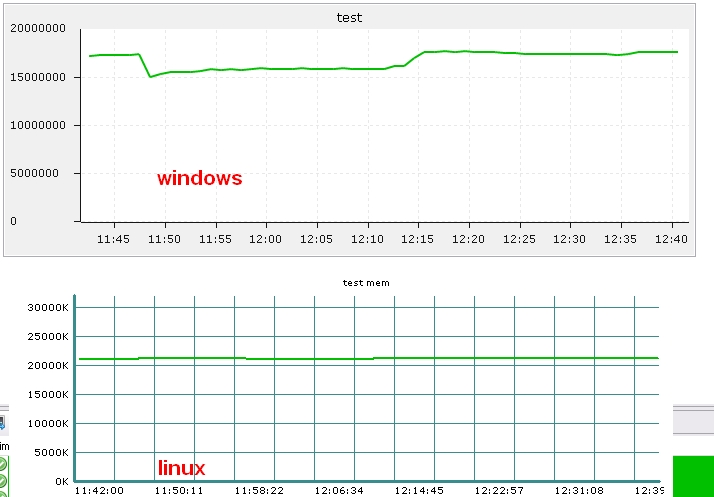
on my linux server the memory consumption of the server is steady,although memory consumption is rising over time it is done without unnecessary jumps.
on my windows server i can see big jumps and not a straight line and even when it is stabilized i do not see a clean straight line.any ideas ?
Lindeamon -
Hi!
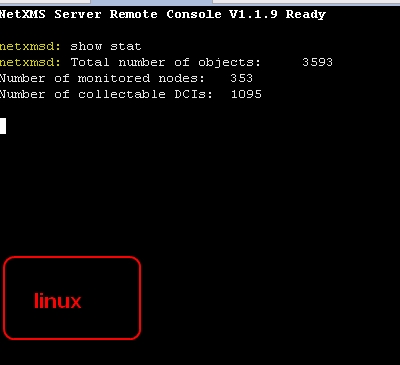
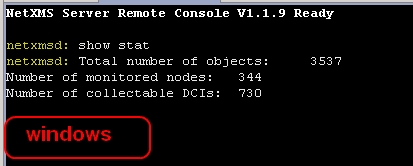
Could you please post graphs of memory consumption and results of "show stat" server console command (it will show number of nodes and DCIs)?
Best regards,
Victor -
hi victor,
i have attached the requested screenshots.
the 1st shot {not numbered file name} was taken about 1.5 hours ago and the rest were taken just nowBest Regards,
Lindeamon
-
As memory usage is not growing, but just going up and down, this is nit caused by memory leak. Most likely this difference caused by different memory management algorithms in Windows and Linux, and/or different database drivers. Also, what parameter you are using - Process.VMSize or Process.WkSet?
Best regards,
Victor -
hi victor,
both servers are using postgreSQL v9.1 and i use the Process.WkSet for both of them and i also have to point out that the linux server is doing the sampling for both servers,the windows server does not sample the memory usage of the process.
Best Regards,
Lindeamon -
Process.WkSet represents amount of physical memory taken by the process (it's called RSS - Resident Set Size - on Linux). It is a decision of OS memory management on when remove unused pages from physical memory to swap and if they should be removed at all. For example, active work with dynamic memory allocation and release (and NetXMS do a lot of malloc/free operations) may cause heap to grow and allocate new pages and physical memory, and then after release memory in process heap shrinks and some pages may become unused. If those pages stay untouched for some time, OS memory manager may decide to remove them from physical memory. Or, process memory manager may releases some pages because of heap shrink - then those pages will be removed from process RSS. So, we have two layers of memory management with different implementations - OS memory manager and process heap (malloc, free, and company). They both can affect number of resident pages. You can also monitor Process.VMSize - it gives total amount of memory consumed by process, even if some of that memory is untouched for long time and swapped out. Will be interesting to see if there will be same difference on Windows and on Linux in this parameter.
Best regards,
Victor -
Hello! It looks like you're interested in this conversation, but you don't have an account yet.
Getting fed up of having to scroll through the same posts each visit? When you register for an account, you'll always come back to exactly where you were before, and choose to be notified of new replies (either via email, or push notification). You'll also be able to save bookmarks and upvote posts to show your appreciation to other community members.
With your input, this post could be even better 💗
Register Login