Skip to content
  • Categories
  • Recent
  • Tags
  • Popular
  • Users
  • Groups
Skins
  • Light
  • Brite
  • Cerulean
  • Cosmo
  • Flatly
  • Journal
  • Litera
  • Lumen
  • Lux
  • Materia
  • Minty
  • Morph
  • Pulse
  • Sandstone
  • Simplex
  • Sketchy
  • Spacelab
  • United
  • Yeti
  • Zephyr
  • Dark
  • Cyborg
  • Darkly
  • Quartz
  • Slate
  • Solar
  • Superhero
  • Vapor

  • Default (Flatly)
  • No Skin
Collapse
Brand Logo

NetXMS Forum

  1. Home
  2. Support
  3. External parameters providers poller thread will not start

External parameters providers poller thread will not start

Scheduled Pinned Locked Moved Support
13 Posts 2 Posters 61.3k Views
  • Oldest to Newest
  • Newest to Oldest
  • Most Votes
Reply
  • Reply as topic
Log in to reply
This topic has been deleted. Only users with topic management privileges can see it.
  • V
    V
    Victor Kirhenshtein
    wrote on last edited by
    #4

    Try to run the following command on management server:

    nxget <agent_ip> Test

    What result you get?

    Best regards,
    Victor

    1 Reply Last reply
    0
    • J
      J
      Jamie
      wrote on last edited by
      #5

      C:\NetXMS\bin>nxget localhost Test
      WINNT.NSM

      1 Reply Last reply
      0
      • V
        V
        Victor Kirhenshtein
        wrote on last edited by
        #6

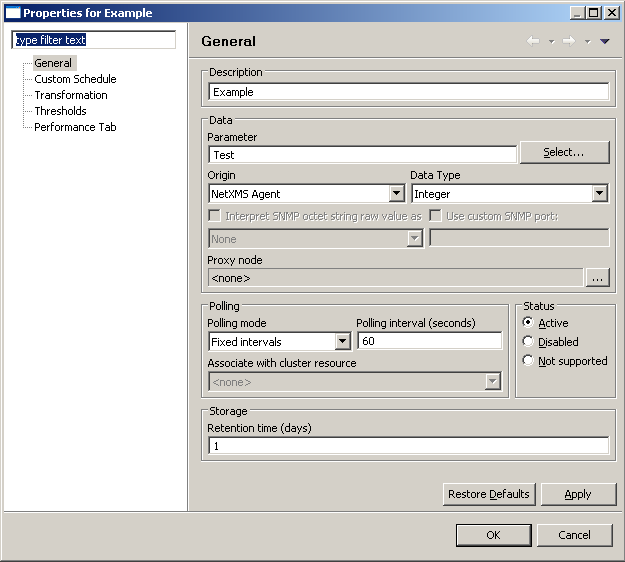
        Ok, so it looks like agent returns something. I suppose that you don't have wc command, and so it just returns first line of dir output. Next question is why you don't see DCI value in management console. Can you post a screenshot of DCI configuration?

        Best regards,
        Victor

        1 Reply Last reply
        0
        • J
          J
          Jamie
          wrote on last edited by
          #7

          I see that is the result of the dir. I noticed it is not returning files from C:\ so I put "" around the command and it works as expected with NXGET.
          I then tried to run a CMD file and that did not work then I prefix it with the START command and it now runs the batch file.
          ExternalParameterShellExec = Test:"Start C:\NetXMS\Test\Launch.cmd"

          I still have problem that nothing shows in Last Values.


          paste.PNG

          1 Reply Last reply
          0
          • V
            V
            Victor Kirhenshtein
            wrote on last edited by
            #8

            You should not use start there - it starts given command asynchronously, not waiting for it's completion. Agent will never get the output of the command. How you CMD file looks like? Also, you can try using form

            ExternalParameter = cmd.exe /c C:\NetXMS\Test\Launch.cmd

            Best regards,
            Victor

            1 Reply Last reply
            0
            • J
              J
              Jamie
              wrote on last edited by
              #9

              OK I will use cmd/ c

              The CMD file contains
              echo "Test" > C:\test.txt
              exit 1

              I am happy agent runs CMD file now via nxget.
               So remaining problem is why server does not run agent CMD.

              1 Reply Last reply
              0
              • V
                V
                Victor Kirhenshtein
                wrote on last edited by
                #10

                You should get string value from that script with nxget. Agent will return first line of output, not return code of the script. As your DCI has integer type, you are probably expect to get some numeric value. For example, to write line to a log and return value of 1, you script should looks like

                @echo "Test" > C:\test.txt
                echo 1

                Best regards,
                Victor

                1 Reply Last reply
                0
                • J
                  J
                  Jamie
                  wrote on last edited by
                  #11

                  The script  is nonsense and only for testing. The problem is the test file does get created with nxget but does not get created from server.
                  In the screenshot above can you see problem in server configuration? Is there a step on the server I am missing?

                  Using config below the agent is working fine. I am missing something on the server side and still get a timestamp of 1/1/70

                  C:\NetXMS\bin>nxget localhost Test
                  2

                  #
                  # NetXMS agent configuration file
                  # Created by server installer at Tue Feb 21 09:46:30 2012
                  #

                  LogFile = {syslog}
                  Servers = 127.0.0.1
                  InstallationServers = 192.168.74.128
                  FileStore = C:\NetXMS\var
                  RequireAuthentication = no
                  SubAgent = winperf.nsm
                  SubAgent = portcheck.nsm
                  ExternalParameterShellExec = Test:"Echo 2"

                  Agent running. Press ESC to shutdown.
                  [25-Feb-2012 10:28:55] Incoming connection from 127.0.0.1
                  [25-Feb-2012 10:28:55] Connection from 127.0.0.1 accepted
                  [25-Feb-2012 10:28:55] [session:0] Received control message CMD_GET_NXCP_CAPS
                  [25-Feb-2012 10:28:55] [session:0] Sending message CMD_NXCP_CAPS (size 16)
                  [25-Feb-2012 10:28:55] [session:0] Received message CMD_KEEPALIVE
                  [25-Feb-2012 10:28:55] [session:0] Sending message CMD_REQUEST_COMPLETED (size 3
                  2)
                  [25-Feb-2012 10:28:55] [session:0] Received message CMD_GET_PARAMETER
                  [25-Feb-2012 10:28:55] [session:0] Requesting parameter "Test"
                  [25-Feb-2012 10:28:55] H_ExternalParameter called for "Test" "S"Echo 2""
                  [25-Feb-2012 10:28:55] H_ExternalParameter: command line is ""Echo 2""
                  [25-Feb-2012 10:28:55] H_ExternalParameter (shell exec): worker thread created
                  [25-Feb-2012 10:28:55] H_ExternalParameter/POpenWorker: worker thread pipe read
                  result: 00B79EB0
                  [25-Feb-2012 10:28:55] H_ExternalParameter (shell exec): execution status 0
                  [25-Feb-2012 10:28:55] [session:0] Sending message CMD_REQUEST_COMPLETED (size 4
                  😎
                  [25-Feb-2012 10:28:55] [session:0] Session with 127.0.0.1 closed

                  1 Reply Last reply
                  0
                  • V
                    V
                    Victor Kirhenshtein
                    wrote on last edited by
                    #12

                    I don't see any problem with DCI configuration. However, from the agent trace I see that server does not connect to agent at all. What DNS name/IP address set as primary host name for the node object (on communication tab in properties)? Try to do forced configuration poll (right click on node, then Poll -> Configuration). Maybe connections initiated by server process blocked by firewall?

                    Best regards,
                    Victor

                    1 Reply Last reply
                    0
                    • J
                      J
                      Jamie
                      wrote on last edited by
                      #13

                      Both server and agent are on localhost (Windows2003 VMWare).

                      I changed the IP address in the Communication Tab to localhost and it works now.

                      Thank you for your help.

                      1 Reply Last reply
                      0

                      Hello! It looks like you're interested in this conversation, but you don't have an account yet.

                      Getting fed up of having to scroll through the same posts each visit? When you register for an account, you'll always come back to exactly where you were before, and choose to be notified of new replies (either via email, or push notification). You'll also be able to save bookmarks and upvote posts to show your appreciation to other community members.

                      With your input, this post could be even better 💗

                      Register Login
                      Reply
                      • Reply as topic
                      Log in to reply
                      • Oldest to Newest
                      • Newest to Oldest
                      • Most Votes


                      • Login

                      • Don't have an account? Register

                      • Login or register to search.
                      Powered by NodeBB Contributors
                      • First post
                        Last post
                      0
                      • Categories
                      • Recent
                      • Tags
                      • Popular
                      • Users
                      • Groups