
Active discovery
-
Couple of questions about active discovery:
-
While most discovered devices are ending up under the correct subnets under the "Entire Network" section, we have a number that were just dumped into the root of the tree. What causes this and how do we get them into the Entire Network tree.
-
Can you explain how address filters work? We are hoping to filter out the addresses out of the network we have links to and/or routes but it seems to add them either way.
3. What is the best way suggested to apply templates and classify newly discovered nodes in the Infrastructure Services tree?
4. Some discovered sections end up with a components section which can have a lot of additional information. Is there a list somewhere of types of devices it "knows" about? Can we add additional detection easily?
5. Is there any updated documentation? Seems to not be in sync with product we are using (1.2.1) and even what I have found seems to not list all of the functions available, discuss what subagents are, ... Seems there may be a lot of hidden power waiting to be unleashed

So far love the tool though! Thanks!
-
-
@lweidig said in Active discovery:
- While most discovered devices are ending up under the correct subnets under the "Entire Network" section, we have a number that were just dumped into the root of the tree. What causes this and how do we get them into the Entire Network tree.
Yes, it's known problem. It should be fixed in release 1.2.2.
@lweidig said in Active discovery:
- Can you explain how address filters work? We are hoping to filter out the addresses out of the network we have links to and/or routes but it seems to add them either way.
Address filters are inclusive, not exclusive - you can specify what address ranges/subnets to include. Also you should enable filtering in general by setting filter to "Automatically generated..." and check "Accept nodes within given range". If you want to exclude some addresses from discovery, you have to create custom filtering script.
@lweidig said in Active discovery:
3. What is the best way suggested to apply templates and classify newly discovered nodes in the Infrastructure Services tree?
You can place objects in Infrastructure Services tree in whatever order you want. It's hard to suggest anything, it usually depends on your organization structure, preferences, etc. You can setup rules for automatically placing nodes into containers - see "Automatic Bind Rules" tab in container's properties.
@lweidig said in Active discovery:
4. Some discovered sections end up with a components section which can have a lot of additional information. Is there a list somewhere of types of devices it "knows" about? Can we add additional detection easily?
"Components" tab shown for any SNMP device which supports ENTITY MIB.
@lweidig said in Active discovery:
5. Is there any updated documentation? Seems to not be in sync with product we are using (1.2.1) and even what I have found seems to not list all of the functions available, discuss what subagents are, ... Seems there may be a lot of hidden power waiting to be unleashed
We are now in progress to move existing documentation into wiki and completing it. I suggest to look into wiki: http://wiki.netxms.org.
Best regards,
Victor -
Thanks for the information. Any ETA on 1.2.2?
Do address filters only work for the active part of discovery? It does not appear they are being used to filter out passive discovery. For example, we have a wireless AP that we have it discover by having the IP address of it in the active discovery target list. After that is discovered however, it discovers ALL of the connected clients even though their IP addresses are not in address ranges listed in the filter.
How about an option to only perform active discovery?
Had found the wiki and will use that as well.
-
Filter should apply to both active and passive discovery. Can you please send me a screenshot of your discovery configuration?
Best regards,
Victor -
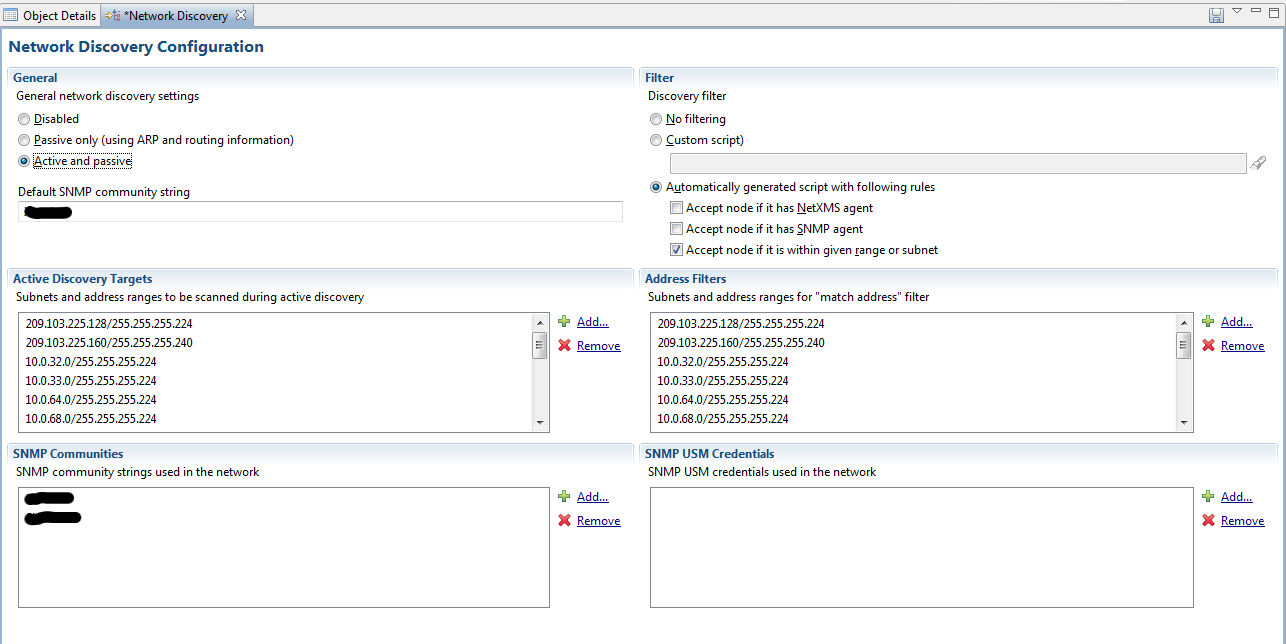
Actually I wiped the nodes all last night before heading to bed and it does appear the passive discovery is following the rules put in place. Have attached a screenshot as well. Basically all of the active IP ranges I have cloned over to the filter range. In the example discussed earlier the AP would give out IP's to clients NOT in one of the ranges listed and we do not want to see the clients in the system.
Is is possible that changing this screen does not have immediate effect and/or affect currently running discovery jobs?
-
Configuration is correct. Changes made in this screen will be activated only when you save them. You will be prompted to save if you close this screen or you can save it by selecting "Save" from view's menu. Unsaved changes indicated by asterisk in tab name.
Best regards,
Victor -
Greetings,
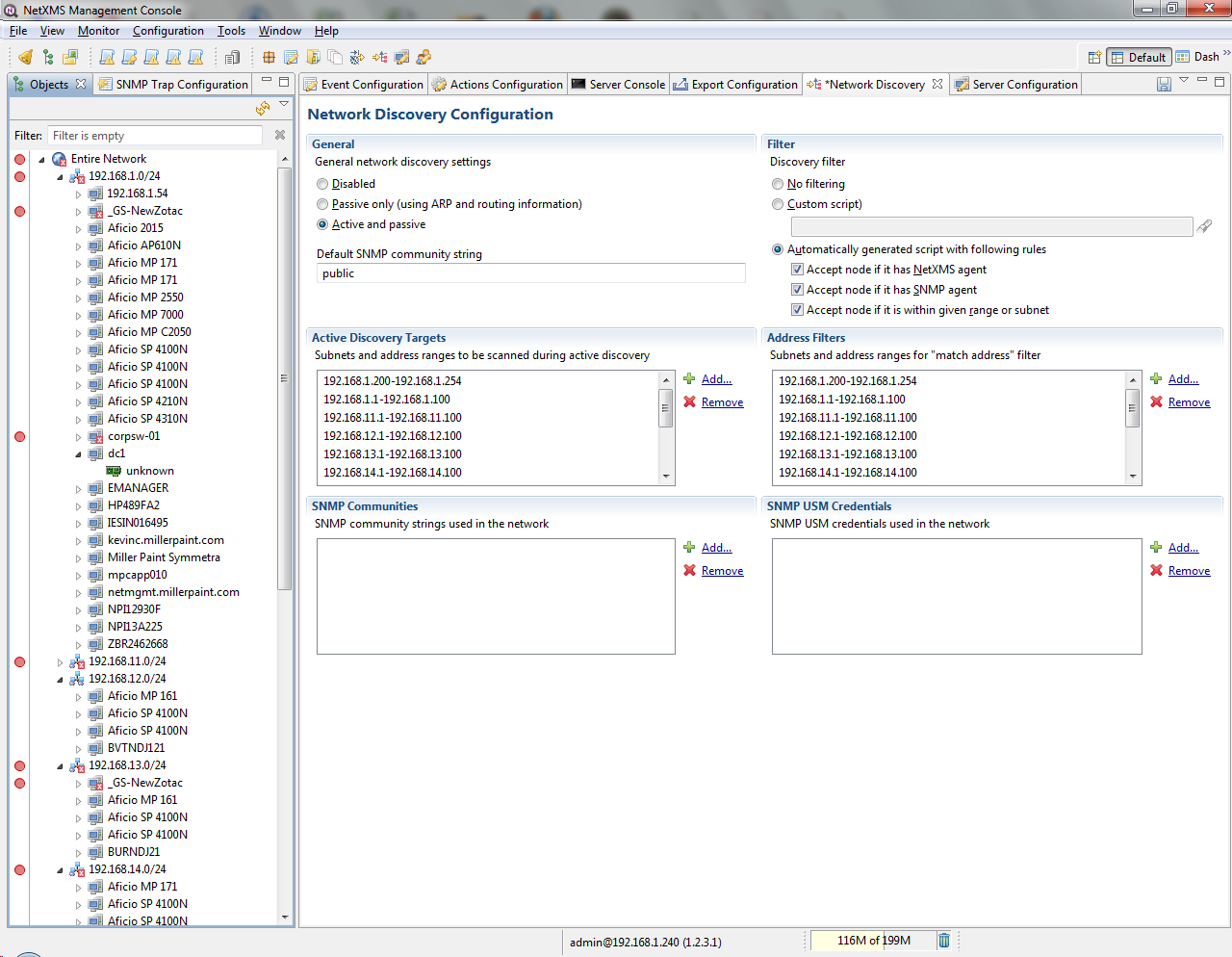
Passive discovery seems to be working fine, but active discovery stopped working after I made some changes to the discovery filters (and restarted the XMS server); see the attached screen shot.
-Kevin
-
I am happy to report that Active Discovery is working fine now.
-Kevin
Hello! It looks like you're interested in this conversation, but you don't have an account yet.
Getting fed up of having to scroll through the same posts each visit? When you register for an account, you'll always come back to exactly where you were before, and choose to be notified of new replies (either via email, or push notification). You'll also be able to save bookmarks and upvote posts to show your appreciation to other community members.
With your input, this post could be even better 💗
Register Login