
NIC not showing up / NIC multiple times
-
@peterjn said in NIC not showing up / NIC multiple times:
I have 2 problems
Windows 2008 R2 Hyper-V host (nsagent 1.2.6 installed)
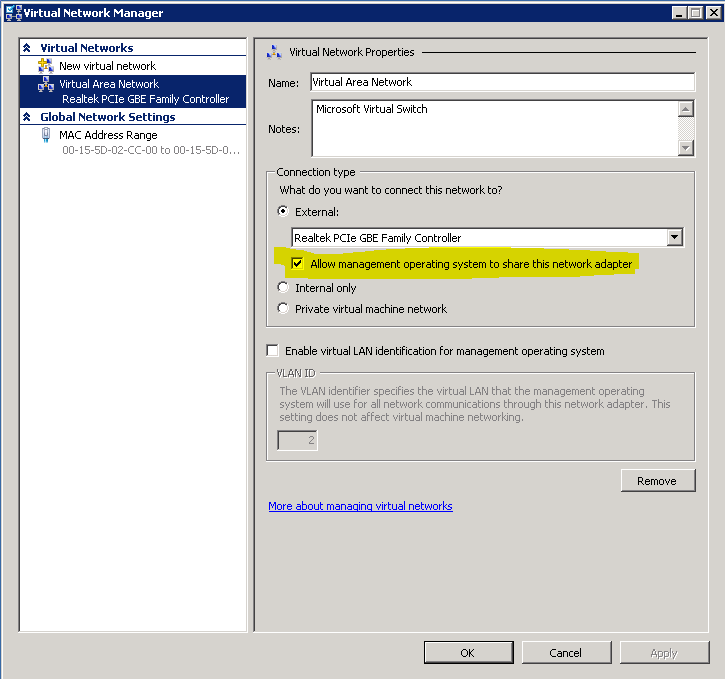
If a nic is used by the Hyper-V network switch (only bound to Microsoft Virtual Network Switch Protocol). It is not showing up in the console.You'll be able to see it only selecting "Allow management operating system to share this network adapter" (see attachment). Otherwise Windows will hide from the list of adapters so NetXMS will not be able to enumerate it.
@peterjn said in NIC not showing up / NIC multiple times:
Linux firewall (snmpd)
If a nic has multple IP addresses I get the same nic multiple times.Is there a fix for this or workaround?
Same story in Windows if you have multiple IPs on the same NIC for a PC. I'm not aware of workaround.
Best regards,
Marco
-
NetXMS counts each logical interface as separate object. I'm thinking about changing this to have multiple IP addresses on one interface, but decision is not made yet.
Best regards,
Victor -
@victor said in NIC not showing up / NIC multiple times:
NetXMS counts each logical interface as separate object. I'm thinking about changing this to have multiple IP addresses on one interface, but decision is not made yet.
Best regards,
VictorIn my opinion, since the MAC address is unique, each interface should be identified by the MAC address and all the IPs associated to that interface should be reported as a list, possibily with corresponding net mask and gateway (if present).
Best regards,
Marco -
@jmp_3f8h said in NIC not showing up / NIC multiple times:
In my opinion, since the MAC address is unique, each interface should be identified by the MAC address and all the IPs associated to that interface should be reported as a list, possibily with corresponding net mask and gateway (if present).
Best regards,
MarcoMAC address is a layer 2 address and is only valid for layer 2 endpoints. So NIC used in a layer 2 switches don't need to have a MAC addresses.
A default gateway is just a route to 0.0.0.0/0 and is like any other routes and is system based.
In windows a route is (simple) destination based routing. Linux has iproute2 and routing can be complex with routing rules.@victor said in NIC not showing up / NIC multiple times:
NetXMS counts each logical interface as separate object. I'm thinking about changing this to have multiple IP addresses on one interface, but decision is not made yet.
Best regards,
VictorIn every operating system. A NIC is a device that can be linked to one or more protocol stacks, software layer 2 switch, etc.
A IP address is given to the IP stack and not to a NIC! The IP stack needs to known how to route outing packets and answer to incoming packets there for the IP stacks links the IP address to a NIC. Pinging a IP address says nothing of the NIC linked to that address is up and running. A NIC can be down or broken and the system will still response to the IP address linked that NIC (using a other NIC). This is because the IP addresses is given to the IP stack and not the NIC.
With Hyper-V at least 1 NIC is assigned to a software layer 2 switch. Virtual VM-NICs in are linked to the software switch. Also a host virtual NIC can be created and linked to the software switch. So the real NIC has no IP address and its MAC address is not used. But it is a real NIC with a status, link speed, etc.
One of the reason for my original posting was that we have problems with a NIC linked to the software Hyper-V switch and I want to monitor this. Currently this is not possible.
Best regards,
Peter -
@peterjn said in NIC not showing up / NIC multiple times:
A NIC can be down or broken and the system will still response to the IP address linked that NIC (using a other NIC).
Hera I'm a bit in trouble to follow you, maybe depends on definition of "down" and "broken"

@peterjn said in NIC not showing up / NIC multiple times:
One of the reason for my original posting was that we have problems with a NIC linked to the software Hyper-V switch and I want to monitor this. Currently this is not possible.
Best regards,
PeterIn my Hyper-V I have agents running in the VMs, if there is a communication problem with the NIC of the server I'm unable to communicate with the VMs. I use that as first indicator, may be that could be useful for a basic diagnosis even in your case.
Best regards,
Marco -
@jmp_3f8h said in NIC not showing up / NIC multiple times:
@peterjn said in NIC not showing up / NIC multiple times:
A NIC can be down or broken and the system will still response to the IP address linked that NIC (using a other NIC).
Hera I'm a bit in trouble to follow you, maybe depends on definition of "down" and "broken"
Example a linux box has 2 NIC, NIC 1 has IP address A and NIC 2 is has IP address B. I have PC connect to NIC 2 and NIC 1 is not connected (down). When I ping IP address A from the PC I wil get a reply. So a ping to IP address A says nothing about the status of NIC 1. It only tells that IP address A is configured on the box.
Windows is a little more complex. When a NIC driver report that the link is down the IP address is removed. But when a NIC is broken (reports false UP) windows wil do the same as linux.@jmp_3f8h said in NIC not showing up / NIC multiple times:
@peterjn said in NIC not showing up / NIC multiple times:
One of the reason for my original posting was that we have problems with a NIC linked to the software Hyper-V switch and I want to monitor this. Currently this is not possible.
Best regards,
PeterIn my Hyper-V I have agents running in the VMs, if there is a communication problem with the NIC of the server I'm unable to communicate with the VMs. I use that as first indicator, may be that could be useful for a basic diagnosis even in your case.
Best regards,
MarcoI have the idee that the before the NIC is going down the speed is reduced and i wanted to test this hypothesis. The link speed in the VMs is always 10Gbps
The current rule in NetXMS that there is a logical NIC based on one IP adres is to simple. NIC can be linked to multple IP addresses, Multiple NIC can be bound to 1 NIC, NIC can have multple virtual VLAN NIC etc.
My request to Victor Kirhenshtein is treat a NIC as a device. a IP address is something of the OS and there is no hard relationship between IP address and NIC. Under windows there are a lot of (unused) virtual NICs so hidding a NIC from de UI is desirable.
Best regards,
Peter -
@peterjn said in NIC not showing up / NIC multiple times:
Example a linux box has 2 NIC, NIC 1 has IP address A and NIC 2 is has IP address B. I have PC connect to NIC 2 and NIC 1 is not connected (down). When I ping IP address A from the PC I wil get a reply. So a ping to IP address A says nothing about the status of NIC 1. It only tells that IP address A is configured on the box.
Windows is a little more complex. When a NIC driver report that the link is down the IP address is removed.
But when a NIC is broken (reports false UP) windows wil do the same as linux.I don't have experience on linux, only on Windows, that was the reason of my trouble to follow you.
Regarding Windows I have a different experience. With disconnected cable the IP is not removed, loopback is still available and pingable from within the PC - where the NIC is installed - if the link was up at least one time in the current session (i.e. up to the next reboot of the PC). No loopback if you rebooted the PC and link had never been up.
Best regards,
Marco -
I agree that current model is too simple. I see two possible options to represent network interfaces in more details.
- Separate physical and logical interfaces completely. Then object tree could look like this:
Node
+-- Physical interface 1 (MAC address)
+-- Physical interface 2 (MAC address)
+-- IP interface 1 (IP address) (reference to physical interface)
+-- IPv6 interface 1 (IPv6 address) (reference to physical interface)and so on.
- Try to build a logical-to-physical hierarchy, like this:
Node
+-- IP interface 1 (IP address)
+-- Physical Interface 1 (MAC address)
+-- IP interface 2 (IP address)
+-- Physical Interface 1 (MAC address)
+-- IPv6 interface 1 (IPv6 address)
+-- Physical Interface 1 (MAC address)
+-- IP interface 3 (IP address)
+-- Team 1
+-- Physical Interface 2 (MAC address)
+-- Physical Interface 3 (MAC address)What do you think?
Best regards,
Victor -
@victor said in NIC not showing up / NIC multiple times:
- Try to build a logical-to-physical hierarchy, like this:
Node
+-- IP interface 1 (IP address)
+-- Physical Interface 1 (MAC address)
+-- IP interface 2 (IP address)
+-- Physical Interface 1 (MAC address)
+-- IPv6 interface 1 (IPv6 address)
+-- Physical Interface 1 (MAC address)
+-- IP interface 3 (IP address)
+-- Team 1
+-- Physical Interface 2 (MAC address)
+-- Physical Interface 3 (MAC address)What do you think?
Best regards,
VictorI personally like more the second option but I don't think that will solve the Peter's problem. In Hyper-V a NIC dedicated to a virtual switch doesn't have an IP, so I guess that it cannot be shown in that hierarchy.
Best regards,
Marco. -
First a look at how Linux is doing it. The output of 'ip address show' has the following structure:
- interface 0
+--- IP address A
+--- IP address B - interface 1
+--- IP address C - interface 2
+--- IP address D
Option 2 is the same as the current situation. You start with the IP address so what to do if a interface has no IP adres? Second a IP address is normaly only link to 1 interface. If multiple interfaces are bound to 1 it wil also show as 1 bounded interface.
Why do you have only network objects under a node and not somthing like this?
NODE
- CPU
- MEM
- DISK
+ DISK0
+ DISK1
+ DISK2 - Interface
+ eth_inet0
+ eth_vlan
+ eth_dmz
+ eth_lan
+ eth_inet1 - FileSystem
+ root
+ var - Network addresses
+ IP Address 1
+ IP Address 2 - Services
+ File server
+ Web server
+ Mail server
PS: I am a newbe to NetXMS i just installed it 1 month a go. But it really looks and feels great. Also the Android APP!
Best regards,
Peter - interface 0
Hello! It looks like you're interested in this conversation, but you don't have an account yet.
Getting fed up of having to scroll through the same posts each visit? When you register for an account, you'll always come back to exactly where you were before, and choose to be notified of new replies (either via email, or push notification). You'll also be able to save bookmarks and upvote posts to show your appreciation to other community members.
With your input, this post could be even better 💗
Register Login