
Instance Discovery Filter Script [SOLVED]
-
Hello,
I am trying to use the function of automate creating DCIs but I have a problem because I cannot properly use calling of scripts or dont know which parameters I can use within the filter (without scripts).
What I have:
Nodes with similar OIDs, but the tracked value (CPU usage) has different "last ID". In my case:
.1.3.6.1.4.1.25506.2.6.1.1.1.1.6.47
.1.3.6.1.4.1.25506.2.6.1.1.1.1.6.65 (etc)
All nodes have one common thing - all other values are "0"
So one node has trackable value in 47, all others are "0".What I want to achieve:
Set DCI in template to apply DCIs based on having non-"0" valueWhat I achieved so far:
I set OID with these settings:General
Description: CPU OID:{instance} (to make the DCI show number of the last ID)
Parameter: .1.3.6.1.4.1.25506.2.6.1.1.1.1.6.{instance} (to show scanned OID, I think when using Instance Discovery function this "parameter" could remain empty, it will still work so this is only for informative purpose too)
Origin: SNMP (just to be sure)
Data Type: IntegerInstance Discovery
Instance discovery method: SNMP Walk - OIDs
Base SNMP OID: .1.3.6.1.4.1.25506.2.6.1.1.1.1.6
Instance discovery fltering script: ...... and this part is unknown for me.
It would be great if I could use some kind of parameter to get the value of the currently SNMPwalked OID so that I can simply write:
"walkedValue != 0;" (if the walked value is non-zero, proceed)
Or get the currently walked OID so that I can write a script:
transport = CreateSNMPTransport(FindObject($node));
varbind = SNMPGet(transport, walkedOID);
if (varbind->value != 0) return 1;
else return 0;Or save the script to the script library and call it:
script:filter
To my underrstanding this is limited to name, description, and instance fields of template DCI so a "normal" call of script:
filter();
But there is still the problem with getting the walkedOID value so I am really at loss how to solve this. It seems there is definitely a way and I am just not being able to see it.
Can you please point me the way ?
Thanks in advance.Milan Sperl
-
Hi!
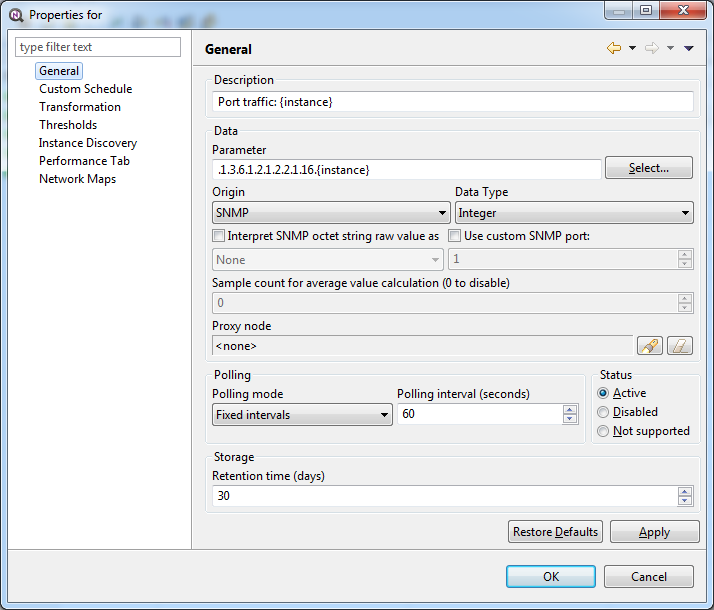
You actually thinking in right direction - you can use SNMPGet function to read value of each instance and determine to include it or not. Below is a working example of such approach. I use OID .1.3.6.1.2.1.2.2.1.16 (ifOutOctets) as a base. I use
Port traffic: {instance}
as description and
.1.3.6.1.2.1.2.2.1.16.{instance}
as parameter name. Correct parameter name is important, because {instance} will be the part after base OID you configure on instance discovery page, not the full OID.
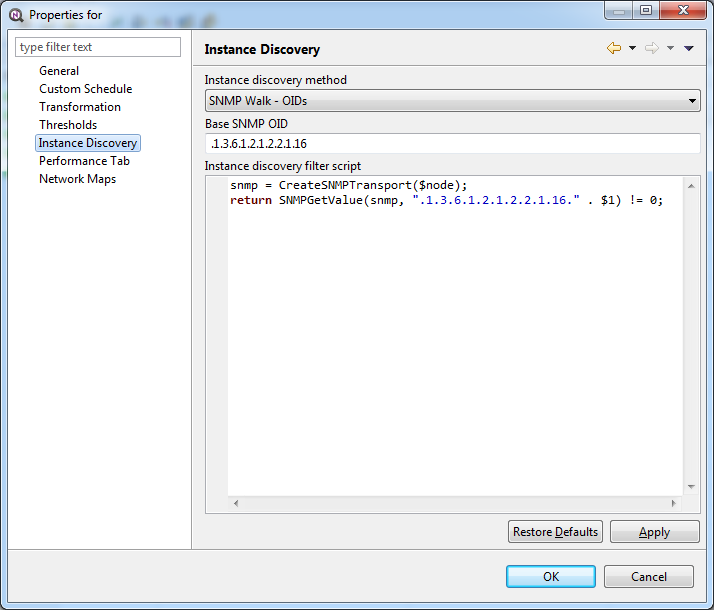
Then, on instance discovery page, I set discovery method to "SNMP Walk - OIDs", set base OID to .1.3.6.1.2.1.2.2.1.16, and use the following filtering script:
snmp = CreateSNMPTransport($node);
return SNMPGetValue(snmp, ".1.3.6.1.2.1.2.2.1.16." . $1) != 0;Now just close data collection configuration for the node and run configuration poll. You should get DCIs for all OIDs with non-zero value.
Best regards,
Victor
-
This is exactly what I needed, thank you.
I would like to ask some more questions to make it completely clear.
-
"$1" means "{instance}" then, are there other parameters or just this one?
-
Can I call scripts in the filter? Is it the "script:name" function?
(I am trying calling scripts now but cant get results yet)
Reason is obvious - to be able to change the filter for more DCIs at once than just one.
I am thinking about forwarding parameters to the script too. -
Running configuration poll doesnt seem to work for me, I have to wait really long time to see the results. Is there a setting which disables this?
-
By the way, in the properties of OID there are no fields called name or instance so I am a bit confused as to where "script:name" functionality can be used.
Other questions which are not important for this topic but I would like to clarify to understand it better:
-
I already found "ApplyDCIFromTemplateToDisabledDCI" and set it back to old behaviour (1) so this means every change in DCI starts "reapplying" process and all I need is just wait or there is some static time (like 30 minutes) in which templates check if their nodes have actual OIDs?
I found ConfigurationPollingInterval (3600), not sure if it is correct information to look at though. -
FindObject() function can be omitted in scripts if I dont need the safety function of returning null when the node is unknown/denied?
With regards
Milan Sperl
-
-
@sperlm said in Instance Discovery Filter Script [SOLVED]:
- "$1" means "{instance}" then, are there other parameters or just this one?
Yes, in instance filtering script first parameter ($1) is current instance value, same value that will be substituted for {instance}. There are also two predefined global variables - $node, which points to current node object, and $dci, which points to current DCI object.
@sperlm said in Instance Discovery Filter Script [SOLVED]:
- Can I call scripts in the filter? Is it the "script:name" function?
(I am trying calling scripts now but cant get results yet)
Reason is obvious - to be able to change the filter for more DCIs at once than just one.
I am thinking about forwarding parameters to the script too.
Yes, you can call scripts from the library. You should specify library scripts you will be calling with use operator, then you'll be able to call functions from these scripts. For example, you have script in a library named Transformations:
sub bytesToBits(bytes)
{
   return bytes * 8;
}

sub butsToBytes(bits)
{
   return bits / 8;
}
Then, if you want to use function bytesToBits in another script, you can do:
use Transformations; return bytesToBits($1);@sperlm said in Instance Discovery Filter Script [SOLVED]:
- Running configuration poll doesnt seem to work for me, I have to wait really long time to see the results. Is there a setting which disables this?
As there are internal locks on data collection configuration, it is important to close data collection editor view before doing configuration poll.
@sperlm said in Instance Discovery Filter Script [SOLVED]:
- By the way, in the properties of OID there are no fields called name or instance so I am a bit confused as to where "script:name" functionality can be used.
Sorry, I didn't understand the question.
@sperlm said in Instance Discovery Filter Script [SOLVED]:
- I already found "ApplyDCIFromTemplateToDisabledDCI" and set it back to old behaviour (1) so this means every change in DCI starts "reapplying" process and all I need is just wait or there is some static time (like 30 minutes) in which templates check if their nodes have actual OIDs?
I found ConfigurationPollingInterval (3600), not sure if it is correct information to look at though.
Instance discovery and templates are different processes. Template being applied to nodes as soon as you close data collection editor for template. Instance discovery, on the other hand, is an automated process - check for new instances occurs at each configuration poll, once per hour by default. And yes, you're right - it is controlled by ConfigurationPollingInterval configuration parameter.
@sperlm said in Instance Discovery Filter Script [SOLVED]:
- FindObject() function can be omitted in scripts if I dont need the safety function of returning null when the node is unknown/denied?
Most of the scripts (transformation, filtering, etc.) always have global variable $node set at startup. This variable points to current node (i.e. node owning DCI or source of event). You only need FindObject when you need access to another node object.
Best regards,
Victor -
Thanks for the reply, filters work exactly as I need now.
Few clarifications:
a)
In my previous question 4) I was referring to the wiki information under Templates section "Macros in template items"You can use various macros in name, description, and instance fields of template DCI.
namely: script:name - String returned by script name. Script should be stored in script library (accessible via Configuration -> Script Library). Inside the script, you can access current node's properties via $node variable.
To put the question short - where exactly it can be used?
(as the wiki information does not make sense to me - DCI form has no "name", macro {instance} can be used in the Parameter on the other hand)b)
Performance tab - a little insight on this would be appreciated.
(did not find any on wiki or forums and this looks like it can solve my problem with viewing the collected data, namely the automated ones)b)
If dci and node parameters are global, does it mean we can use class reference attributes like $node->snmpOID anywhere?
I am already filtering nodes for templates with this functionality so I assume it is possible.c)
I also tried to use the same script functions from instance discovery in automatic apply rules for templates but could get results only with direct scripts, when I try to do the same thing with use/script it does nothing (or I was not able to test it properly). -
@sperlm said in Instance Discovery Filter Script [SOLVED]:
Thanks for the reply, filters work exactly as I need now.
Few clarifications:
a)
In my previous question 4) I was referring to the wiki information under Templates section "Macros in template items"You can use various macros in name, description, and instance fields of template DCI.
namely: script:name - String returned by script name. Script should be stored in script library (accessible via Configuration -> Script Library). Inside the script, you can access current node's properties via $node variable.
To put the question short - where exactly it can be used?
(as the wiki information does not make sense to me - DCI form has no "name", macro {instance} can be used in the Parameter on the other hand)Macros in templates expands when template being applied to node. It is useful when you want to put some node-specific information during template apply (node IP address for example) into parameter name or description. "name" was the old universal name for what you now see as "Parameter" for agent DCI, "OID" for SNMP DCI, etc. It is still used in some places.
@sperlm said in Instance Discovery Filter Script [SOLVED]:
b)
Performance tab - a little insight on this would be appreciated.
(did not find any on wiki or forums and this looks like it can solve my problem with viewing the collected data, namely the automated ones)Performance tab shows line charts with last hour data for all DCIs marked to be shown on performance tab. You can enable DCI for performance tab in DCI properties, on "Performance Tab" page.
@sperlm said in Instance Discovery Filter Script [SOLVED]:
b)
If dci and node parameters are global, does it mean we can use class reference attributes like $node->snmpOID anywhere?
I am already filtering nodes for templates with this functionality so I assume it is possible.Yes, all scripts related to nodes have $node variable set, and all scripts related to DCIs have $dci variable set.
@sperlm said in Instance Discovery Filter Script [SOLVED]:
c)
I also tried to use the same script functions from instance discovery in automatic apply rules for templates but could get results only with direct scripts, when I try to do the same thing with use/script it does nothing (or I was not able to test it properly).There are no difference between automatic apply rule script an any other script regarding library use. Most likely you've make some mistake. Please post your scripts here.
Best regards,
Victor -
Thanks for the patience, youre really doing a great job.
(btw I found where the Performance Tab is just now, thats why I was confused and asked... sorry :-[)As for the filtering scripts I tried to convert this:
if (($node->snmpOID) == ".1.3.6.1.4.1.25506.1.1")
{
	snmp = CreateSNMPTransport($node);
	x = SNMPGetValue(snmp, ".1.3.6.1.4.1.25506.2.6.1.1.1.1.6.47");
	if (x != null) return (x > 0);
	else return 0;
}
Filter is to pick nodes that have set snmpOID and CPU statistics at address 47.
Structure is built with this ideas:- if snmpOID is not equal the whole CreateSNMPTransport is not executed (and savig a little bit of system resources)
- asking for SNMPGetValue just once to do two tests
- return 1 only if value is numerical and non-zero (if I tried to return just (x>0) there is possibility x is null and creating error)
Tried to "convert" it to script style this way:
use filterTools;
if (($node->snmpOID) == ".1.3.6.1.4.1.25506.1.1")
{
	x = 0;
	x = aboveZero(.1.3.6.1.4.1.25506.2.6.1.1.1.1.6.47);
	return x;
}
filterTools:
sub aboveZero(dci)
{
	snmp = CreateSNMPTransport($node);
	x = SNMPGetValue(snmp, dci);
	if (x != null) return (x > 0);
	else return 0;
}
With Regards
Milan Sperl
-
You forgot double quotes around OID passed to aboveZero function, so script ends up with syntax error. And you can shorten the script to just
return ($node->snmpOID == ".1.3.6.1.4.1.25506.1.1") && aboveZero(".1.3.6.1.4.1.25506.2.6.1.1.1.1.6.47");function aboveZero will be called only if first condition is true, because NXSL uses short-circuit expression evaluation (http://en.wikipedia.org/wiki/Short-circuit_evaluation).
Best regards,
Victor -
My bad. It works now, thanks again.
The short-circuit functionality si great too.
Can shorten structures like this:if (x != null) return (x > 0); else return 0;... into this:
if (x != null && x > 0) return 1;-if I don't need to catch return 0, which is not needed in filters
-in scripts I should add "else return 0;"p.s. I unintentionally left my test structure (that "x = 0" etc, using 3 lines with just "X") in the last post, sorry about that. It was there only because I was testing it and commenting out lines or skipping the filter altogether.
With Regards
Milan Sperl
-
Hi,
I tried your script, for getting only non-zero values:
@victor said in Instance Discovery Filter Script [SOLVED]:
Then, on instance discovery page, I set discovery method to "SNMP Walk - OIDs", set base OID to .1.3.6.1.2.1.2.2.1.16, and use the following filtering script:
snmp = CreateSNMPTransport($node);
return SNMPGetValue(snmp, ".1.3.6.1.2.1.2.2.1.16." . $1) != 0;but it is not working, I still get 0 values. Maybe that is because i have delta calculation?
My parameter is: .1.3.6.1.2.1.31.1.1.1.10.{instance}
and in Instance tab:
SNMP Walk - OID's
.1.3.6.1.2.1.31.1.1.1.10and script:
snmp = CreateSNMPTransport($node);
return SNMPGetValue(snmp, ".1.3.6.1.2.1.31.1.1.1.10." . $1) != 0;Thanks in advance,
Nikk -
This filtering script checks that absolute value for given OID is 0. If you have non-zero value which is not changing over time, OID will pass filter but you will still get 0 as delta value. If you want to filter out any non-changing values, you should get two samples and check delta, like this:
snmp = CreateSNMPTransport($node); v1 = SNMPGetValue(snmp, ".1.3.6.1.2.1.2.2.1.16." . $1); sleep(10000); // sleep for 10 seconds v2 = SNMPGetValue(snmp, ".1.3.6.1.2.1.2.2.1.16." . $1); return (v2 - v1) != 0;Of course, practical use of such method is questionable and depends on your goals - you will either miss slowly changing OIDs if sleep interval is too small or make configuration polling extremely long if you have lot of instances and long sleep interval.
Best regards,
Victor -
Hi,
Yea, I thought that it could be something with non-zero values, but some of them actually are 0 values, as some ports, have never been opened.
I'm monitoring many parameters on a lot of instances, so maybe I just delete the unnecessary instances for now
Thank you for idea any way
Nikk
-
-
Hello, I will reply here so others can try to help too.
DESCRIPTION -interface traffic: {instance}
PARAMETER -1.3.6.1.2.1.2.2.1.16.{instance}
base OID to .1.3.6.1.2.1.2.2.1.16
snmp = CreateSNMPTransport($node);
return SNMPGetValue(snmp, ".1.3.6.1.2.1.2.2.1.16." . $1) != 0;Not sure if it is the problem you encountered but I had problems with this structure because there is no guarantee there will be 0 value, there can be null too so I wrote it like this:
snmp = CreateSNMPTransport($node);
x = SNMPGetValue(snmp, ".1.3.6.1.2.1.2.2.1.16." . $1);
if (x != null) return (x > 0);
else return 0;p.s. does it mean you get the desired DCI with correct OID on all of your nodes but the value there is 0 or it creates unwanted DCIs with wrong OID?
-
hi Sperlm,
thank you for replying back.
[/quote]Not sure if it is the problem you encountered but I had problems with this structure because there is no guarantee there will be 0 value, there can be null too so I wrote it like this:snmp = CreateSNMPTransport($node);
x = SNMPGetValue(snmp, ".1.3.6.1.2.1.2.2.1.16." . $1);
if (x != null) return (x > 0);
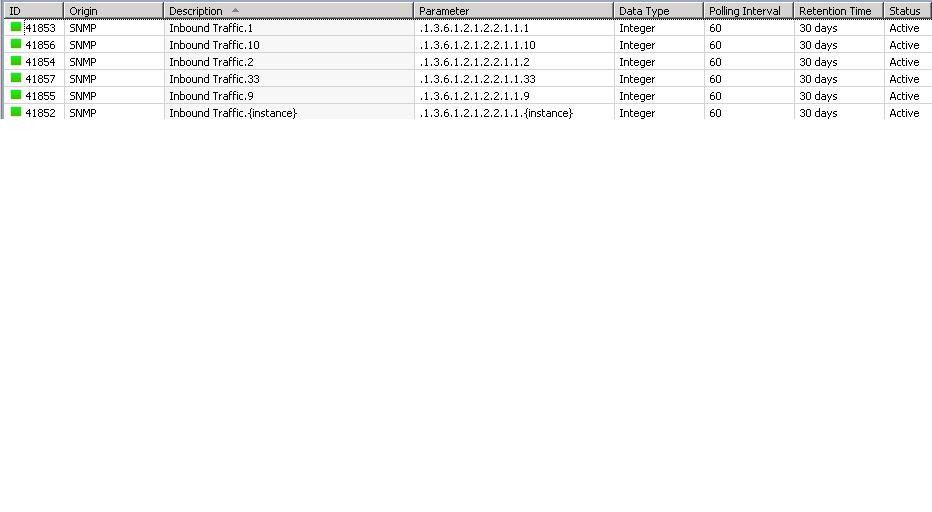
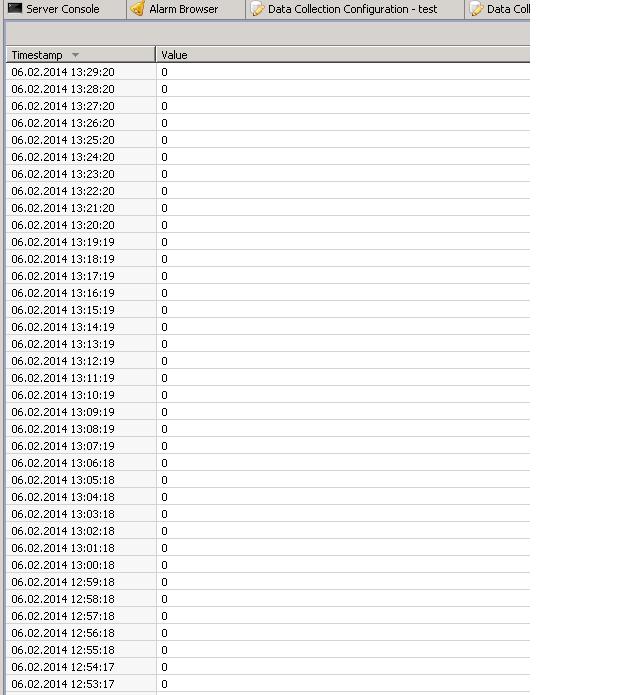
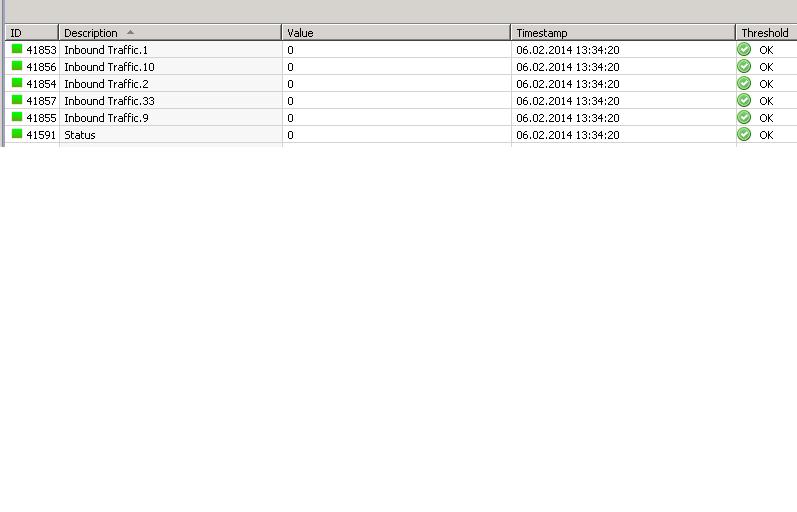
else return 0;[/quote]i tried this Script on the instance discovery tab of Template than applied to Node i get the DCI for Non Zero values interfaces [ like 1,2,9,10,33] pls check on attachment but when i see the collected values for these DCI it shows 0 value...
[/quote]p.s. does it mean you get the desired DCI with correct OID on all of your nodes but the value there is 0 or it creates unwanted DCIs with wrong OID?
[/quote]yes getting 0 value. why it does not give the values of traffic on interfaces.
Regards,
Percy
-
@sperlm said in Instance Discovery Filter Script [SOLVED]:
Hello, I will reply here so others can try to help too.
DESCRIPTION -interface traffic: {instance}
PARAMETER -1.3.6.1.2.1.2.2.1.16.{instance}
base OID to .1.3.6.1.2.1.2.2.1.16
snmp = CreateSNMPTransport($node);
return SNMPGetValue(snmp, ".1.3.6.1.2.1.2.2.1.16." . $1) != 0;Not sure if it is the problem you encountered but I had problems with this structure because there is no guarantee there will be 0 value, there can be null too so I wrote it like this:
snmp = CreateSNMPTransport($node);
x = SNMPGetValue(snmp, ".1.3.6.1.2.1.2.2.1.16." . $1);
if (x != null) return (x > 0);
else return 0;p.s. does it mean you get the desired DCI with correct OID on all of your nodes but the value there is 0 or it creates unwanted DCIs with wrong OID?
@percy said in Instance Discovery Filter Script [SOLVED]:
hi Sperlm,
thank you for replying back.
Not sure if it is the problem you encountered but I had problems with this structure because there is no guarantee there will be 0 value, there can be null too so I wrote it like this:
snmp = CreateSNMPTransport($node);
x = SNMPGetValue(snmp, ".1.3.6.1.2.1.2.2.1.16." . $1);
if (x != null) return (x > 0);
else return 0;
[/quote]
i tried this Script on the instance discovery tab of Template than applied to Node i get the DCI for Non Zero values interfaces [ like 1,2,9,10,33] pls check on attachment but when i see the collected values for these DCI it shows 0 value...[/quote]
p.s. does it mean you get the desired DCI with correct OID on all of your nodes but the value there is 0 or it creates unwanted DCIs with wrong OID?
[/quote]
yes getting 0 value. why it does not give the values of traffic on interfaces.
[/quote] -
Hi,
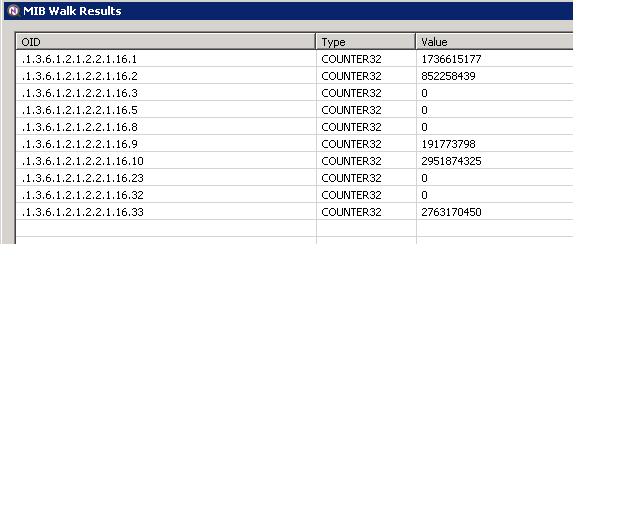
do a snmpwalk on the device with .1.3.6.1.2.1.2.2.1.16 value.
It should list all subsequent oids (.1.3.6.1.2.1.2.2.1.16.0, .1.3.6.1.2.1.2.2.1.16.1 etc..) with values and see if there are values in 1, 2, 9, 10, 33.One more thing - Instance discovery method should be SNMP Walk - OIDs (but I suppose you've got that right).
With regards,
Milan -
-
-
Hello! It looks like you're interested in this conversation, but you don't have an account yet.
Getting fed up of having to scroll through the same posts each visit? When you register for an account, you'll always come back to exactly where you were before, and choose to be notified of new replies (either via email, or push notification). You'll also be able to save bookmarks and upvote posts to show your appreciation to other community members.
With your input, this post could be even better 💗
Register Login