
Disk usage in tube chart, max value setting missing
-
Hi,
I'm trying to create a tube chart for the disk usage on each of my servers. When I use a dial chart for CPU usage, there is a maximum value field that I can fill. I don't see this in the tube chart config.
I'm using the instructions for creating the DCI given here: https://www.netxms.org/forum/configuration/configure-certain-servers-to-monitor-disk-space-using-netxms/
I found the missing disk.free value by reading this: https://www.netxms.org/forum/configuration/disk-parameters-missing/msg7205/#msg7205
When I add the newly created DCI for the disk
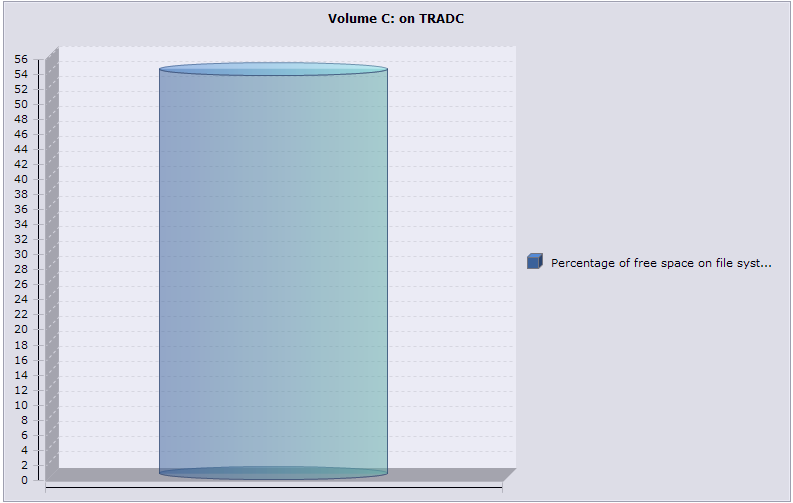
 to the tube chart then I don't see a field to add the maximum value like when I did the dial chart. Is this how it should be or is there another way to get the tube chart to render relative to the maximum value of 100%? The numbers on the left of my chart that indicate percentage don't go all the way to 100%. I've attached a screenshot to show the issue.
Regards,
R
-
Hi!
Currently upper limit for bar/tube chart is determined by max value of added elements. I'll add a feature request for setting custom max value for chart.
Best regards,
Victor -
@victor said in Disk usage in tube chart, max value setting missing:
Hi!
Currently upper limit for bar/tube chart is determined by max value of added elements. I'll add a feature request for setting custom max value for chart.
Best regards,
VictorCan the max value be set on the element somehow and if so how? If not, what is the recommended way to display the value of the percentage of a volume's space that is used?
I was considering using a dial, but then it would look like the CPU dials and this might be confusing to the users.
Regards,
R
-
Hi,
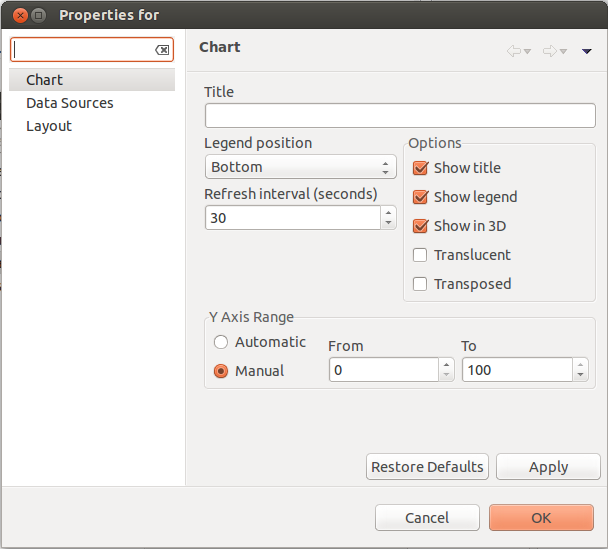
Since 1.2.12 for tube and line chart can be set range for y axis.
Range can be set on the main chart preference page.
-

Hello! It looks like you're interested in this conversation, but you don't have an account yet.
Getting fed up of having to scroll through the same posts each visit? When you register for an account, you'll always come back to exactly where you were before, and choose to be notified of new replies (either via email, or push notification). You'll also be able to save bookmarks and upvote posts to show your appreciation to other community members.
With your input, this post could be even better 💗
Register Login