Skip to content
  • Categories
  • Recent
  • Tags
  • Popular
  • Users
  • Groups
Skins
  • Light
  • Brite
  • Cerulean
  • Cosmo
  • Flatly
  • Journal
  • Litera
  • Lumen
  • Lux
  • Materia
  • Minty
  • Morph
  • Pulse
  • Sandstone
  • Simplex
  • Sketchy
  • Spacelab
  • United
  • Yeti
  • Zephyr
  • Dark
  • Cyborg
  • Darkly
  • Quartz
  • Slate
  • Solar
  • Superhero
  • Vapor

  • Default (Flatly)
  • No Skin
Collapse
Brand Logo

NetXMS Forum

  1. Home
  2. Support
  3. Node down alarm outside of polling time

Node down alarm outside of polling time

Scheduled Pinned Locked Moved Support
12 Posts 5 Posters 127.3k Views
  • Oldest to Newest
  • Newest to Oldest
  • Most Votes
Reply
  • Reply as topic
Log in to reply
This topic has been deleted. Only users with topic management privileges can see it.
  • B
    B
    bulwer
    wrote on last edited by
    #1

    Got a very strange one here. We have 2 Kiosk PCs used at one of our sites to allow customers entrance to the centre. We want to monitor that these are staying up during the day so I added them both to NetXMS with just the standard Status DCI. I then set a custom schedule so it only collects the data when the PC should be on and stops overnight when they are manually switched off. According to the history of the DCI, this works perfectly. However, we are getting Node down alarms and therefore emails outside of the custom schedule for just one of these PCs when it is being switched off. The other PC should be switched off around the same time but we don't get an alarm for that which is what we want.

    Probably one of those annoying problems you won't be able to replicate but I thought I would mention it on the off chance I have done something stupid. I have attached screenshots of the setup of the DCI in question but, as I say, the History shows that it is collecting data at the correct time - it is just triggering the alarm when it shouldn't be and doesn't appear to be collecting data.
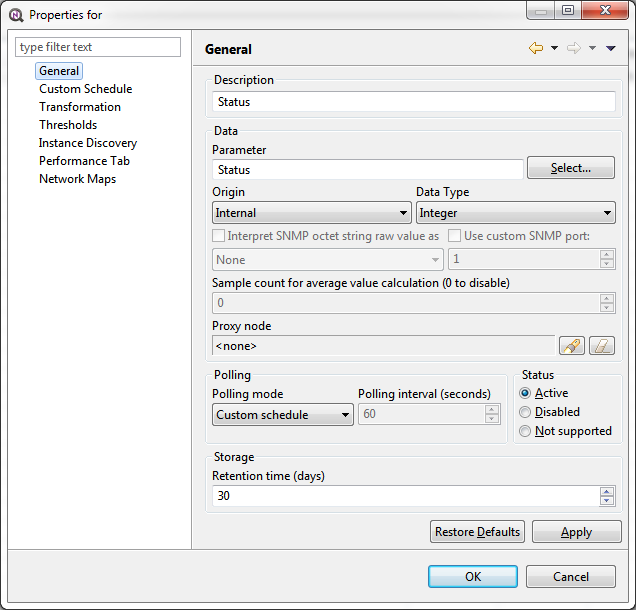
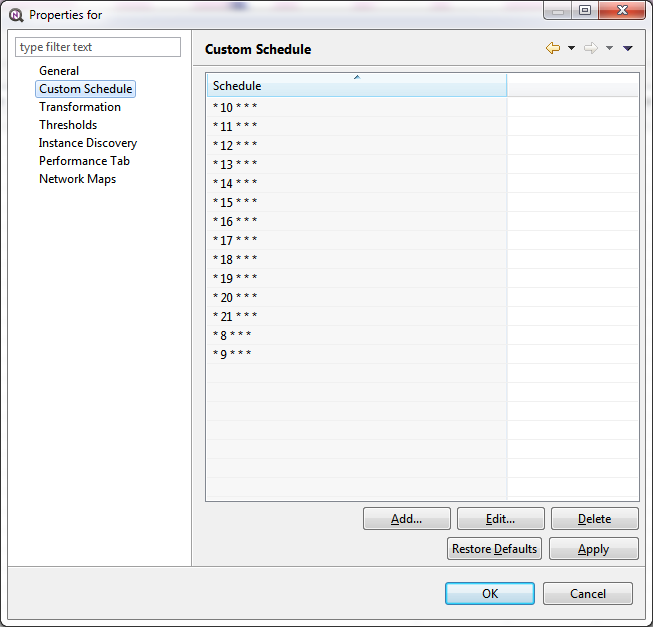
    kiosk1.png

    Kiosk2.png

    1 Reply Last reply
    0
    • Dani@M3TU
      Dani@M3TU
      Dani@M3T
      wrote on last edited by
      #2

      I see exactly the same issue with my custom schedule '* 8-24 * * *'

      1 Reply Last reply
      0
      • Dani@M3TU
        Dani@M3TU
        Dani@M3T
        wrote on last edited by
        #3

        For me the question is, what triggers the SYS_NODE_DOWN event. The default DCI 'status' has no threshold configured.

        1 Reply Last reply
        0
        • A
          A
          Alex Kirhenshtein
          wrote on last edited by
          #4

          It's generated internally, when server can't reach node via any allowed channel (ICMP, Agent, SNMP)

          Easiest way is to have a rule in a event processing policy which silently ignores SYS_NODE_DOWN during off-hours.
          Check attached screenshot for sample configuration.

          Please note that this EPP is processed from top to bottom and by default all rules are processed (unlike "first-match-win" in thresholds), so this rule should be above any other SYS_NODE_DOWN related rules.

          Description of "TIME" structure (returned by localtime()): http://wiki.netxms.org/wiki/NXSL:TIME

          Update: script should be like "if (now->hour >= 20 || now->hour <= šŸ˜Ž ..."

          @user54119 said in Node down alarm outside of polling time:

          For me the question is, what triggers the SYS_NODE_DOWN event. The default DCI 'status' has no threshold configured.
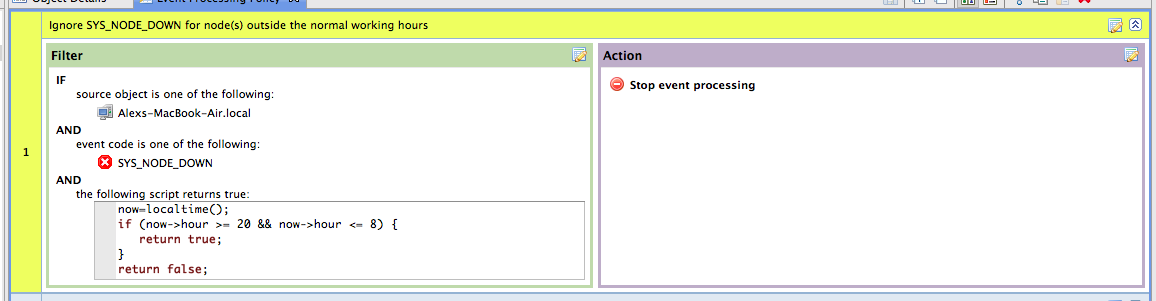

          Screen Shot 2014-01-28 at 00.56.43.png

          1 Reply Last reply
          0
          • V
            V
            Victor Kirhenshtein
            wrote on last edited by
            #5

            Actually, there is an etrror in the script: you should use || (logical or) instead of && (logical and).

            Best regards,
            Victor

            1 Reply Last reply
            0
            • Dani@M3TU
              Dani@M3TU
              Dani@M3T
              wrote on last edited by
              #6

              thanks for this 'workaround'. But in my opinion this is not very elegant, it's inconsistent. All DCIs of a node are managed by there own 'custom schedule', only for 'status' we need an event processing policy. A 'custom schedule' for the status of a node would be a good feature. Or maybe SYS_NODE_DOWN event could be triggered by the 'status' DCI, so the 'custom schedule' of this DCI could be used.

              1 Reply Last reply
              0
              • V
                V
                Victor Kirhenshtein
                wrote on last edited by
                #7

                It is possible to add threshold to status DCI and generate some custom event instead of SYS_NODE_DOWN, and do all processing for this custom event. But status and SYS_NODE_DOWN have one important difference - status also takes current alarms into consideration. So, if there is active critical alarm, status will be 4 (critical), but SYS_NODE_DOWN will not be generated, because node itself is reachable. Starting from upcoming 1.2.12 release, it is also possible to create DCI which will check node down flag. If you put threshold on such DCI and will generate some custom node down event, you'll get exactly what you need. To create such DCI, create new DCI with source "Internal" and parameter name "Dummy", and use the following transformation script:

                return ($node->runtimeFlags & 0x04) ? 1 : 0;
                

                This DCI will return 1 if node is down and 0 otherwise.

                Best regards,
                Victor

                1 Reply Last reply
                0
                • jdowneyJ
                  jdowneyJ
                  jdowney
                  wrote on last edited by
                  #8

                  Hi looking at doing the same we have some nodes which are either rebooted nightly or weekly. Is there a way to implement per node of no status updates during this time?

                  Thanks

                  1 Reply Last reply
                  0
                  • jdowneyJ
                    jdowneyJ
                    jdowney
                    wrote on last edited by
                    #9

                    would it be an option to create a maintenance schedule for this?

                    I've tried to use Cron Maker to set a cron schedule within the task but it does not seem run. Any ideas on what I'm doing wrong or if there is a better way to do this.Ā 

                    www.cronmaker.com -

                    0 30 23 ? * MON,TUE,WED,THU,FRI *

                    Ā (Every weekday - Monday - Friday 23:30)

                    Thanks

                    1 Reply Last reply
                    0
                    • jdowneyJ
                      jdowneyJ
                      jdowney
                      wrote on last edited by
                      #10

                      Nudge, Nudge Anyone know what I'm doing wrong or is there an issue with 2.1-M2 which is why this is not working?

                      1 Reply Last reply
                      0
                      • V
                        V
                        Victor Kirhenshtein
                        wrote on last edited by
                        #11

                        Hi,

                        as far as I can tell your schedule is not valid cron expression. As stated on web site "Generated expressions are based on Quartz cron format". NetXMS supports subset of UNIX cron format (see here for example: https://en.wikipedia.org/wiki/Cron#Modern_versions). It only supports *, /, -, L, and lists. Try to change your schedule to

                        30 23 * * 1-5
                        

                        Best regards,
                        Victor

                        1 Reply Last reply
                        0
                        • jdowneyJ
                          jdowneyJ
                          jdowney
                          wrote on last edited by
                          #12

                          Thanks a lot this has resolved our issue with overnight daily reboots.
                          Ā šŸ™‚
                          John

                          1 Reply Last reply
                          0

                          Hello! It looks like you're interested in this conversation, but you don't have an account yet.

                          Getting fed up of having to scroll through the same posts each visit? When you register for an account, you'll always come back to exactly where you were before, and choose to be notified of new replies (either via email, or push notification). You'll also be able to save bookmarks and upvote posts to show your appreciation to other community members.

                          With your input, this post could be even better šŸ’—

                          Register Login
                          Reply
                          • Reply as topic
                          Log in to reply
                          • Oldest to Newest
                          • Newest to Oldest
                          • Most Votes


                          • Login

                          • Don't have an account? Register

                          • Login or register to search.
                          Powered by NodeBB Contributors
                          • First post
                            Last post
                          0
                          • Categories
                          • Recent
                          • Tags
                          • Popular
                          • Users
                          • Groups