
DCI filter script - how to ignore some filesystems when using {instance} ?
-
if (rindex($1,":")>0) // this is for your case.
{
// if(length($1)>3) return false; // in some cases, you can link a disc drive to directory. uncomment this line if you don't want to see them.
if (rindex($1,"A:")>0) return false; // in my case, i have virtual pcs, and some of them have floppy disk drives, i don't want to see them.
value = AgentReadParameter($node, "FileSystem.Total(" . $1 . ")");
return (value != null) && (value > 0);
//return %(true, $1);
}
return false; -
-
The issue I see with this is when a CD disk does not report its value as ERROR and starts reporting the value as "0". An example of this would be when a CD/DVD is put into the drive and the reported value changes from ERROR to 0 (zero) space available and the threshold alert will be sent.
My question is, is there a way to exclude CD/DVD drives completely with this filter? Or is there another work around to get this accomplished?
Below is how I have the scrpit currently:
if (rindex($1,":")>0)
{
// if(length($1)>3) return false;
if (rindex($1,"A:")>0) return false;
value = AgentReadParameter($node, "FileSystem.Total(" . $1 . ")");
return (value != null) && (value > 0);
//return %(true, $1);
}
return false; -
Hi,
in version 2.0-M3 I've added new parameter FileSystem.Type, so with agent version 2.0-M3 you can filter out CDs as following:
if (rindex($1,":")>0)
{
   type = AgentReadParameter($node, "FileSystem.Type(" . $1 . ")");
   // exclude CDs:
   return (value != null) && (value != "CDFS");
   // if only NTFS systems are of interest (usual situation):
   // return value == "NTFS";
}
return false;
Best regards,
Victor -
-
Most likely next week, or week after in worst case.
Best regards,
Victor -
Guys,
I'm looking to create a script that will only show drives within a certain size range. For example only show drives that are between 500Gb and 1,000GB or 1,000GB and 1,500GB.
The reason being is that i want to setup thresholds differently on drives. Smaller drives i would like to have a higher percentage free than huge drives. The bigger the drive gets the lower i want the percentage free to alert on the threshold.
-
if ($1 =~ "[:/]") { value = AgentReadParameter($node, "FileSystem.Total(" . $1 . ")") return (value > 5*1024*1024*1024 && value < 1*1024*1024*1024*1024); } return false;@sharpspro said in DCI filter script - how to ignore some filesystems when using {instance} ?:
Guys,
I'm looking to create a script that will only show drives within a certain size range. For example only show drives that are between 500Gb and 1,000GB or 1,000TB and 1,500GB.
The reason being is that i want to setup thresholds differently on drives. Smaller drives i would like to have a higher percentage free than huge drives. The bigger the drive gets the lower i want the percentage free to alert on the threshold.
-
I tried your suggestion and it did not work for me. Currently I'm using a filter script to ignore CD/DVD drives that report as errors when there is no disk inserted as well as system partitions with no drive letter. I got the script from this post please review below.
CURRENT SCRIPTif (rindex($1,":")>0) { // if(length($1)>3) return false; if (rindex($1,"A:")>0) return false; value = AgentReadParameter($node, "FileSystem.Total(" . $1 . ")"); return (value != null) && (value > 0); //return %(true, $1); } return false;SO for the DCI I created I removed the current script I use and I tried your suggestion and it located all drives and didn't filter anything.
NEW SCRIPT
if ($1 =~ "[:/]") { value = AgentReadParameter($node, "FileSystem.Total(" . $1 . ")") return (value > 5*1024*1024*1024 && value < 1*1024*1024*1024*1024); } return false;For the values you suggested (5*1024*1024*1024) is for 5GB I asume and (1*1024*1024*1024*1024) is for 1TB. If I understand this right, if I wanted to filter drives that are 500GB to 1000GB I would use (value > 512*1024*1024*1024 && value < 1*1024*1024*1024*1024) Not sure on this and hope its not a stupid question.
-
-
This script:
if ($1 =~ "[:/]") { value = AgentReadParameter($node, "FileSystem.Total(" . $1 . ")") return (value > 5*1024*1024*1024 && value < 1*1024*1024*1024*1024); } return false;has few typos - match operation is ~= and semicolon is missing in line 2. It should be
if ($1 ~= "[:/]") { value = AgentReadParameter($node, "FileSystem.Total(" . $1 . ")"); return (value > 5*1024*1024*1024 && value < 1*1024*1024*1024*1024); } return false;Best regards,
Victor -
Some reason that script is not working. I included screen shots maybe I have something wrong.
When I change the scrpit to the one I used prior and it locates all the drives. That script is below.
if (rindex($1,":")>0)
{
// if(length($1)>3) return false;
if (rindex($1,"A:")>0) return false;
value = AgentReadParameter($node, "FileSystem.Total(" . $1 . ")");
return (value != null) && (value > 0);
//return %(true, $1);
}
return false;
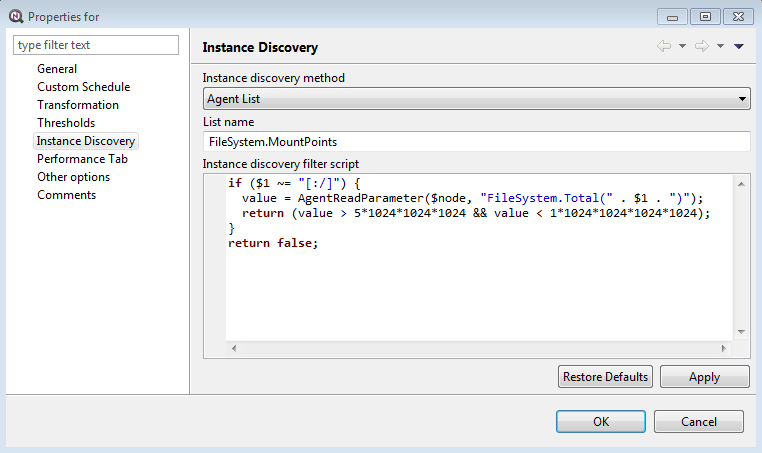
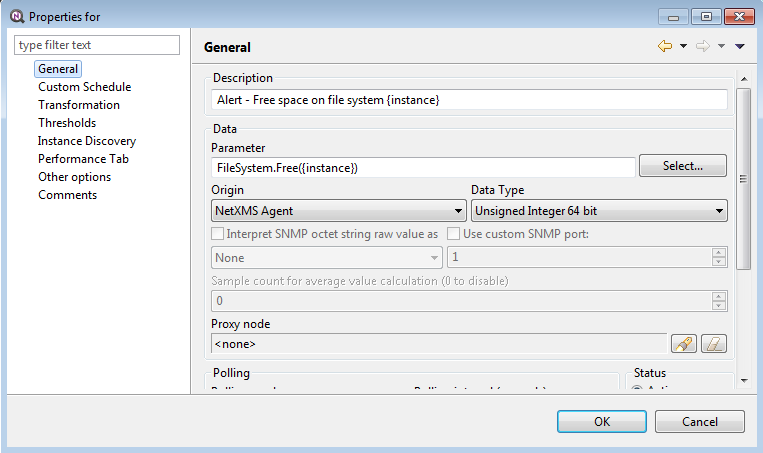
-
-
-
To filter CD/DVD and Volume in the "Instance Detection" section, I use this script:
type=AgentReadParameter($node, "FileSystem.Type(" . $1 . ")");
if ((type == null) || (type == "") || (type == "CDFS") || (type == "UDF"))
{
return false;
}if (
type != null && (
type == "aufs" ||
type == "autofs" ||
type == "cgroup" ||
type == "configfs" ||
type == "debugfs" ||
type == "devpts" ||
type == "devtmpfs" ||
type == "fusectl" ||
type == "fuse.gvfsd-fuse" ||
type == "fuse.lxcfs" ||
type == "hugetlbfs" ||
type == "iso9660" ||
type == "mqueue" ||
type == "nfsd" ||
type == "overlay" ||
type == "proc" ||
type == "pstore" ||
type == "rpc_pipefs" ||
type == "securityfs" ||
type == "selinuxfs" ||
type == "squashfs" ||
type == "sysfs" ||
type == "tmpfs"
)) {
return false;
}if (($1 == "/proc") ||
($1 like "/proc/*") ||
($1 == "/sys") ||
($1 like "/sys/*") ||
($1 == "/run") ||
($1 like "/run/*") ||
($1 == "/dev") ||
($1 like "*Volume*") ||
($1 like "/dev/*"))
return false;
return true;
Hello! It looks like you're interested in this conversation, but you don't have an account yet.
Getting fed up of having to scroll through the same posts each visit? When you register for an account, you'll always come back to exactly where you were before, and choose to be notified of new replies (either via email, or push notification). You'll also be able to save bookmarks and upvote posts to show your appreciation to other community members.
With your input, this post could be even better 💗
Register Login