
Cisco Port Channels and Connection Points
-
Hi,
I am experiencing an issue with some servers and devices not displaying correct connection points.
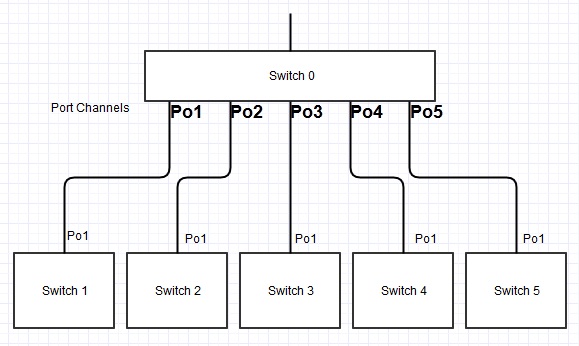
The Cisco switches are connected to one "Aggregate" switch using two ports in a port channel, for redundancy.However while some devices are showing as connected to the correct port (e.g. Switch 1 port g/12)...
Others are showing incorrectly as connected to the port-channel (e.g. AggSwitch port PoCh1)I can verify the correct port by finding the device's mac address in the switch's mac address table (show mac-address-table)
Do you have any suggestions as to how I could tackle this issue?
-
Can you please provide more detailed example of correctly and incorrectly displayed connection point (maybe with some screenshots) together with mac address table records?
Best regards,
Victor -
sorry for the delay in replying.
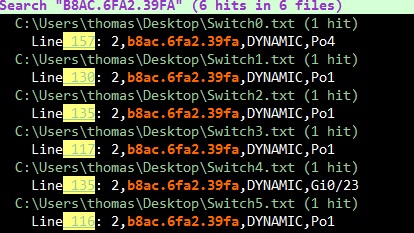
basically, when searching for switch ports, if a device is on Switch4 or Switch5, NetXMS is showing it as portchannel Po4 or Po5 rather than the actual port.
In the attached screen shot I searched all MAC address tables for B8AC.6FA2.39FA, it is plugged into port Gi0/23 on Switch4
When I search for the same MAC address in NetXMS it tells me that it is plugged into Switch0 port Po4.
Searching for the same MAC address using netdisco also give me the correct port (23)
I have attached the mac address tables and a diagram of the switch layout too.
Thank you
-
It looks like NetXMS server cannot correctly identify port for B8AC.6FA2.39FA on Switch 4 for some reason, and so shows Switch0 as best match (it is actually previous hop). Can you please send me full MAC address table for both Switch0 (can only for Po4) and Switch4?
Best regards,
Victor -
Hi victor,
thanks for replying.Those text files in the attached zip are the full mac address tables (show mac address-table) as csv.
is there another command i should be using?
thank you
-
Sorry, I miss it. Will take a look.
Best regards,
Victor -
Hi,
just an update, I set up a separate server and a fresh database - however am still having the same issue.
According to the interface properties the port channels are using Peer Discovery Protocol STP where as the physical ports are using CDP, I don't know if that may be causing an issue?
I could possibly remove the port channels and use standard trunk ports as another test - however this is a live network so getting suitable downtime to do such a thing is difficult.
Hello! It looks like you're interested in this conversation, but you don't have an account yet.
Getting fed up of having to scroll through the same posts each visit? When you register for an account, you'll always come back to exactly where you were before, and choose to be notified of new replies (either via email, or push notification). You'll also be able to save bookmarks and upvote posts to show your appreciation to other community members.
With your input, this post could be even better 💗
Register Login