Skip to content
  • Categories
  • Recent
  • Tags
  • Popular
  • Users
  • Groups
Skins
  • Light
  • Brite
  • Cerulean
  • Cosmo
  • Flatly
  • Journal
  • Litera
  • Lumen
  • Lux
  • Materia
  • Minty
  • Morph
  • Pulse
  • Sandstone
  • Simplex
  • Sketchy
  • Spacelab
  • United
  • Yeti
  • Zephyr
  • Dark
  • Cyborg
  • Darkly
  • Quartz
  • Slate
  • Solar
  • Superhero
  • Vapor

  • Default (Flatly)
  • No Skin
Collapse
Brand Logo

NetXMS Forum

  1. Home
  2. Support
  3. too much alarm

too much alarm

Scheduled Pinned Locked Moved Support
13 Posts 2 Posters 22.2k Views
  • Oldest to Newest
  • Newest to Oldest
  • Most Votes
Reply
  • Reply as topic
Log in to reply
This topic has been deleted. Only users with topic management privileges can see it.
  • C
    C
    christian_k
    wrote on last edited by
    #3

    "name of node:node status changed to MINOR", "name of node:node status changed to NORMAL" like a winking until you exit the application

    1 Reply Last reply
    0
    • V
      V
      Victor Kirhenshtein
      wrote on last edited by
      #4

      Looks like you have rule in event processing policy for events SYS_NODE_NORMAL, SYS_NODE_WARNING, SYS_NODE_MINOR, SYS_NODE_MAJOR, SYS_NODE_CRITICAL. Usually you should not generate alarms from those events.

      Best regards,
      Victor

      1 Reply Last reply
      0
      • C
        C
        christian_k
        wrote on last edited by
        #5

        i don't have any rules in event processing policy for that events. and something that i've seen is that, when it start happens, the cpu usage of the server stay at the high level (more than 90 %) during the execution of netxms (netxms more than 40%, nxmc more than 35%) so the server start to work very slow.

        1 Reply Last reply
        0
        • V
          V
          Victor Kirhenshtein
          wrote on last edited by
          #6

          Can you please provide a screenshot of your event processing policy? Also, what NetXMS version you are using?

          Best regards,
          Victor

          1 Reply Last reply
          0
          • C
            C
            christian_k
            wrote on last edited by
            #7

            good morning, screenshot is in the attachement; i'm using the 1.2.13 version
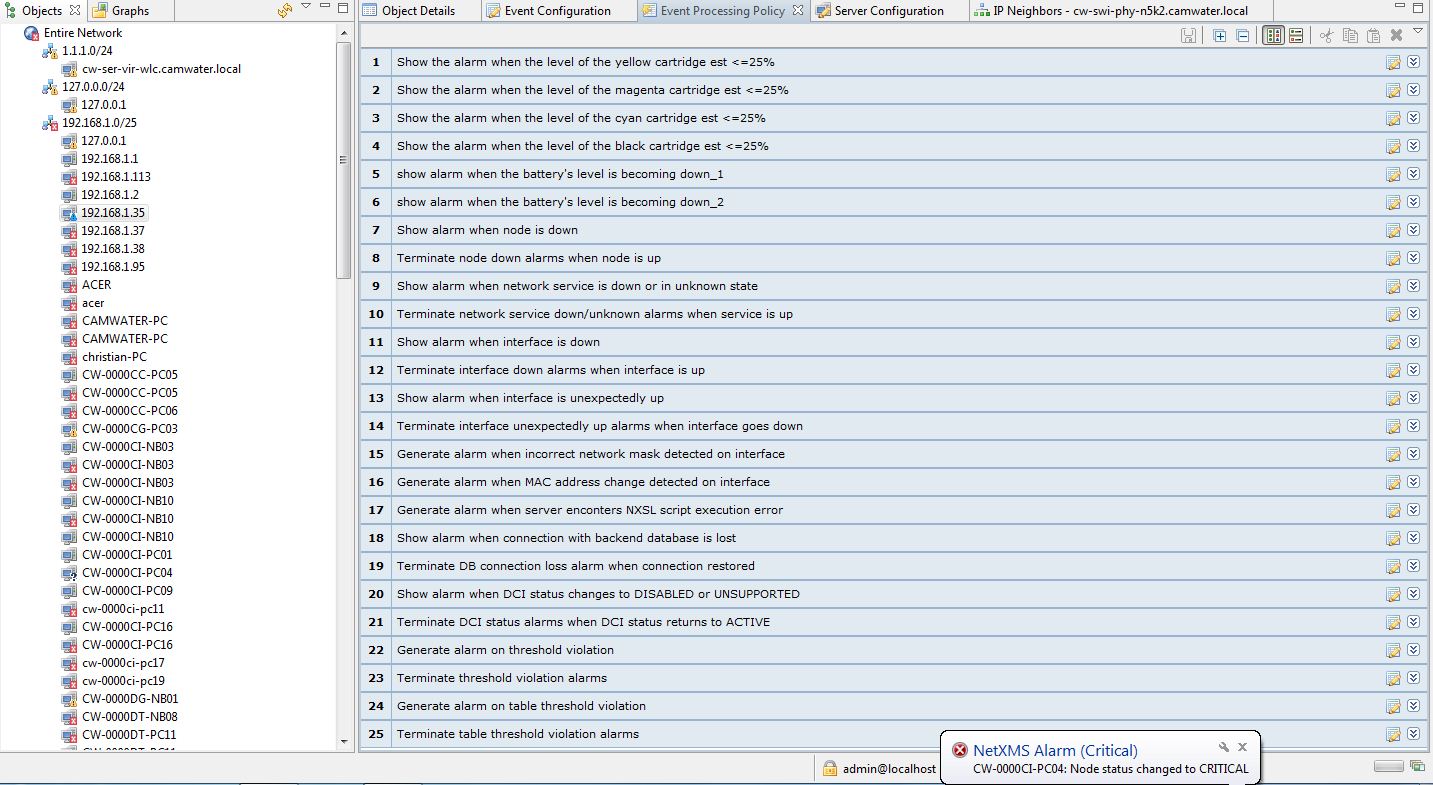

            event_processing_policy.JPG

            1 Reply Last reply
            0
            • V
              V
              Victor Kirhenshtein
              wrote on last edited by
              #8

              It's hard to tell anything from rule comments only 🙂 I need to see rules expanded. To avoid making lot of screenshots you can export all rules and attach xml file. Go to Tools -> Export configuration, and add all rules to the export. Then press "Save" icon to save it into XML file.

              Best regards,
              Victor

              1 Reply Last reply
              0
              • C
                C
                christian_k
                wrote on last edited by
                #9

                ok, this is it in the attached file


                events

                1 Reply Last reply
                0
                • V
                  V
                  Victor Kirhenshtein
                  wrote on last edited by
                  #10

                  I only see event in exported file, not event processing policy rules. Did you add rules for export?

                  Best regards,
                  Victor

                  1 Reply Last reply
                  0
                  • C
                    C
                    christian_k
                    wrote on last edited by
                    #11

                    oh sorry, i forgot to add rules; this the right file in attachement.

                    best regards.


                    events&rules

                    1 Reply Last reply
                    0
                    • V
                      V
                      Victor Kirhenshtein
                      wrote on last edited by
                      #12

                      Hi!

                      It seems that rule named "Show alarm when node is down" has any event as a source (probably SYS_NODE_DOWN that was there originally was accidentally deleted) - that way it generates alarm on every event (including node status change events), thus triggering infinite loop of alarm creation. Add SYS_NODE_DOWN back and everything should be fine.

                      Best regards,
                      Victor

                      1 Reply Last reply
                      0
                      • C
                        C
                        christian_k
                        wrote on last edited by
                        #13

                        it works! 😄 😄 thanks a lot for your prompt reaction. now netxms 1.2.13 is running find on my server.

                        thank you,
                        christian

                        1 Reply Last reply
                        0

                        Hello! It looks like you're interested in this conversation, but you don't have an account yet.

                        Getting fed up of having to scroll through the same posts each visit? When you register for an account, you'll always come back to exactly where you were before, and choose to be notified of new replies (either via email, or push notification). You'll also be able to save bookmarks and upvote posts to show your appreciation to other community members.

                        With your input, this post could be even better 💗

                        Register Login
                        Reply
                        • Reply as topic
                        Log in to reply
                        • Oldest to Newest
                        • Newest to Oldest
                        • Most Votes


                        • Login

                        • Don't have an account? Register

                        • Login or register to search.
                        Powered by NodeBB Contributors
                        • First post
                          Last post
                        0
                        • Categories
                        • Recent
                        • Tags
                        • Popular
                        • Users
                        • Groups