
network mapping issues...
-
I have installed NETXMS and it seems to be working fine, but I am having an issue with the maps. They do not seem to be able to display only items attached to a single switch at a time.
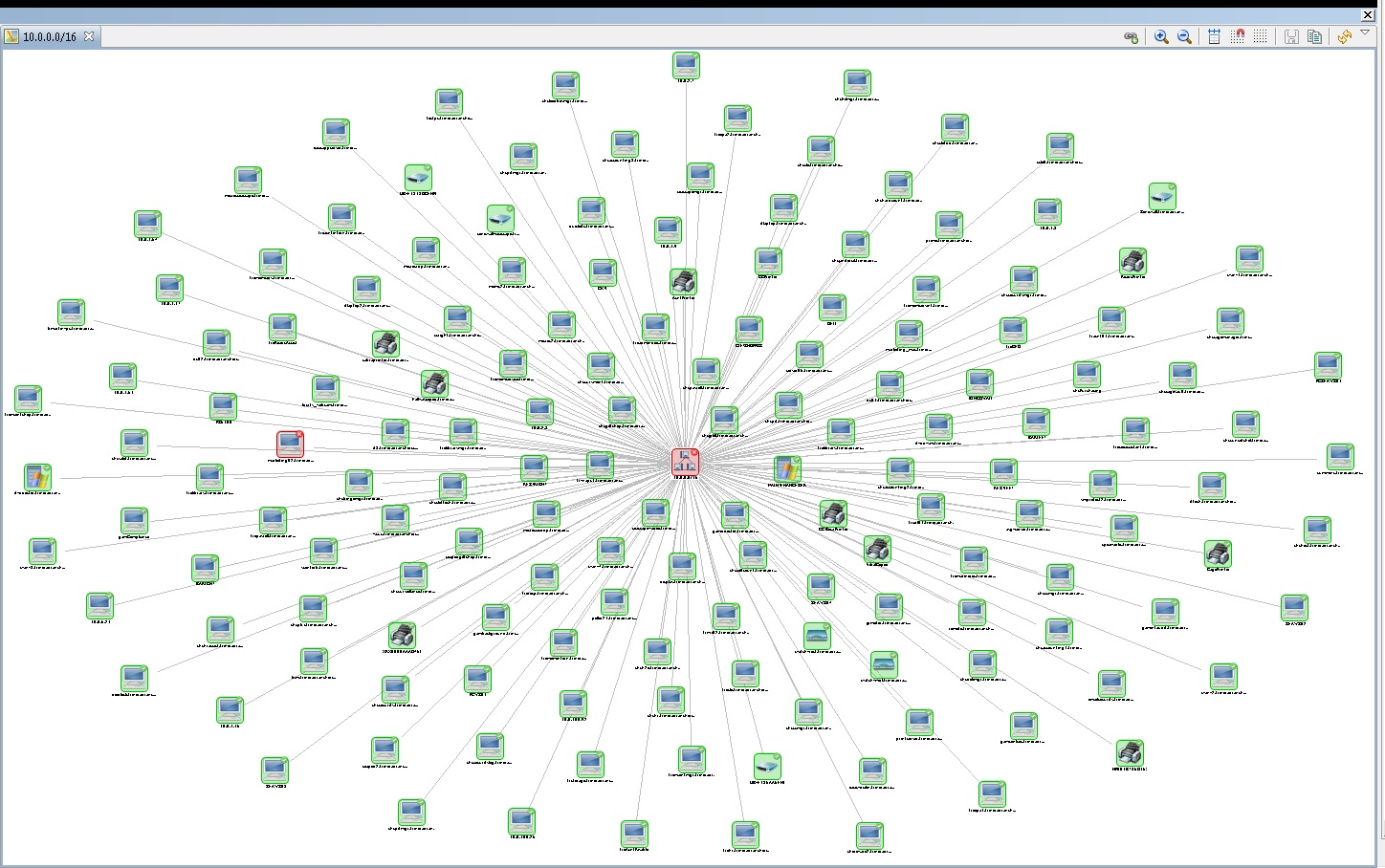
For example: We have 6 switches. I select a switch as the seed node for an IP topology map. No matter what switch I select, it shows all of the machines in the network, even if I set the map options to topology radius discovery of 1.
Also, when I want to find what switch port something is connected to, I either get the port that goes to the switch the device is connected to (if not the same switch I am looking at), or something like the node is indirectly connected to network switch xxx port gi0/1 (the link to another switch), or connection point information cannot be found.Attached is a screenshot of a map with the topology set to 1. from a single switch as the seed node. The devices seen are from ALL the switches

Is there a cisco setting I need to apply to get the topology to report correctly?
-
Hi,
IP topology map shows IP topology ignoring physical connectivity between nodes - and I suppose that all nodes and switches in your network are in the same IP subnet. What you need is layer 2 topology map, which shows physical connections between devices.
Best regards,
Victor -
Hi ,
Can you help me with Network Maps
In a project i have only 1 Subnet but the switches are distributed in 3 Towers, hence in the network maps i wanted to visualize the switches in 3 different towers.
How can i create a Network Map for 3 different towers showing only the switches present in each tower though all the switches are in the same Subnet?
-
Hi,
you can set either standard postal address attributes or some custom attribute on each switch to indicate which tower it belongs to, and then create 3 maps and use filtering script to filter only switches related to certain tower.
Best regards,
Victor -
Hi Victor,
As I'm very new to NetXMS could you please help me with the settings as you mentioned in your previous email.
Setting the postal address attributes for switch
Filtering scriptRegards
Ramesh -
Hi,
Assuming you want to see the switches per tower as well as all connected devices, the following should work:
In the properties of each switch in tower 1, select Location. For the sake of this example, set Street Address to "Tower 1".
Create a new network map, map type Layer 2 Topology. Select one of the switches in Tower 1 as Seed Node.Now right-click the map, select Properties -> Object Filter and paste the following:
if ( $node->streetAddress == "Tower 1" ) return true;
interfaces = GetNodeInterfaces($node);
foreach(i : interfaces)
{
	if ( i->peerNode != null ) peerNode = i->peerNode;
	else continue;
	if ( peerNode->streetAddress == "Tower 1" ) return true;
}
return false;
What the above does is allow any node onto the map that has a street address of "Tower 1" (and is connected to your seed node), as well as any node that has an interface connected to a node with a street address of "Tower 1" (as long as that node is linked to your seed node somehow and within the discovery radius).
Probably not the prettiest or most efficient way of doing it, but a quick test worked on my system.
-
Hi Tursiops,
Thank you ,its working
Regards
Ramesh
Hello! It looks like you're interested in this conversation, but you don't have an account yet.
Getting fed up of having to scroll through the same posts each visit? When you register for an account, you'll always come back to exactly where you were before, and choose to be notified of new replies (either via email, or push notification). You'll also be able to save bookmarks and upvote posts to show your appreciation to other community members.
With your input, this post could be even better 💗
Register Login