Skip to content
  • Categories
  • Recent
  • Tags
  • Popular
  • Users
  • Groups
Skins
  • Light
  • Brite
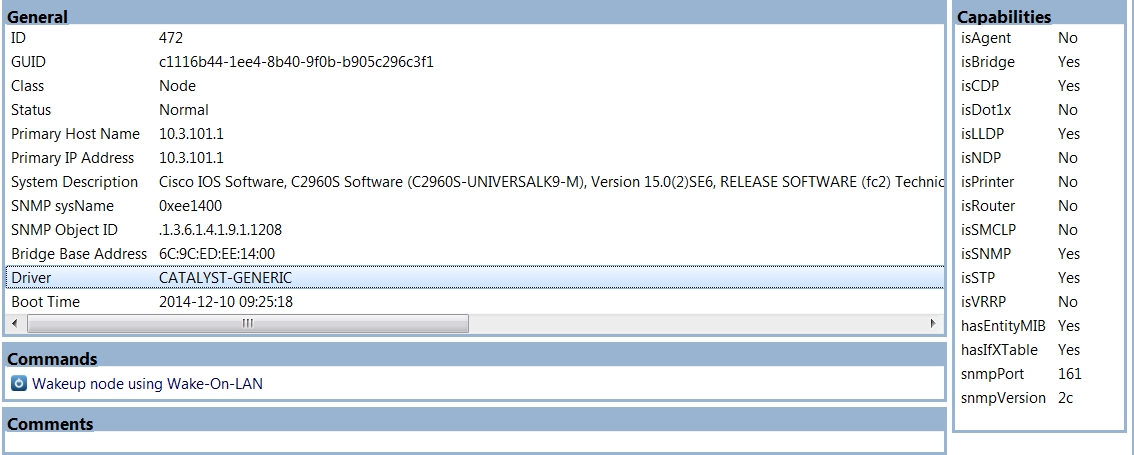
  • Cerulean
  • Cosmo
  • Flatly
  • Journal
  • Litera
  • Lumen
  • Lux
  • Materia
  • Minty
  • Morph
  • Pulse
  • Sandstone
  • Simplex
  • Sketchy
  • Spacelab
  • United
  • Yeti
  • Zephyr
  • Dark
  • Cyborg
  • Darkly
  • Quartz
  • Slate
  • Solar
  • Superhero
  • Vapor

  • Default (Flatly)
  • No Skin
Collapse
Brand Logo

NetXMS Forum

  1. Home
  2. Support
  3. Incomplete MAC address tables for Cisco 2960 and 4900M switches - missing static

Incomplete MAC address tables for Cisco 2960 and 4900M switches - missing static
Scheduled Pinned Locked Moved Support
21 Posts 4 Posters 79.8k Views
  • Oldest to Newest
  • Newest to Oldest
  • Most Votes
Reply
  • Reply as topic
Log in to reply
This topic has been deleted. Only users with topic management privileges can see it.
  • T
    T
    tomaskir
    wrote on last edited by
    #6

    This was fixed in one of the 2.0 RC releases.

    Are you running 2.0.1 and is it still not working?

    1 Reply Last reply
    0
    • G
      G
      GTM
      wrote on last edited by
      #7

      Yes, I'm running 2.0.1.  I looked up my own MAC address and it shows me indirectly connected to another switch (my VLAN extends to a Juniper switch), rather than my directly connected Cisco 2960X (running 15.2(3)E2).  We enable port security on all switch ports in order to limit the number of MAC addresses learned and to prevent CAM table overflows.  We don't actually statically assign MAC addresses to ports, but a look at the MAC address table shows almost all MAC addresses as "STATIC".  The only DYNAMIC ones are the MAC's learned on the uplink port-channel (which doesn't have port security enabled).  Here's a snippet:

      SWITCHNAME#show mac address-table | include STATIC
       All    0100.0ccc.cccc    STATIC      CPU
       All    0100.0ccc.cccd    STATIC      CPU
       All    0100.0ccd.cddc    STATIC      CPU
       All    0180.c200.0000    STATIC      CPU
       All    0180.c200.0001    STATIC      CPU
       All    0180.c200.0002    STATIC      CPU
       All    0180.c200.0003    STATIC      CPU
       All    0180.c200.0004    STATIC      CPU
       All    0180.c200.0005    STATIC      CPU
       All    0180.c200.0006    STATIC      CPU
       All    0180.c200.0007    STATIC      CPU
       All    0180.c200.0008    STATIC      CPU
       All    0180.c200.0009    STATIC      CPU
       All    0180.c200.000a    STATIC      CPU
       All    0180.c200.000b    STATIC      CPU
       All    0180.c200.000c    STATIC      CPU
       All    0180.c200.000d    STATIC      CPU
       All    0180.c200.000e    STATIC      CPU
       All    0180.c200.000f    STATIC      CPU
       All    0180.c200.0010    STATIC      CPU
       All    ffff.ffff.ffff    STATIC      CPU
       509    00a0.0304.8cfe    STATIC      Gi3/0/31
       509    00c0.e403.31dc    STATIC      Gi3/0/40
         3    00c0.b784.5333    STATIC      Gi3/0/38
         3    00c0.b7a1.e885    STATIC      Gi3/0/32
         3    00c0.b7b8.ccaf    STATIC      Gi3/0/37
         3    00c0.b7b8.d0a2    STATIC      Gi3/0/36
        30    0001.e65c.89b1    STATIC      Gi1/0/17
        30    001a.4b1f.f7ae    STATIC      Gi3/0/34
        30    001b.780d.090f    STATIC      Gi2/0/7
        30    0026.732f.b2ae    STATIC      Gi1/0/2
        30    308d.99ab.29d7    STATIC      Gi1/0/37
        30    5820.b14c.a5c4    STATIC      Gi2/0/2
        30    7446.a04e.7867    STATIC      Gi3/0/33
        30    f4ce.463d.0b3f    STATIC      Gi1/0/1
        14    0004.f296.dda5    STATIC      Gi2/0/36
        14    0004.f29a.da22    STATIC      Gi1/0/15
        14    0004.f29b.1196    STATIC      Gi1/0/21
        14    0004.f29d.22af    STATIC      Gi2/0/34
      
      1 Reply Last reply
      0
      • T
        T
        tomaskir
        wrote on last edited by
        #8

        Can you please confirm if you see the static entries for the Cisco switch node in its Object tools > Switch forwarding database (FDB)?

        I have also created a new ticket:
        https://dev.raden.solutions/issues/1129

        1 Reply Last reply
        0
        • G
          G
          GTM
          wrote on last edited by
          #9

          The static entries are NOT in the FDB table.  In fact, the FDB table only shows 7 MAC addresses.  All of the MAC addresses that it shows are DYNAMIC, but not all of the DYNAMIC entries on the switch are displayed in the FDB table.

          1 Reply Last reply
          0
          • V
            V
            Victor Kirhenshtein
            wrote on last edited by
            #10

            Hi,

            what driver is selected for this Cisco switch (you can see it on object overview page)?

            Best regards,
            Victor

            1 Reply Last reply
            0
            • G
              G
              GTM
              wrote on last edited by
              #11

              It shows: Driver=CATALYST-GENERIC

              1 Reply Last reply
              0
              • V
                V
                Victor Kirhenshtein
                wrote on last edited by
                #12

                Could you please send result of SNMP walk on .1.3.6.1.2.1.17.4.3.1.1 for that switch?

                Best regards,
                Victor

                1 Reply Last reply
                0
                • G
                  G
                  GTM
                  wrote on last edited by
                  #13
                  [netxms@netxms ~]# snmpwalk -v 2c -Of -c "SUPERSECRETSTRING" THE_IP_ADDRESS .1.3.6.1.2.1.17.4.3.1.1
                  .iso.org.dod.internet.mgmt.mib-2.dot1dBridge.dot1dTp.dot1dTpFdbTable.dot1dTpFdbEntry.dot1dTpFdbAddress.'..B...' = STRING: 0:3:42:f4:ef:81
                  .iso.org.dod.internet.mgmt.mib-2.dot1dBridge.dot1dTp.dot1dTpFdbTable.dot1dTpFdbEntry.dot1dTpFdbAddress.'.....`' = STRING: 0:1a:1e:0:9a:60
                  .iso.org.dod.internet.mgmt.mib-2.dot1dBridge.dot1dTp.dot1dTpFdbTable.dot1dTpFdbEntry.dot1dTpFdbAddress.'......' = STRING: 0:1a:1e:0:9a:b0
                  .iso.org.dod.internet.mgmt.mib-2.dot1dBridge.dot1dTp.dot1dTpFdbTable.dot1dTpFdbEntry.dot1dTpFdbAddress.'.&....' = STRING: 0:26:f0:dd:0:0
                  .iso.org.dod.internet.mgmt.mib-2.dot1dBridge.dot1dTp.dot1dTpFdbTable.dot1dTpFdbEntry.dot1dTpFdbAddress.'.*j..B' = STRING: 0:2a:6a:a4:f0:42
                  .iso.org.dod.internet.mgmt.mib-2.dot1dBridge.dot1dTp.dot1dTpFdbTable.dot1dTpFdbEntry.dot1dTpFdbAddress.'.*j.l.' = STRING: 0:2a:6a:a5:6c:c2
                  .iso.org.dod.internet.mgmt.mib-2.dot1dBridge.dot1dTp.dot1dTpFdbTable.dot1dTpFdbEntry.dot1dTpFdbAddress.'(..^.h' = STRING: 28:c7:ce:5e:dd:68
                  .iso.org.dod.internet.mgmt.mib-2.dot1dBridge.dot1dTp.dot1dTpFdbTable.dot1dTpFdbEntry.dot1dTpFdbAddress.'(..^.X' = STRING: 28:c7:ce:5e:de:58
                  [netxms@netxms ~]#
                  
                  1 Reply Last reply
                  0
                  • V
                    V
                    Victor Kirhenshtein
                    wrote on last edited by
                    #14

                    Is it all MAC addresses that should be? If not, try to use community@vlan for different vlans (for example, public@100 as community string for vlan 100) - will it report all MAC addresses? Also please do walk on .1.3.6.1.2.1.17.4.3.1.2 and .1.3.6.1.2.1.17.4.3.1.3 (or just one walk on .1.3.6.1.2.1.17.4.3.1).

                    Best regards,
                    Victor

                    1 Reply Last reply
                    0
                    • G
                      G
                      GTM
                      wrote on last edited by
                      #15

                      No, it's not all of the MAC addresses.  There are 3 or 4 VLANs on the switch.  I attached the output of one of them.


                      snmpwalk.txt

                      1 Reply Last reply
                      0
                      • V
                        V
                        Victor Kirhenshtein
                        wrote on last edited by
                        #16

                        I just noticed that you check FDB on switch using object tools. What is shown if you use Topology -> Switch forwarding database context menu on switch?

                        1 Reply Last reply
                        0
                        • G
                          G
                          GTM
                          wrote on last edited by
                          #17

                          Ah, going that route it shows all of the MAC addresses.  Although the "Find IP Address" tool still shows the indirectly attached port.

                          1 Reply Last reply
                          0
                          • V
                            V
                            Victor Kirhenshtein
                            wrote on last edited by
                            #18

                            So the problem is not with reading FDB, but with internal logic. Can you run manual topology poll (from Poll->Topology context menu) on Cisco switch and your workstation and show results?

                            1 Reply Last reply
                            0
                            • G
                              G
                              GTM
                              wrote on last edited by
                              #19

                              From the switch:

                              [26.01.2016 09:34:56] **** Poll request sent to server ****
                              [26.01.2016 09:34:56] Poll request accepted
                              [26.01.2016 09:34:56] Starting topology poll for node IT
                              [26.01.2016 09:34:58] VLAN list successfully retrieved from node
                              [26.01.2016 09:35:01] Switch forwarding database retrieved
                              [26.01.2016 09:35:02] Link layer topology retrieved (2 connections found)
                              [26.01.2016 09:35:02] Updating peer information on interfaces
                              [26.01.2016 09:35:02]    Local interface Gi1/0/50 linked to remote interface UPLINK SWITCH1:Ethernet2/21
                              [26.01.2016 09:35:02]    Local interface Gi2/0/50 linked to remote interface UPLINK SWITCH2:Ethernet2/21
                              [26.01.2016 09:35:02] Link layer topology processed
                              [26.01.2016 09:35:02] Finished topology poll for node IT
                              [26.01.2016 09:35:02] **** Poll completed successfully ****
                              

                              And from the node object that is my workstation:

                              [26.01.2016 09:36:44] **** Poll request sent to server ****
                              [26.01.2016 09:36:44] Poll request accepted
                              [26.01.2016 09:36:44] Starting topology poll for node Test Workstation
                              [26.01.2016 09:36:44] Failed to get switch forwarding database
                              [26.01.2016 09:36:44] Link layer topology retrieved (0 connections found)
                              [26.01.2016 09:36:44] Updating peer information on interfaces
                              [26.01.2016 09:36:44] Link layer topology processed
                              [26.01.2016 09:36:44] Finished topology poll for node Test Workstation
                              [26.01.2016 09:36:44] **** Poll completed successfully ****
                              

                              I hope that's what you were looking for.

                              1 Reply Last reply
                              0
                              • V
                                V
                                Victor Kirhenshtein
                                wrote on last edited by
                                #20

                                Do you see correct MAC address on workstation's interface? If yes, is this MAC address present in FDB table you see in console and is it the only MAC address on a port?

                                1 Reply Last reply
                                0
                                • G
                                  G
                                  GTM
                                  wrote on last edited by
                                  #21

                                  Here is a CSV export of the FDB entry for the workstation:

                                  "MAC Address","Port","Interface","VLAN","Node","Type"
                                  "00:23:24:6C:89:04","95","[0]","500","Test Workstation","static"
                                  

                                  The workstation is actually on Gi2/0/39.  My workstation is plugged into a Polycom IP phone, so Gi2/0/39 has both MAC addresses in the mac address table.  The port is an access port (we don't currently separate voice into a dedicated VLAN).

                                  Here's the entry for the phone:

                                  "MAC Address","Port","Interface","VLAN","Node","Type"
                                  "00:04:F2:9D:B0:F2","95","[0]","500","","static"
                                  
                                  1 Reply Last reply
                                  0

                                  Hello! It looks like you're interested in this conversation, but you don't have an account yet.

                                  Getting fed up of having to scroll through the same posts each visit? When you register for an account, you'll always come back to exactly where you were before, and choose to be notified of new replies (either via email, or push notification). You'll also be able to save bookmarks and upvote posts to show your appreciation to other community members.

                                  With your input, this post could be even better 💗

                                  Register Login
                                  Reply
                                  • Reply as topic
                                  Log in to reply
                                  • Oldest to Newest
                                  • Newest to Oldest
                                  • Most Votes


                                  • Login

                                  • Don't have an account? Register

                                  • Login or register to search.
                                  Powered by NodeBB Contributors
                                  • First post
                                    Last post
                                  0
                                  • Categories
                                  • Recent
                                  • Tags
                                  • Popular
                                  • Users
                                  • Groups