Skip to content
  • Categories
  • Recent
  • Tags
  • Popular
  • Users
  • Groups
Skins
  • Light
  • Brite
  • Cerulean
  • Cosmo
  • Flatly
  • Journal
  • Litera
  • Lumen
  • Lux
  • Materia
  • Minty
  • Morph
  • Pulse
  • Sandstone
  • Simplex
  • Sketchy
  • Spacelab
  • United
  • Yeti
  • Zephyr
  • Dark
  • Cyborg
  • Darkly
  • Quartz
  • Slate
  • Solar
  • Superhero
  • Vapor

  • Default (Flatly)
  • No Skin
Collapse
Brand Logo

NetXMS Forum

  1. Home
  2. Support
  3. email user based on container items

email user based on container items

Scheduled Pinned Locked Moved Support
10 Posts 4 Posters 93.7k Views
  • Oldest to Newest
  • Newest to Oldest
  • Most Votes
Reply
  • Reply as topic
Log in to reply
This topic has been deleted. Only users with topic management privileges can see it.
  • C
    C
    curruscanis
    wrote on last edited by
    #1

    I have emails setup to email a user upon all critical alerts and resolution of given alerts.  Is there is method to email an additional user only for nodes within a container? 

    Thank you for your assistance!

    1 Reply Last reply
    0
    • A
      A
      Alex Kirhenshtein
      wrote on last edited by
      #2

      Just add additional rule into EPP. Set events=(list), source=container, action=email-to-additional-user

      1 Reply Last reply
      0
      • C
        C
        curruscanis
        wrote on last edited by
        #3

        Thank you Alex, that is what I came up with too.  I was hoping there was a way to alter a given rule in the event processing that would do both.  If I have to create a new rule for each container that has a different person responsible it will eventually be a lot of redundant rules with the only difference being the email destination.

        1 Reply Last reply
        0
        • V
          V
          Victor Kirhenshtein
          wrote on last edited by
          #4

          You can set responsible person's in container's custom attribute, and create universal action that will use script to extract recipient. For example, you can definie recipients in email action like this:

          %[GetRecipients]

          Then, create script in script library caled "GetRecipients" like this:

          foreach(p : GetNodeParents($node))
          {
          	rcpt = GetCustomAttribute(p, "recipients");
          	if (rcpt != null)
          		return rcpt;
          }
          return "default@email";  // fallback email if nothing was set in containers
          

          It will return emails configured in parent container for node in custom attribute "recipients", or default email if nothing is configured. Script can be made more complicated to collect all recipients on all upper layers and combine them into single recipient list.

          Best regards,
          Victor

          1 Reply Last reply
          0
          • C
            C
            curruscanis
            wrote on last edited by
            #5

            Thank you Victor, I will give that a try.  It is easier than setting up different alerts and actions for each email address.

            1 Reply Last reply
            0
            • J
              J
              Marco Incalcaterra
              wrote on last edited by
              #6

              @victor said in email user based on container items:

              It will return emails configured in parent container for node in custom attribute "recipients", or default email if nothing is configured. Script can be made more complicated to collect all recipients on all upper layers and combine them into single recipient list.

              Hi Victor,

              Have a look to the attached image. Is it possible to find the custom attribute in a "top level" parent container? I've created the custom attribute "recipients" into the container "Thinksoft" but when the alarm is generated from an inner node (e.g. VM-REDQUEEN three levels down or SKYNET two levels down) that custom attribute seems ignored.

              Best regards,
              Marco
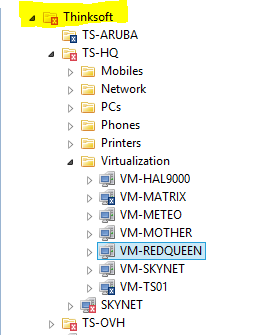

              tree.PNG

              1 Reply Last reply
              0
              • V
                V
                Victor Kirhenshtein
                wrote on last edited by
                #7

                Hi,

                how script to extract recipients looks like?

                Best regards,
                Victor

                1 Reply Last reply
                0
                • J
                  J
                  Marco Incalcaterra
                  wrote on last edited by
                  #8

                  @victor said in email user based on container items:

                  Hi,

                  how script to extract recipients looks like?

                  Best regards,
                  Victor

                  Exactly like te one you posted in your example, I assumed (wrongly at this point) that all the parents were explored in the "foreach" statement.

                  Marco

                  1 Reply Last reply
                  0
                  • V
                    V
                    Victor Kirhenshtein
                    wrote on last edited by
                    #9

                    Only direct parents are examined. Recursive script could looks like this:

                    rcpt = GetRecipients($node);
                    return (rcpt != null) ? rcpt : "default@email";  // fallback email if nothing was set in containers
                    
                    sub GetRecipients(obj)
                    {
                        rcpt = GetCustomAttribute(obj, "recipients");
                        if (rcpt != null)
                    	 return rcpt;
                        foreach(p : GetObjectParents(obj))
                        {
                            rcpt = GetRecipients(p);
                      	if (rcpt != null)
                     		return rcpt;
                        }
                        return null;
                    }
                    

                    and if you want that any closest parent had higher priority:

                    rcpt = GetRecipients($node);
                    return (rcpt != null) ? rcpt : "default@email";  // fallback email if nothing was set in containers
                    
                    sub GetRecipients(obj)
                    {
                        foreach(p : GetObjectParents(obj))
                        {
                            rcpt = GetCustomAttribute(p, "recipients");
                    	if (rcpt != null)
                    		return rcpt;
                        }
                        foreach(p : GetObjectParents(obj))
                        {
                            rcpt = GetRecipients(p);
                    	if (rcpt != null)
                    		return rcpt;
                        }
                        return null;
                    }
                    

                    Best regards,
                    Victor

                    1 Reply Last reply
                    0
                    • J
                      J
                      Marco Incalcaterra
                      wrote on last edited by
                      #10

                      @victor said in email user based on container items:

                      rcpt = GetRecipients($node);
                      return (rcpt != null) ? rcpt : "default@email";  // fallback email if nothing was set in containers
                      
                      sub GetRecipients(obj)
                      {
                          foreach(p : GetObjectParents(obj))
                          {
                              rcpt = GetCustomAttribute(p, "recipients");
                      	if (rcpt != null)
                      		return rcpt;
                          }
                          foreach(p : GetObjectParents(obj))
                          {
                              rcpt = GetRecipients(p);
                      	if (rcpt != null)
                      		return rcpt;
                          }
                          return null;
                      }
                      

                      I've used this one (the second) and it rocks! Thank you very much for your help.  😄

                      Best remarks,
                      Marco

                      1 Reply Last reply
                      0

                      Hello! It looks like you're interested in this conversation, but you don't have an account yet.

                      Getting fed up of having to scroll through the same posts each visit? When you register for an account, you'll always come back to exactly where you were before, and choose to be notified of new replies (either via email, or push notification). You'll also be able to save bookmarks and upvote posts to show your appreciation to other community members.

                      With your input, this post could be even better 💗

                      Register Login
                      Reply
                      • Reply as topic
                      Log in to reply
                      • Oldest to Newest
                      • Newest to Oldest
                      • Most Votes


                      • Login

                      • Don't have an account? Register

                      • Login or register to search.
                      Powered by NodeBB Contributors
                      • First post
                        Last post
                      0
                      • Categories
                      • Recent
                      • Tags
                      • Popular
                      • Users
                      • Groups