
Monitor Windows service name based on OS version
-
I'm new to NetXMS and it is working well for our needs. I am tweaking our DCI's now and have a question.
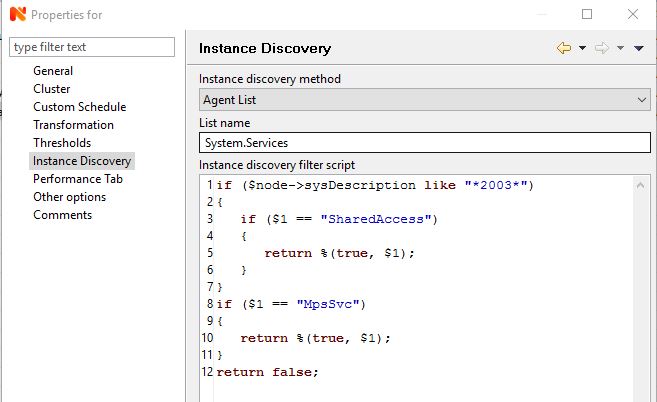
I have Windows 2003, 2008, and 2012 servers. I have a template setup to add DCI's to the servers and that works fine. I am monitoring the windows firewall service and the name is different on 2003 ("SharedAccess") compared to 2008/2012 ("MpsSvc"). I would like to use the same template/DCI and detect if it is on 2003. I tried using an instance discovery script, but that did not work.
The script I used was:
if($node->sysDescription like "*2003*") {
$1 = "SharedAccess"
else $1 = "MpsSvc"
}
return true;As an alternative, I tried to make separate templates with Auto apply rules. I tried this for the rule:
return $node->sysDescription like "*2003*";
and that is not working as I expect.Any suggestions would be appreciated. Thank you.
Gary
-
-
Thank you for the reply.
My original template script worked, it just took longer than expected to apply. How often is it checked to see if a template should be automatically applied? The active discovery interval?
Can you see a way to make it work so I only need one template?
-
All auto-apply functionality is executed on each node during configuration poll of that node.
You can force a conf poll on a node with right click > Poll > Configuration.
You can configure how often conf poll runs in Server Configuration - ConfigurationPollingInterval.
-
I got it working.
One thing that kept tripping me up is that when I would make a change to the discovery script and then Force DCI poll, it would say that it was unsupported. So I would make more changes and that would be unsupported. I probably had it working earlier and just needed to be patient for NetXMS to do it's thing.
I had to still see if it was Windows 2003 because newer versions use both services but only the MpsSvc is the firewall.
Hello! It looks like you're interested in this conversation, but you don't have an account yet.
Getting fed up of having to scroll through the same posts each visit? When you register for an account, you'll always come back to exactly where you were before, and choose to be notified of new replies (either via email, or push notification). You'll also be able to save bookmarks and upvote posts to show your appreciation to other community members.
With your input, this post could be even better 💗
Register Login