Skip to content
  • Categories
  • Recent
  • Tags
  • Popular
  • Users
  • Groups
Skins
  • Light
  • Brite
  • Cerulean
  • Cosmo
  • Flatly
  • Journal
  • Litera
  • Lumen
  • Lux
  • Materia
  • Minty
  • Morph
  • Pulse
  • Sandstone
  • Simplex
  • Sketchy
  • Spacelab
  • United
  • Yeti
  • Zephyr
  • Dark
  • Cyborg
  • Darkly
  • Quartz
  • Slate
  • Solar
  • Superhero
  • Vapor

  • Default (Flatly)
  • No Skin
Collapse
Brand Logo

NetXMS Forum

  1. Home
  2. Support
  3. Change aspect of monitor status in dashboard

Change aspect of monitor status in dashboard
Scheduled Pinned Locked Moved Support
4 Posts 2 Posters 45.2k Views
  • Oldest to Newest
  • Newest to Oldest
  • Most Votes
Reply
  • Reply as topic
Log in to reply
This topic has been deleted. Only users with topic management privileges can see it.
  • E
    E
    enieto
    wrote on last edited by
    #1

    Hello

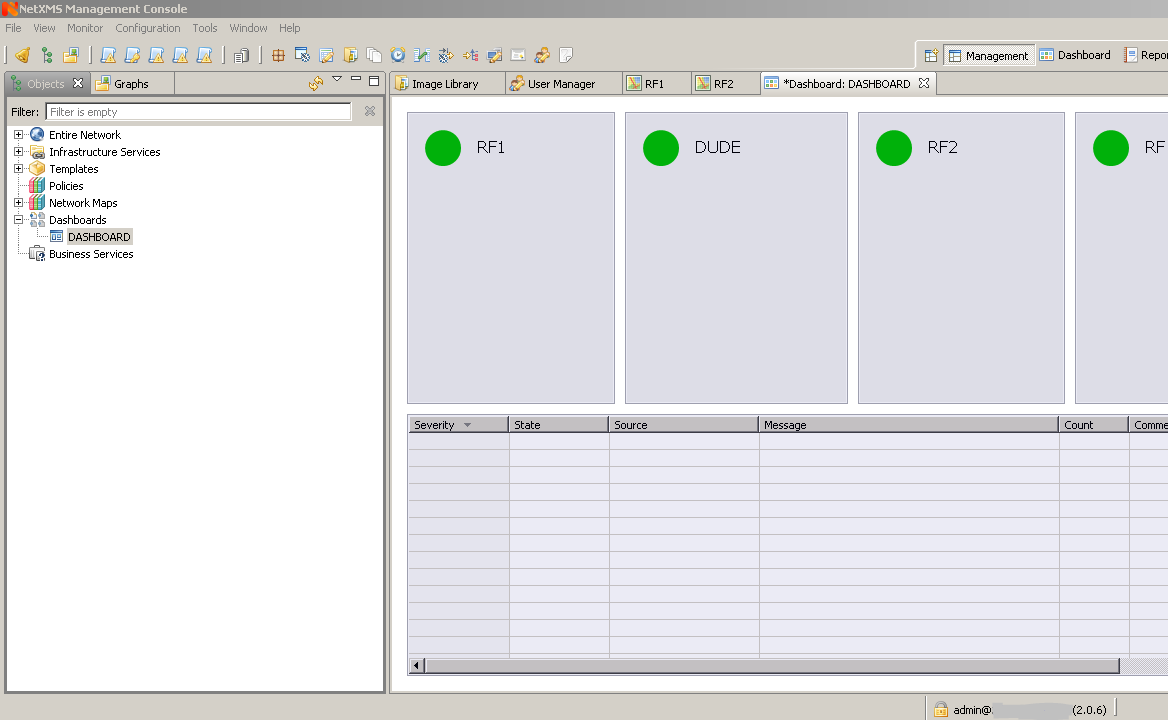
    I would like to change the look of the status indicator.

    I could change the state point to make it big? I monitor it on a screen and are very small.

    Any advice?

    Regards


    Captura.PNG

    1 Reply Last reply
    0
    • V
      V
      Victor Kirhenshtein
      wrote on last edited by
      #2

      Hi,

      currently it's not possible, GUI code has to be fixed to scale status indicators properly. You can use the following workaround: create DCI for node status, optionally use transformation script to transform status code into text, setup thresholds for each severity, and put it on dashboard using "Gauge" element with gauge type set to "Text". Gauge will scale text to fill all available space.

      Best regards,
      Victor

      1 Reply Last reply
      0
      • E
        E
        enieto
        wrote on last edited by
        #3

        as I can create dci status? I have more than 50 host in each container.

        and I want to know when any node in the container falls.

        Regards

        1 Reply Last reply
        0
        • V
          V
          Victor Kirhenshtein
          wrote on last edited by
          #4

          You can create template and apply it on all nodes. It can also apply automatically using auto-apply script.

          Best regards,
          Victor

          1 Reply Last reply
          0

          Hello! It looks like you're interested in this conversation, but you don't have an account yet.

          Getting fed up of having to scroll through the same posts each visit? When you register for an account, you'll always come back to exactly where you were before, and choose to be notified of new replies (either via email, or push notification). You'll also be able to save bookmarks and upvote posts to show your appreciation to other community members.

          With your input, this post could be even better 💗

          Register Login
          Reply
          • Reply as topic
          Log in to reply
          • Oldest to Newest
          • Newest to Oldest
          • Most Votes


          • Login

          • Don't have an account? Register

          • Login or register to search.
          Powered by NodeBB Contributors
          • First post
            Last post
          0
          • Categories
          • Recent
          • Tags
          • Popular
          • Users
          • Groups