
Apply Node to Template Problem
-
Problem,
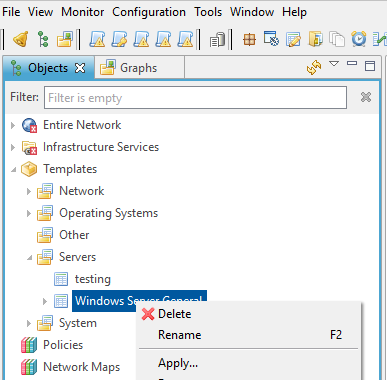
I'm unable to Apply a new Node to a Template. I have attached a screen shoot. When I click the "Apply..." NO new window pops up. At one time it would pop up a new window to pick the node to apply to this template. Before the problem stated I was adding a new Node to a template and typed: "?M" in the filter field and press entered. That was the last time I saw the pop up window. I have turned on Debug to Level 9 and looked at the output put did not see any messages that were related to templates, Apply, or Error messages.
Also I tried to Export my Templates, But when I click the Add... on the Export Configuration screen also no new window pops up for selecting the templates.
I'm using the Web NetXMS Management Console Version 2.0.8
I did find a fix a few hours later:
We renamed or database, then created a new database.
Went to the Apply Template popup and I saw my "?M" in the filter. I removed the "?" from the filter.
Then removed the new database and renamed or original database back.
Now the Apply Template works with our original database.Thanks
Steve
-
Was not able to reproduce on development enviroments.
Can you please provide the log for console?
Standalone console log can be found under your user home folder .nxmc/data/.metadata/.log
Web console log can be found under servlet container log folder for applications. In my case it is: /var/lib/tomcat8/work/Catalina/localhost/nxmc/eclipse/workspace/.metadata -
Was able to reproduce. Thank you.
Hello! It looks like you're interested in this conversation, but you don't have an account yet.
Getting fed up of having to scroll through the same posts each visit? When you register for an account, you'll always come back to exactly where you were before, and choose to be notified of new replies (either via email, or push notification). You'll also be able to save bookmarks and upvote posts to show your appreciation to other community members.
With your input, this post could be even better 💗
Register Login