Skip to content
  • Categories
  • Recent
  • Tags
  • Popular
  • Users
  • Groups
Skins
  • Light
  • Brite
  • Cerulean
  • Cosmo
  • Flatly
  • Journal
  • Litera
  • Lumen
  • Lux
  • Materia
  • Minty
  • Morph
  • Pulse
  • Sandstone
  • Simplex
  • Sketchy
  • Spacelab
  • United
  • Yeti
  • Zephyr
  • Dark
  • Cyborg
  • Darkly
  • Quartz
  • Slate
  • Solar
  • Superhero
  • Vapor

  • Default (Flatly)
  • No Skin
Collapse
Brand Logo

NetXMS Forum

  1. Home
  2. Support
  3. Trying to get LDAP to work with AD

Trying to get LDAP to work with AD

Scheduled Pinned Locked Moved Support
8 Posts 4 Posters 72.8k Views
  • Oldest to Newest
  • Newest to Oldest
  • Most Votes
Reply
  • Reply as topic
Log in to reply
This topic has been deleted. Only users with topic management privileges can see it.
  • C
    C
    chillyw13
    wrote on last edited by
    #1

    Not sure if I understand fully what this is supposed to accomplish.  My understanding is that it will add users from my AD domain into Netxms, correct?  I have put everything into the settings according to the docs, but I never see my users populate.  I greped my log files and see no errors.  Just wondering if I am looking at this correctly or not.

    1 Reply Last reply
    0
    • T
      T
      Tursiops
      wrote on last edited by
      #2

      We're using LDAP/AD and it works fine.
      What does your NetXMS server configuration look like? Does it have access to your domain controller (firewall or user authentication issues)? Are your search base and filter correct? Does your SyncUser exist?
      Can you show us your existing configuration (of course without providing usernames/passwords)?

      1 Reply Last reply
      0
      • C
        C
        chillyw13
        wrote on last edited by
        #3

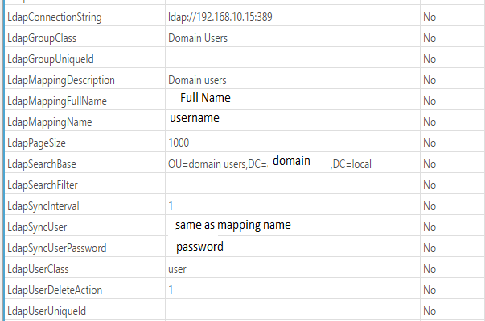
        No firewall.  Attached is my config.


        ldap.png

        1 Reply Last reply
        0
        • D
          D
          devportal
          wrote on last edited by
          #4

          try this:
          set      LdapMappingName to sAMAccountName
                    LdapMappingFullName to displayName
                    LdapMappingDescription to description
                    LdapGroupClass to group
                    LdapSearchFilter to (objectClass=user)

          1 Reply Last reply
          0
          • C
            C
            chillyw13
            wrote on last edited by
            #5

            Ok, I set those per your post, still not seeing anything.  Are my domain users supposed to show up in the user manager?  If I am supposed to add them in, how do I select AD authentication?  Still trying to figure out how to know this is working.  I should also note that I started the server in debug mode (-D9) and there are no errors for ldap.  Of course there is nothing there for anything ldap.  It's like it's not even trying to connect.  I know openldap is running: Started LSB: OpenLDAP standalone server (Lightweight Directory Access Protocol).

            1 Reply Last reply
            0
            • C
              C
              chillyw13
              wrote on last edited by
              #6

              Woohoo!!  Finally got it working!  Thanks for the response as that got me pointed in the right direction.

              1 Reply Last reply
              0
              • C
                C
                chillyw13
                wrote on last edited by
                #7

                One last thing to add to this.  I have assigned my AD account with admin group membership.  I even set my account with full access.  I can indeed get to everything in the menu.  however, the object browser does not show anything.  Nothing.  It's completely blank.  Is there something I missed?

                1 Reply Last reply
                0
                • V
                  V
                  Victor Kirhenshtein
                  wrote on last edited by
                  #8

                  Hi,

                  you have to add object access rights as well. They are assigned in object properties. You can also add your users to Admins group - it should have all object rights assignments already.

                  Best regards,
                  Victor
                  1 Reply Last reply
                  0

                  Hello! It looks like you're interested in this conversation, but you don't have an account yet.

                  Getting fed up of having to scroll through the same posts each visit? When you register for an account, you'll always come back to exactly where you were before, and choose to be notified of new replies (either via email, or push notification). You'll also be able to save bookmarks and upvote posts to show your appreciation to other community members.

                  With your input, this post could be even better 💗

                  Register Login
                  Reply
                  • Reply as topic
                  Log in to reply
                  • Oldest to Newest
                  • Newest to Oldest
                  • Most Votes


                  • Login

                  • Don't have an account? Register

                  • Login or register to search.
                  Powered by NodeBB Contributors
                  • First post
                    Last post
                  0
                  • Categories
                  • Recent
                  • Tags
                  • Popular
                  • Users
                  • Groups