
Monitor IIS on WIndows Server
-
Hi, does anyone know how I can use NetXMS to monitor the status of items within IIS? For example I want to monitor if application pools are stopped or started and alert if they are stopped for a few minutes.
Any help would be greatly appreciated.
Thanks
Damien
-
I guess this could roughly be achieved by:
- Setting up an ExternalList in the NetXMS agent to return the names of all AppPools
- Writing a PowerShell script to return AppPool status for a given AppPool
- Configuring the NetXMS agent with an ExternalParameter to call that script, accepting the AppPool name as a parameter
- Configuring your DCI in NetXMS to use instance discovery using the ExternalList and ExternalParameter you created.
-
Hi, I managed to monitor IIS application pools using another method.
I added a new DCI and changed the origin for DCI to be 'Windows Performance Counters' opposed to NetXMS agent.
From here I was then able to select parameter app_pool_was\current application pool state.
Thanks
Damien
-
I'm glad you got this working for your setup.
If you ever want a template for "any IIS" with "any AppPool", which you can automatically apply to all Window Servers running IIS, you will need some kind of instance discovery/list to take care of providing a list of AppPools to NetXMS though (but at least you won't need PowerShell to return the status itself).
-
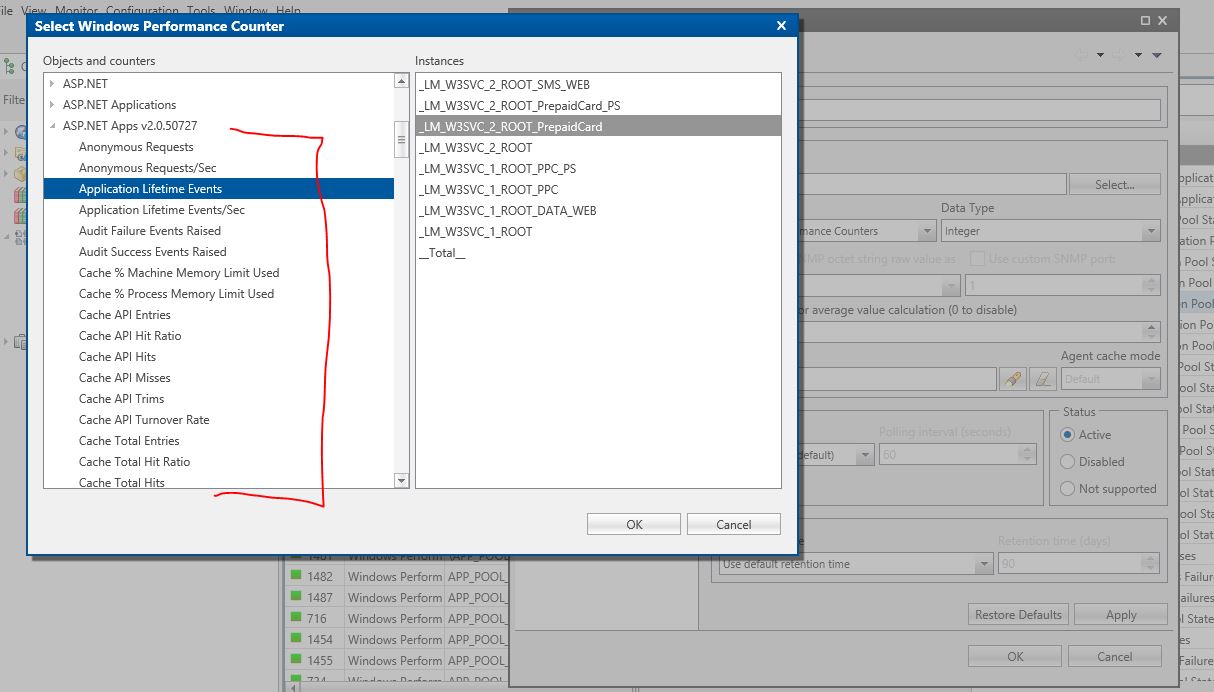
Hi, just picking this up again. I need to setup dci's based off windows performance counters for each of our application pools, we have a lot of pools! At the moment I am adding the DCI's manually which is very painstaking. I have attached a screen shot where you can see our app pools on the right hand side and available counters on the left hand side. As an example for app pool 'prepaid' I want to monitor every counter from the left hand side. Is there a way for me to automate this opposed to adding each DCI separately? Many thanks.
-
Hi,
you can use instance discovery to create same counters for each pool. You should be able to use agent list
PDH.ObjectInstances(ASP.NET Apps v2.0.50727)
Best regards,
Victor
Hello! It looks like you're interested in this conversation, but you don't have an account yet.
Getting fed up of having to scroll through the same posts each visit? When you register for an account, you'll always come back to exactly where you were before, and choose to be notified of new replies (either via email, or push notification). You'll also be able to save bookmarks and upvote posts to show your appreciation to other community members.
With your input, this post could be even better 💗
Register Login