Skip to content
  • Categories
  • Recent
  • Tags
  • Popular
  • Users
  • Groups
Skins
  • Light
  • Brite
  • Cerulean
  • Cosmo
  • Flatly
  • Journal
  • Litera
  • Lumen
  • Lux
  • Materia
  • Minty
  • Morph
  • Pulse
  • Sandstone
  • Simplex
  • Sketchy
  • Spacelab
  • United
  • Yeti
  • Zephyr
  • Dark
  • Cyborg
  • Darkly
  • Quartz
  • Slate
  • Solar
  • Superhero
  • Vapor

  • Default (Flatly)
  • No Skin
Collapse
Brand Logo

NetXMS Forum

  1. Home
  2. Support
  3. Upgrade Win Agent 2.0.8 > 2.1: Logwatch Subagent not loading

Upgrade Win Agent 2.0.8 > 2.1: Logwatch Subagent not loading

Scheduled Pinned Locked Moved Support
9 Posts 2 Posters 37.1k Views
  • Oldest to Newest
  • Newest to Oldest
  • Most Votes
Reply
  • Reply as topic
Log in to reply
This topic has been deleted. Only users with topic management privileges can see it.
  • S
    S
    Spheron
    wrote on last edited by
    #1

    Hello @all,

    wie use policys to deploy the agent configs. One "Master" policy:

    <config>
        <agent>
            <MasterServers>XX.XX.XX.XX</MasterServers>
            <ConfigIncludeDir>C:\NetXMS\etc\nxagentd.conf.d</ConfigIncludeDir>
            <LogFile>{syslog}</LogFile>
            <FileStore>C:\NetXMS\var</FileStore>
            <SubAgent>winperf.nsm</SubAgent>
        </agent>
    </config>

    An one policy to get alarms from windows eventlog:

    <config>
        <agent>
            <SubAgent>logwatch.nsm</SubAgent>
        </agent>
        <logwatch>
            <Parser>c:\netxms\var\logwatch_win_eventlog_system_parser.xml</Parser>
            <Parser>c:\netxms\var\logwatch_win_eventlog_application_parser.xml</Parser>
        </logwatch>
    </config>

    Until Agent 2.0.8 this works without problems. Since i upgraded the agents to 2.1 (64bit), the 2.1 agent is not loading the logwatch subagent.

    All 2.0.8 agents have loaded the logwatch subagent and sending windows event is working.

    We using NetXMS Server V2.1 64bit on Win7 64bit Host with MySQL 5.6.35 64bit.

    Greetings
    Marco

    1 Reply Last reply
    0
    • V
      V
      Victor Kirhenshtein
      wrote on last edited by
      #2

      Hi,

      try to change <agent> tag to <core>.

      Best regards,
      Victor

      1 Reply Last reply
      0
      • S
        S
        Spheron
        wrote on last edited by
        #3

        Hello Victor,

        this does not help. Logwatch is still not shown in subagent list.

        Greets
        Marco

        1 Reply Last reply
        0
        • V
          V
          Victor Kirhenshtein
          wrote on last edited by
          #4

          Please show output of command

          nxagentd.exe -C

          Best regards,
          Victor

          1 Reply Last reply
          0
          • S
            S
            Spheron
            wrote on last edited by
            #5

            With the config in my first post (with <agent>)  nxagentd.exe -C  shows:

            config
             +- CORE
             |  +- MasterServers
             |  |    value: XX.XX.XX.XX
             |  +- ConfigIncludeDir
             |  |    value: C:\NetXMS\etc\nxagentd.conf.d
             |  +- LogFile
             |  |    value: {syslog}
             |  +- FileStore
             |  |    value: C:\NetXMS\var
             |  +- SubAgent
             |        value: winperf.nsm
             +- agent
             |  +- MasterServers
             |  |    value: XX.XX.XX.XX
             |  +- ConfigIncludeDir
             |  |    value: C:\NetXMS\etc\nxagentd.conf.d
             |  +- LogFile
             |  |    value: {syslog}
             |  +- FileStore
             |  |    value: C:\NetXMS\var
             |  +- SubAgent
             |        value: logwatch.nsm
             |        value: winperf.nsm
             |        value: logwatch.nsm
             |        value: filemgr.nsm
             +- logwatch
             |  +- Parser
             |        value: c:\netxms\var\logwatch_win_eventlog_system_parser.xml
             |        value: c:\netxms\var\logwatch_win_eventlog_application_parser.xml
             |        value: c:\netxms\var\logwatch_win_eventlog_system_parser.xml
             |        value: c:\netxms\var\logwatch_win_eventlog_application_parser.xml
             +- filemgr
                +- RootFolder
                      value: c:\

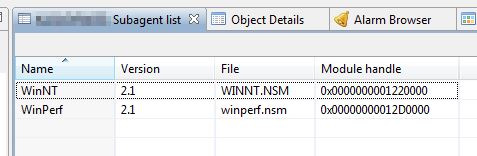
            In the subagentlist of the management console only the winnt and winperf subagents are showing (see attachment, please).

            I test the eventlog with:  eventcreate /T ERROR /ID 1000 /L APPLICATION /D "TestError"

            Greetings
            Marco

            subagentlist_managementconsole.jpg

            1 Reply Last reply
            0
            • V
              V
              Victor Kirhenshtein
              wrote on last edited by
              #6

              Hi,

              as seen from output SubAgent entry for logwatch still in "agent" section, but should be in "CORE". Could you show me how your policy looks like now?

              Best regards,
              Victor

              1 Reply Last reply
              0
              • S
                S
                Spheron
                wrote on last edited by
                #7

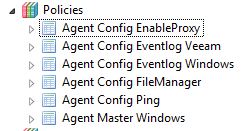
                Actual theses are the policies:

                "Agent Master Windows" policie:

                <config>
                  <agent>
                      <MasterServers>XX.XX.XX.XX</MasterServers>
                      <ConfigIncludeDir>C:\NetXMS\etc\nxagentd.conf.d</ConfigIncludeDir>
                      <LogFile>{syslog}</LogFile>
                      <FileStore>C:\NetXMS\var</FileStore>
                      <SubAgent>winperf.nsm</SubAgent>
                  </agent>
                </config>

                "Agent Config Eventlog Windows" policie:

                <config>
                  <agent>
                      <SubAgent>logwatch.nsm</SubAgent>
                  </agent>
                  <logwatch>
                      <Parser>c:\netxms\var\logwatch_win_eventlog_system_parser.xml</Parser>
                      <Parser>c:\netxms\var\logwatch_win_eventlog_application_parser.xml</Parser>
                  </logwatch>
                </config>

                In the "Agent Config Eventlog Windows" i tried to change the <agent> in <core>. This results in a agent crash and the logwatch subagent are still not showing, so i reverted back to <agent>.

                In which section i must change the <agent> in <core>?

                Best regards,
                Marco

                NetXMS_Policies.jpg

                1 Reply Last reply
                0
                • V
                  V
                  Victor Kirhenshtein
                  wrote on last edited by
                  #8

                  So it should be:

                  <config>
                    <core>
                        <MasterServers>XX.XX.XX.XX</MasterServers>
                        <ConfigIncludeDir>C:\NetXMS\etc\nxagentd.conf.d</ConfigIncludeDir>
                        <LogFile>{syslog}</LogFile>
                        <FileStore>C:\NetXMS\var</FileStore>
                        <SubAgent>winperf.nsm</SubAgent>
                    </core>
                  </config>

                  <config>
                    <core>
                        <SubAgent>logwatch.nsm</SubAgent>
                    </core>
                    <logwatch>
                        <Parser>c:\netxms\var\logwatch_win_eventlog_system_parser.xml</Parser>
                        <Parser>c:\netxms\var\logwatch_win_eventlog_application_parser.xml</Parser>
                    </logwatch>
                  </config>

                  Also, it is not necessary to use XML format - you can use key-value format as well.

                  Best regards,
                  Victor

                  1 Reply Last reply
                  0
                  • S
                    S
                    Spheron
                    wrote on last edited by
                    #9

                    Hello Victor,

                    thanks for the examples. I changed as described and it worked. Thanks.

                    Best regards,
                    Marco

                    1 Reply Last reply
                    0

                    Hello! It looks like you're interested in this conversation, but you don't have an account yet.

                    Getting fed up of having to scroll through the same posts each visit? When you register for an account, you'll always come back to exactly where you were before, and choose to be notified of new replies (either via email, or push notification). You'll also be able to save bookmarks and upvote posts to show your appreciation to other community members.

                    With your input, this post could be even better 💗

                    Register Login
                    Reply
                    • Reply as topic
                    Log in to reply
                    • Oldest to Newest
                    • Newest to Oldest
                    • Most Votes


                    • Login

                    • Don't have an account? Register

                    • Login or register to search.
                    Powered by NodeBB Contributors
                    • First post
                      Last post
                    0
                    • Categories
                    • Recent
                    • Tags
                    • Popular
                    • Users
                    • Groups