
RabbitMQ Monitoring
-
-
-
-
Hi,
currently there is no ready to use solution. You probably can build shell script that will use RabbitMQ HTTP API to fetch required information and get it into NetXMS via external parameters.
Best regards,
Victor -
I have this mostly working except for one part that I cannot understand.
I am using a powershell script to get the statistic that I want and this is returning properly. I am using externalparametersprovider and am able to see the parameter in the node. The issue is the value is not returning when I use a variable in powershell. If I hard code a value, then the hard coded value is returned.
Write-Host Rabbit=$message_count returns "" to the NetXMS server but the output on the powershell window is Rabbit=5000
Write-Host Rabbit=5000 returns "5000" to the NetXMS serverI have also tried echo instead of Write-Host with the same results.
Thank you
-
-
Install the RabbitMQ Management Plugin
https://www.rabbitmq.com/management.htmlIn the nxagentd.conf of the node I want to monitor RabbitMQ I put:
ExternalParametersProvider = "C:\Windows\system32\WindowsPowerShell\v1.0\powershell.exe" "C:\NetXMS\var\rabbit.ps1":60
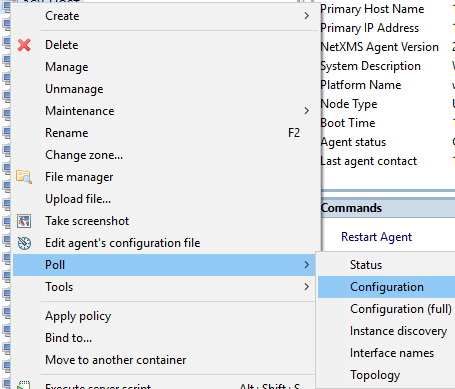
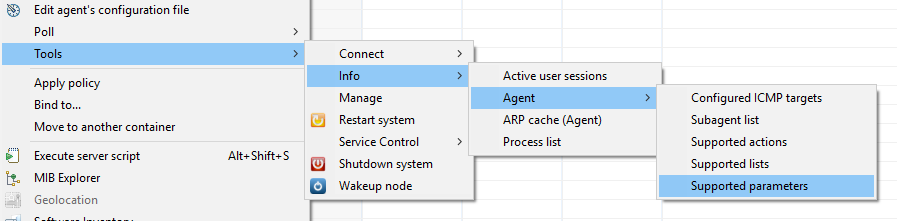
Restart the agentThis gives you a Rabbit parameter. You need to poll the node for the config first to see the parameter. Right click the node and see attached screen shots on how to poll and verify parameter is available
I used the attached powershell script. Make changes to $username, $password, $rabbithost, $vhost (if not using default of / (%2F)), $queue
$workingfile gives back a table of all the statistics for the queueThe issue was that the default vhost in rabbit is a '/' which needs coded as %2F. It runs fine in the powershell ISE and was even writing out a debug text file with the correct value. However, when run from the command line, it fails with a "not found" error because the '/' is not interpreted correctly. The function at the top (which is not my own) cleans up the URI correctly and now I get the value back in NetXMS.
Hello! It looks like you're interested in this conversation, but you don't have an account yet.
Getting fed up of having to scroll through the same posts each visit? When you register for an account, you'll always come back to exactly where you were before, and choose to be notified of new replies (either via email, or push notification). You'll also be able to save bookmarks and upvote posts to show your appreciation to other community members.
With your input, this post could be even better 💗
Register Login