Skip to content
  • Categories
  • Recent
  • Tags
  • Popular
  • Users
  • Groups
Skins
  • Light
  • Brite
  • Cerulean
  • Cosmo
  • Flatly
  • Journal
  • Litera
  • Lumen
  • Lux
  • Materia
  • Minty
  • Morph
  • Pulse
  • Sandstone
  • Simplex
  • Sketchy
  • Spacelab
  • United
  • Yeti
  • Zephyr
  • Dark
  • Cyborg
  • Darkly
  • Quartz
  • Slate
  • Solar
  • Superhero
  • Vapor

  • Default (Flatly)
  • No Skin
Collapse
Brand Logo

NetXMS Forum

  1. Home
  2. Support
  3. Install Agent 2.2.1 fails

Install Agent 2.2.1 fails
Scheduled Pinned Locked Moved Support
12 Posts 2 Posters 60.7k Views
  • Oldest to Newest
  • Newest to Oldest
  • Most Votes
Reply
  • Reply as topic
Log in to reply
This topic has been deleted. Only users with topic management privileges can see it.
  • V
    V
    Victor Kirhenshtein
    wrote on last edited by
    #2

    Hi,

    we are checking this.

    Best regards,
    Victor

    1 Reply Last reply
    0
    • S
      S
      Spheron
      wrote on last edited by
      #3

      Hello Victor,

      thanx for the fast response. If i can help with more informations or logfiles please let me know...

      Greets
      Marco

      1 Reply Last reply
      0
      • V
        V
        Victor Kirhenshtein
        wrote on last edited by
        #4

        What is current version of NetXMS agent that you are trying to upgrade?

        1 Reply Last reply
        0
        • S
          S
          Spheron
          wrote on last edited by
          #5

          We are trying to upgrade agents running at V2.1.2

          1 Reply Last reply
          0
          • S
            S
            Spheron
            wrote on last edited by
            #6

            Hello @all,

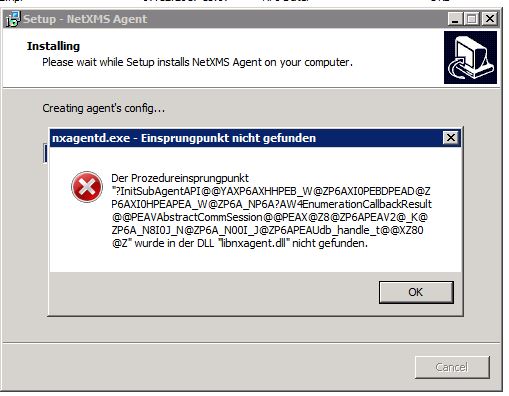
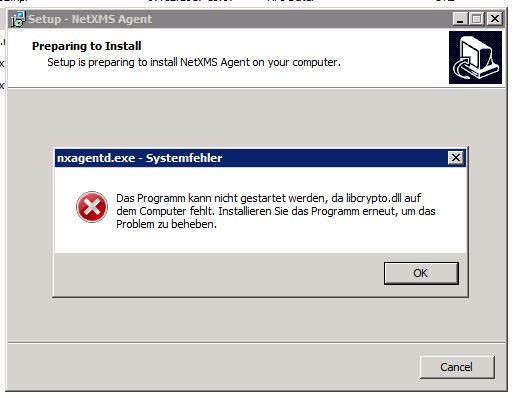
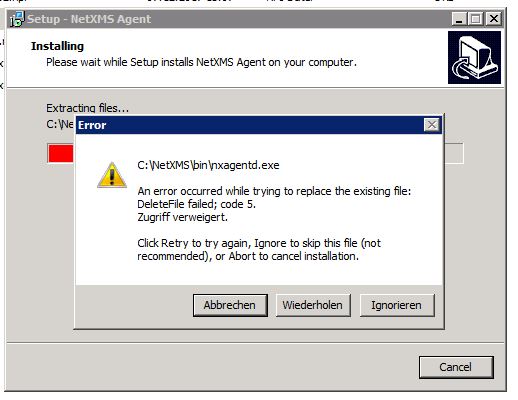
            unfortunately the above described behaviour is still present. I tried to update from Windows Agent 2.2.4 (64bit) to Windows Agent 2.2.6 (64bit) but i have no chance to update the agent. Error is the same as described above. I had to reboot all our 30x servers to install the NetXMS agent.

            Has anyone more infos or workaround for this problem, please?

            Greetings
            Marco

            ----
            Running NetXMS Server 2.2.6 64bit on Windows 7 / Agents are at V2.2.4

            1 Reply Last reply
            0
            • V
              V
              Victor Kirhenshtein
              wrote on last edited by
              #7

              Hi,

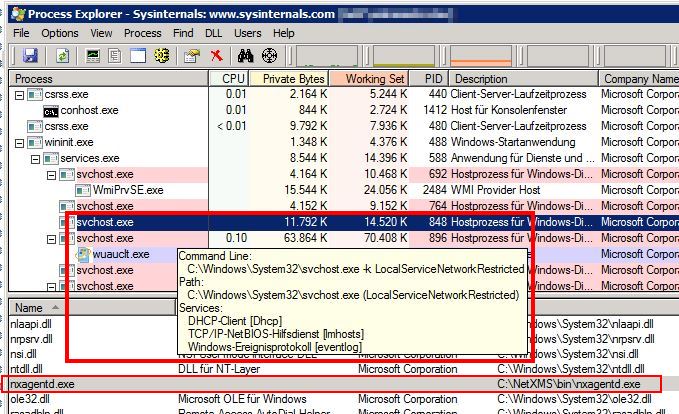
              I can confirm that issue is caused by logwatch subagent usage. Event log service process keeps agent exe file open. I'm working on fix/workaround for this.

              Best regards,
              Victor

              1 Reply Last reply
              0
              • V
                V
                Victor Kirhenshtein
                wrote on last edited by
                #8

                After some more testing it seems that logwatch itself is not an issue - event log service will open nxagentd.exe when there are active event log viewer with "System" log open (or any other process that reads event log via Wevt API) - but event log service will close it when reader terminates. Can you check if there are active event log viewer process or any other process that possibly reads system event log? If yes, can you close/restart those processes?

                Best regards,
                Victor

                1 Reply Last reply
                0
                • S
                  S
                  Spheron
                  wrote on last edited by
                  #9

                  Hello Victor,

                  think i found something. System must be a VMWare Windows VM (Server 2008R1/2016), VMWare tools installed. Steps to reproduce:

                  • NetXMS Agent is running and still the nxagentd.exe handle from svchost.exe exist
                  • Stopping VMWare Tools Service (Service "VMTools", V10.1.15)
                  • Waiting for couple of minutes (1-3)
                  • nxagentd.exe handle from svchost.exe is gone away

                  Now, i can update des NetXMS Agent via NetXMS Server or agent installer exe

                  I can this reproduce on all our Windows VM's (Server 2008R2/2016 64bit).

                  Physical machines seems not be affected. Here i can upgrade the agent without any problems (i looked at process explorer bevor update: there exist no nxagentd.exe handle from svchost.exe

                  Hope this helps and perhaps, you can find a workaround/fix for that...

                  Greetings
                  Marco

                  1 Reply Last reply
                  0
                  • V
                    V
                    Victor Kirhenshtein
                    wrote on last edited by
                    #10

                    Hi,

                    then it looks like VMWare tools service is subscribed to event log and so event log service has to hold the lock on nxagentd.exe. I see two possible solutions:

                    1. Check if nxagentd.exe is locked, attempt to stop VMWare Tools service and retry (probably multiple times).

                    2. Check if nxagentd.exe is locked, rename it (should be allowed), and retry installation. Then attempt to delete backup file(s) on next upgrade or at system restart. This is universal as it is not important what exact process causing lock.

                    I'll try to implement one of these in 2.2.7 installer.

                    Best regards,
                    Victor

                    1 Reply Last reply
                    0
                    • S
                      S
                      Spheron
                      wrote on last edited by
                      #11

                      By the way:

                      with activated Vmware Tools service nextxms can't read the windows performance counters (if i poll netxms configuration from via netxms server):

                      [21.06.2018 09:50:32]    Reading list of available Windows Performance Counters...
                      [21.06.2018 09:50:36]    unable to get Windows Performance Counters list

                      If i stop the the vmware service, netxms CAN poll the windows performance counters:

                      [21.06.2018 09:51:13]    Reading list of available Windows Performance Counters...
                      [21.06.2018 09:51:18]    159 counters read

                      After starting Vmware Tools service netxms can further polling windows performance counters.

                      Maybe that help you further...

                      Greetings
                      Marco

                      1 Reply Last reply
                      0
                      • S
                        S
                        Spheron
                        wrote on last edited by
                        #12

                        Hello Victor,

                        thanks for fixing the vmware tools thing... 🙂

                        Greetings
                        Marco

                        1 Reply Last reply
                        0

                        Hello! It looks like you're interested in this conversation, but you don't have an account yet.

                        Getting fed up of having to scroll through the same posts each visit? When you register for an account, you'll always come back to exactly where you were before, and choose to be notified of new replies (either via email, or push notification). You'll also be able to save bookmarks and upvote posts to show your appreciation to other community members.

                        With your input, this post could be even better 💗

                        Register Login
                        Reply
                        • Reply as topic
                        Log in to reply
                        • Oldest to Newest
                        • Newest to Oldest
                        • Most Votes


                        • Login

                        • Don't have an account? Register

                        • Login or register to search.
                        Powered by NodeBB Contributors
                        • First post
                          Last post
                        0
                        • Categories
                        • Recent
                        • Tags
                        • Popular
                        • Users
                        • Groups